Material-ui: Snackbar didn't autohide
- [x] I have searched the issues of this repository and believe that this is not a duplicate.
Expected Behavior
Autohide Snackbar when autoHideDuration's value be set.
Current Behavior
did not autohide Snackbar.
Steps to Reproduce (for bugs)
Context
Your Environment
| Tech | Version |
|--------------|---------|
| Material-UI | 1.0.0-beta.23 |
| React | 16.0.0 |
| browser | chrome 62.0.3202.94 (Official Build) (64-bit) |
| etc | |
 17x
17x
All 10 comments
You don't use handleClose anywhere in your code. You need to add this to your snackbar:
onClose={this.handleClose}
 evantrimboli
on 27 Dec 2017
evantrimboli
on 27 Dec 2017
@evantrimboli is right. We need to make the property description more precise. I'm assuming that "automatically" is confusing people.
 oliviertassinari
on 27 Dec 2017
oliviertassinari
on 27 Dec 2017
@evantrimboli . Actually, I tried that method before but not working.
After pulling this issue I update the React to version 16.2.0 and M-UI to version 1.0.0-beta.25. then. the world is more beautiful :)
thanks @oliviertassinari 's answer in #9624 . I used disableTriggerFocus resolve my problem (but i cant find disableRestoreFocus of the dialog in API ).
17x
on 28 Dec 2017
but i cant find disableRestoreFocus of the dialog in API
Wait the next beta release.
oliviertassinari
on 28 Dec 2017
Same issue with Material UI 3.1.1: it does not hide after the duration.
 wilk
on 3 Oct 2018
wilk
on 3 Oct 2018
If it does need handleClose it should be clearer, you'd think autoHideDuration would be enough to auto hide it.
 paulcredmond
on 11 Dec 2018
paulcredmond
on 11 Dec 2018
@paulcredmond it should be explained in the property description. What would you change?
oliviertassinari
on 11 Dec 2018
It's explained there, but might be worth mentioning in the demo.
paulcredmond
on 18 Dec 2018
@paulcredmond Sure, a note about it in the documentation won't harm. Do you want to edit it? :)
oliviertassinari
on 19 Dec 2018
It didn't work for me too...
I did a trick with the message:
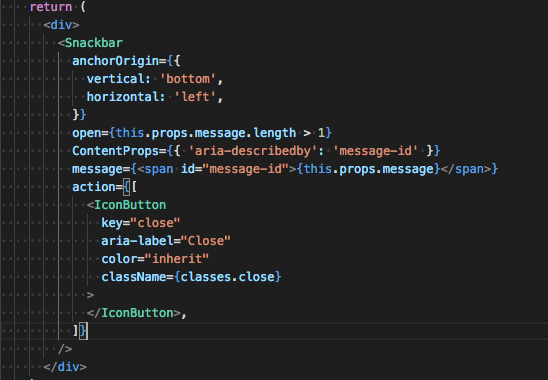
on my father component I did:
setTimeout(() => this.setState({ message: '' }), 6000);
The message disappears after 6 seconds.
 adiazarya100
on 27 Dec 2018
adiazarya100
on 27 Dec 2018
Related issues
 ghost
·
3Comments
ghost
·
3Comments
 finaiized
·
3Comments
finaiized
·
3Comments
 activatedgeek
·
3Comments
activatedgeek
·
3Comments
 rbozan
·
3Comments
rbozan
·
3Comments
 mb-copart
·
3Comments
mb-copart
·
3Comments
Most helpful comment
Same issue with Material UI 3.1.1: it does not hide after the duration.