Material-ui: createGenerateClassName ruleCounter mismatch between SSR vs hydrated style sheets
Hi,
First I must say thanks for the awesome effort that has been put into v1 rewrite
- [x] I have searched the issues of this repository and believe that this is not a duplicate.
Expected Behavior
Consider a SSR scenario with async component loading using ReactDOM.hydrate, with a component hierarchy a bit like this:
Layout
-Header
--ItemTitle (async)
-Main
--ListFilterControls
--List (async)
---ListItem
---ListItem
---ListItem
--ListLoadMoreControls
-Footer
As the async component load time is variable (database vs cache vs network), the order that React encounters the components can differ between the browser vs server
Current Behavior
Initial render of the raw HTML/CSS from SSR is okay, components have the correct styles sheets applied.
However after removing the SSR injected styles sheets, some of the later order (ie lower down the page) component styles get corrupted/go missing.
const jssStyles = document.getElementById("jss-server-side");
jssStyles.parentNode.removeChild(jssStyles);
If the component with corrupted styles is remounted (eg by a page transition/click action) then the component styles are rebound and corrected
Diagnostic
Comparing the raw HTML/CSS from the SSR, I can see that the CSS style sheet name matches the reference used by the HTML, how it should be, and this works.
When comparing what happens in the hydrated HTML/CSS, I can see that the HTML css classname remains the same as the server, however the [head.style.css] name has changed, it has got a new ruleCounter. This causes the component to lose its styles. (until a remount/state change)
If i inject a custom createGenerateClassName for the purpose of tracing the ruleCounter i can see:
- The style sheet ruleCounter for most of the outer components (Layout,Header,Main,Footer) are always the same on both server and client
- The style sheet ruleCounter for some of the later components (List,ListItem,ListLoadMoreControls) are different between server and client
- The amount of rules are the same, its just the order that they are processed is different.
ItemsControls-layout_controls-147
NewContent-layout_container-148
NewContent-layout_cell-149
LoadMore-layout_container-150
LoadMore-layout_cell-151
MuiDialog-root-152
MuiDialog-paper-153
MuiDialog-paperWidthXs-154
MuiDialog-paperWidthSm-155
MuiDialog-paperWidthMd-156
MuiDialog-fullWidth-157
MuiDialog-fullScreen-158
MuiSnackbar-root-159
MuiSnackbar-anchorTopCenter-160
MuiSnackbar-anchorBottomCenter-161
MuiSnackbar-anchorTopRight-162
MuiSnackbar-anchorBottomRight-163
MuiSnackbar-anchorTopLeft-164
MuiSnackbar-anchorBottomLeft-165
Tile-animation_expand-166
Tile-animation_expandopen-167
Tile-layout_avatar-168
Tile-layout_age-169
Tile-layout_age2-170
Tile-layout_age2_passed-171
Tile-layout_summary-172
Tile-layout_summary2-173
Tile-layout_summary_row-174
Tile-layout_summary_cell-175
Avatar-avatar_root-176
Summary-layout_summary-177
Summary-layout_summary2-178
Summary-layout_summary_row-179
Summary-layout_summary_cell-180
ItemsControls-layout_controls-147
NewContent-layout_container-148
NewContent-layout_cell-149
Tile-animation_expand-150
Tile-animation_expandopen-151
Tile-layout_avatar-152
Tile-layout_age-153
Tile-layout_age2-154
Tile-layout_age2_passed-155
Tile-layout_summary-156
Tile-layout_summary2-157
Tile-layout_summary_row-158
Tile-layout_summary_cell-159
Avatar-avatar_root-160
Summary-layout_summary-161
Summary-layout_summary2-162
Summary-layout_summary_row-163
Summary-layout_summary_cell-164
LoadMore-layout_container-165
LoadMore-layout_cell-166
MuiDialog-root-167
MuiDialog-paper-168
MuiDialog-paperWidthXs-169
MuiDialog-paperWidthSm-170
MuiDialog-paperWidthMd-171
MuiDialog-fullWidth-172
MuiDialog-fullScreen-173
MuiSnackbar-root-174
MuiSnackbar-anchorTopCenter-175
MuiSnackbar-anchorBottomCenter-176
MuiSnackbar-anchorTopRight-177
MuiSnackbar-anchorBottomRight-178
MuiSnackbar-anchorTopLeft-179
MuiSnackbar-anchorBottomLeft-180
Ideas
Some attempts to workaround this problem:
- Disabling SSR, the component tree and styles generate completely on the client, so all ruleCounters match, not ideal as i lose SSR
- Force consistent component rendering order, hard as async loading time is variable, also need to consider how fiber would work
- Force re-render of whole component tree after ReactDOM.hydrate, not ideal, as perf hit
- Custom createGenerateClassName which removes non-deterministic ruleCounter
I am leaning towards no4
This works in development-mode, however [sheet.options.meta] is not calculated in production-mode
Could there be a way to allow [sheet.options.meta] in production mode?
https://github.com/callemall/material-ui/blob/v1-beta/src/styles/withStyles.js#L188-L193
(note: all my calls to withStyles already use [options.name] so there shouldnt be any clashes)
Your Environment
| Tech | Version |
|--------------|---------|
| Material-UI | 1.0.0-beta.14 |
| React | 16.0.0 |
| browser | IE11/Chrome/Firefox |
 djeeg
djeeg
All 31 comments
Again, this issue is really sneaky. You are like the 10th user reporting className generation issue. We have tried to add as many warning as we could so far. Let's see your use case. It would help a lot to have a reproduction example.
- Force consistent component rendering order
That was how v1-alpha styling solution was working, unrelated to componentWillMount call order.
- [sheet.options.meta] is not calculated in production-mode
You have access to the name, which is used to build the meta key. It's enough to hack a temporary solution.
This solution will harm the payload in production.
I think that we have another solution, using the withStyles() declaration order, this is static.
@kof Big changes might be needed if the issue is confirmed 😱 . I have opened a question on React side. Let's see what their answer is.
 oliviertassinari
on 3 Oct 2017
oliviertassinari
on 3 Oct 2017
We need something small that reproduces the actual issue.
 kof
on 3 Oct 2017
kof
on 3 Oct 2017
@oliviertassinari I'm curious, would you mind adding a link to the corresponding React issue?
 leMaik
on 3 Oct 2017
leMaik
on 3 Oct 2017
@leMaik You can find it here https://github.com/facebook/react/issues/11070. The takeaway is that the described behavior from this issue is not the expected one on React side. So it can either be a React or Material-UI bug, It's impossible to know without digging into a reproduction example.
oliviertassinari
on 3 Oct 2017
Hi, thanks for quick response.
I have put together a quick demo of the behaviour https://github.com/djeeg/material-ui-rulecounter
(Note that I couldnt yet get the async part working, however can demostrate the issue using simpler code)
Run the app and see:
- SSR renders the tiles and the button with correct styles
- Wait 2 seconds
- After React.hydrate, the button loses its styles (the tiles disappearing, sort of mimics what happens with async components, mount order is different)
4 . Modify App.js to render the tiles in both server and browser
                    (true) ? (
                        <div>
                            {
                                ["a", "b", "c", "d", "e"].map((value) => <Tile value={value}/>)
                            }
                        </div>
                    ) : null
- Now when hydrate happens, the button doesnt lose the styles
(Hopefully this works for you, I have extracted my main logic into a CRA+SSR starter, I may have missed something, ping me if it doesnt work)
djeeg
on 4 Oct 2017
@djeeg This issue is very interesting. Thanks a lot for the reproduction example. I have been digging into this button issue. Here is what I have noticed:
Server-side
The button is generated with a root classes named c2.
Client Side
The button is generated with a root classes named c1. But the class name doesn't change in the DOM. React keep the server side generated class name c2. Hence the broken UI.
As far as I see the issue, it's an issue on React land, not Material-UI side.
oliviertassinari
on 5 Oct 2017
@djeeg I would advise you to remove all process.browser rendering based logic. You could also be interested in our No Server Side Rendering helper component: NoSSR.js
oliviertassinari
on 5 Oct 2017
Some links or references to fix this? I'm using withStyles HOC and i'm getting the same problem, the server generate a "copy-button-wrapper-1" but the client generate a "copy-button-wrapper-12"
I have no idea why this classes are different :/
btw I removed that component and now the "next-component" has the same problem, in server "Text-root-1" and client "Text-root-12"
material-ui: ^1.0.0-beta.16
react-jss: ^7.1.0
jss: ^8.1.0
jss-preset-default: ^3.0.0
react: ^15.5.4
 GiancarlosIO
on 25 Oct 2017
GiancarlosIO
on 25 Oct 2017
I had this issue as well today, and for me it was caused by having both await asyncBootstrapper(app); and await getDataFromTree(app); in my SSR generation code.
- https://www.npmjs.com/package/react-async-component#server-side-rendering
- https://www.apollographql.com/docs/react/recipes/server-side-rendering.html#getDataFromTree
Removing the asyncBootstrapper line solved the problem (it was optional for my use-case anyway) and my classes matched again. Not sure if this helps in getting to the root of the issue or not. I didn't change anything on the client side, only in my server SSR generation code.
 radicand
on 3 Dec 2017
radicand
on 3 Dec 2017
I think I am facing the same issue. Server code is different than client code. Could be that I'm doing something wrong ... Would be cool if we had some ssr example with material-ui and react-apollo.
 HriBB
on 22 May 2018
HriBB
on 22 May 2018
Both getDataFromTree and renderToStringWithData walk the React component tree and render each element in order to fetch data (see https://github.com/apollographql/react-apollo/blob/master/src/getDataFromTree.ts#L120).
That means the class counter of the GenerateClassName function will already have been incremented once React.renderToString is called.
The solution is to reset the counter after calling getDataFromTree by either implementing a custom GenerateClassName function or a wrapper around it, e.g.
const GenerateClassNameFactory = class {
  generateClassName = createGenerateClassName();

  createGenerateClassName() {
    return (rule, sheet) => this.generateClassName(rule, sheet);
  }

  reset = () => {
    this.generateClassName = createGenerateClassName();
  };
};
Hope that helps!
edit: just found a related issue, https://github.com/mui-org/material-ui/issues/10522
 mfellner
on 3 Jul 2018
mfellner
on 3 Jul 2018
Hello @mfellner !
I have exactly the problem with react-apollo but i can't understand how to use your solution, regenerate the class name after the getDataFromTree and before renderToString. I trying but getting the same error :/ Can u give a simple example, juste the part of your main component wrap and the getDataFromTree + renderToString ?
Thanks.
 CocoJr
on 18 Jul 2018
CocoJr
on 18 Jul 2018
@CocoJr, for Apollo SSR you should set disableStylesGeneration on MuiThemeProvider to true when running getDataFromTree and back to false again when calling renderToString (https://github.com/mui-org/material-ui/issues/10522#issuecomment-390408732).
The whole point is to only generate the styles one single time during SSR, otherwise the counter is wrong. My solution above has a similar effect: provide your own wrapper function around generateClassName and recreate the internal function instance with createGenerateClassName when you need to reset the counter.
Alas, disableStylesGeneration is the better approach because it prevents styles from being pointlessly created when they are not needed.
mfellner
on 18 Jul 2018
I would love to mitigate this kind of issues once I or someone gets time for https://github.com/cssinjs/jss/issues/677
Basically when rehydrating we can check the version mismatch and provide meaningful help that explains what happend.
kof
on 18 Jul 2018
@mfellner I trying but without result honestly :/
This is my current server.js part:
let app = (
        <JssProvider registry={sheetsRegistry} generateClassName={generateClassName}>
            <MuiThemeProvider theme={theme} sheetsManager={new Map()} disableStylesGeneration={true}>
                <ApolloProvider client={client}>
                    <I18nextProvider i18n={req.i18n}>
                        <StaticRouter location={req.url} context={context}>
                            <App />
                        </StaticRouter>
                    </I18nextProvider>
                </ApolloProvider>
            </MuiThemeProvider>
        </JssProvider>
    );

    getDataFromTree(app).then(() => {
        app = (
            <JssProvider registry={sheetsRegistry} generateClassName={generateClassName}>
                <MuiThemeProvider theme={theme} sheetsManager={new Map()}>
                    <ApolloProvider client={client}>
                        <I18nextProvider i18n={req.i18n}>
                            <StaticRouter location={req.url} context={context}>
                                <App />
                            </StaticRouter>
                        </I18nextProvider>
                    </ApolloProvider>
                </MuiThemeProvider>
            </JssProvider>
        );
        const content = ReactDOMServer.renderToString(app);
        const initialState = client.cache.extract();
        const css = sheetsRegistry.toString();
        const helmet = Helmet.renderStatic();

        const html = <Html content={content} state={initialState} css={css} helmet={helmet} />;

        res.status(200);
        res.send(`<!doctype html>\n${ReactDOMServer.renderToStaticMarkup(html)}`);
        res.end();
    })
And i rehydrate like this:
ReactDOM.hydrate(
        <MuiThemeProvider theme={theme}>
            <ApolloProvider client={client}>
                <I18nextProvider i18n={i18n}>
                    <Router history={history}>
                        <Main/>
                    </Router>
                </I18nextProvider>
            </ApolloProvider>
        </MuiThemeProvider>,
        document.getElementById('root')
    );
I try a lot of possibility with changing the order of my HOCs but not work :/ Always the same warning.
CocoJr
on 18 Jul 2018
@CocoJr, this is maybe not the right place to have a longer discussion about a particular implementation issue. You might want to create a Stackoverflow issue and a small isolated version of your app showcasing your problem in a separate GitHub repo.
That being said, in your example above you're creating two different React component trees which could be a problem. You should only have a single one. If you're wondering how to set disableStylesGeneration from the outside, just pass in a function that returns a boolean as a property.
Be sure to follow https://material-ui.com/guides/server-rendering/ and https://www.apollographql.com/docs/react/features/server-side-rendering.html and just make sure you're not incrementing the ruleCounter during the call to getDataFromTree by ensuring disableStylesGeneration is set to false.
mfellner
on 18 Jul 2018
@mfellner I know it's not the good place, but i'm looking everywhere and ALL say's the same, but without example.
So OK, i have to make a function for getting dynamicly disableStylesGeneration value (for JSS ou MuiThemes ?), but how you can do this function type in JS, because when i go after the .then, all is reset in my new scope ><
Secondly, why it's happend just after SVG icon, not before? Why my design working? So i'm not really sure it's due to disableStylesGeneration (but i don't know, no example available for doing the tricks properly)
And if i don't show my drawer with Link component and icon, my mismatch it's solverd and i have: Warning: Did not expect server HTML to contain a <h1> in <div>.
CocoJr
on 18 Jul 2018
(You said: If you're wondering how to set disableStylesGeneration from the outside, just pass in a function that returns a boolean as a property. What did u mean ? If i pass a function, the prop type is invalid....)
CocoJr
on 18 Jul 2018
I found the solution to disable the StylesGeneration and enable it again before the renderToString, but i have the same problems....
CocoJr
on 19 Jul 2018
@CocoJr, I made this example application, here's the relevant line: https://github.com/mfellner/apollo-mui-ssr-example/blob/master/src/server.ts#L48 Maybe I'll write up a blog post on this topic in a while...
Hope this helps! Otherwise I'd suggest sharing your code on Stackoverflow so people can help you directly.
mfellner
on 19 Jul 2018
Yes, thanks a lot. Believe me, it's really good to have an example :)
Now if i've more problems, i going to stack overflow :)
Sorry for disturbing this issue tracker :/
CocoJr
on 20 Jul 2018
@mfellner Is is necessary to have apollo for this solution?
 zwhitchcox
on 15 Aug 2018
zwhitchcox
on 15 Aug 2018
I'm running just a regular react app without apollo...does anyone have a solution for me?
zwhitchcox
on 15 Aug 2018
@zwhitchcox no Apollo necessary – the issue occurs whenever your React component tree is rendered more than once on the server side (Apollo's getDataFromTree is just one function that renders the component tree).
That's why you should disable styles generation until your final server-side render pass, e.g.,
const body = ReactDOM.renderToString(element);
const css = sheetsRegistry.toString();
Oh, sorry, I actually figured out I wasn't having the same problem....my problem was with webpack
zwhitchcox
on 15 Aug 2018
@zwhitchcox I'm happy to hear you found a solution!
oliviertassinari
on 15 Aug 2018
@zwhitchcox would you mind sharing what happened?
 lucasavila00
on 21 Aug 2018
lucasavila00
on 21 Aug 2018
Yes, it's actually a really weird bug. Basically, I was building my server with webpack and node, and I didn't set the process.env.NODE_ENV variable when running the server, because webpack is supposed to take care that for you. Unfortunately, for whatever reason, sometimes require would return the webpack version, and sometimes it would return the version from node_modules. I was able to fix this by setting the NODE_ENV variable on both the server process, and within we pack itself. I never bothered to figure out what was wrong, because the webpack team are a bunch of jerks, and would probably say it was my fault and not accept my pr anyway
zwhitchcox
on 21 Aug 2018
I fixed my issue aswell.
I was having issues where if I mixed import styles classes would be generated twice on the server.
import React from "react";
// note how one is relative and the other absolute
import Button from "../node_modules/@material-ui/core/Button";
import IconButton from "@material-ui/core/IconButton";

class Page extends React.Component {
  public render() {
    return (
      <React.Fragment>
        <IconButton>xxx</IconButton>
        <Button>yyy</Button>
      </React.Fragment>
    );
  }
}

export default Page;
Then, on the client, I get:
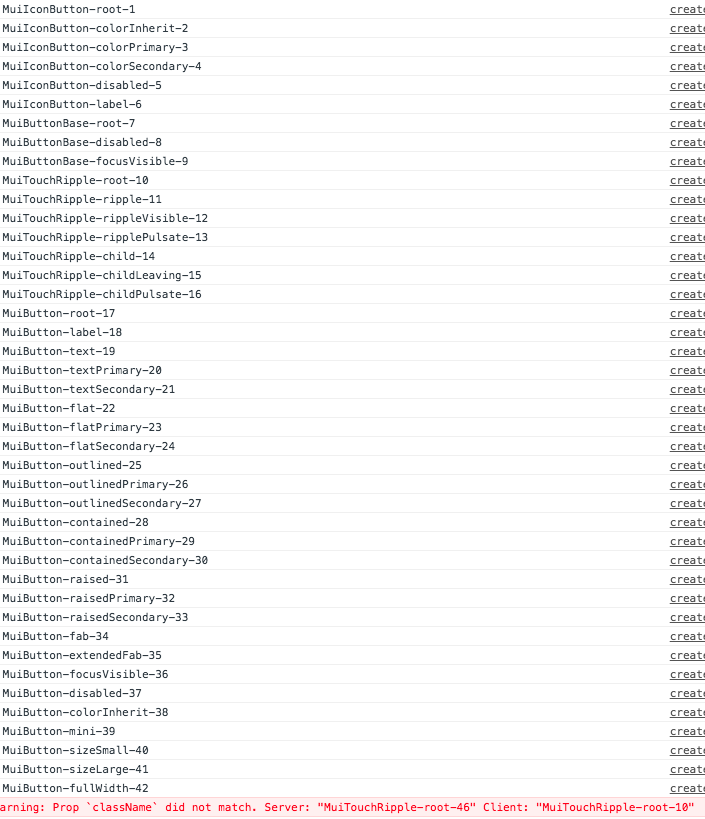
And on the server:
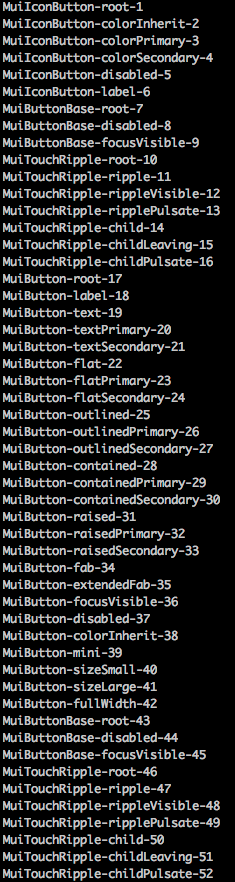
I'm using Next.js, React Apollo, Typescript and a lot of other technology that could be generating this issue. I'll try to isolate it and submit an issue here but I'm posting this in case someone else has this issue.
lucasavila00
on 21 Aug 2018
What I did to fix it was go to the actual code in material ui where they use process.env.NODE_ENV and add the code:
try {
console.log(process.env.NODE_ENV)
throw new Error
} catch (e) {
  console.log(e.stack)
}
And that's how I saw that sometimes the stack had node_modules and sometimes webpack, so that would be my recommended place to start, because you can see what is calling it
zwhitchcox
on 21 Aug 2018
Had also encountered the same problem with React 16 SSR with my React framework.
Solved the issue with a namespace system.
The sheetsheet generated will looks like:
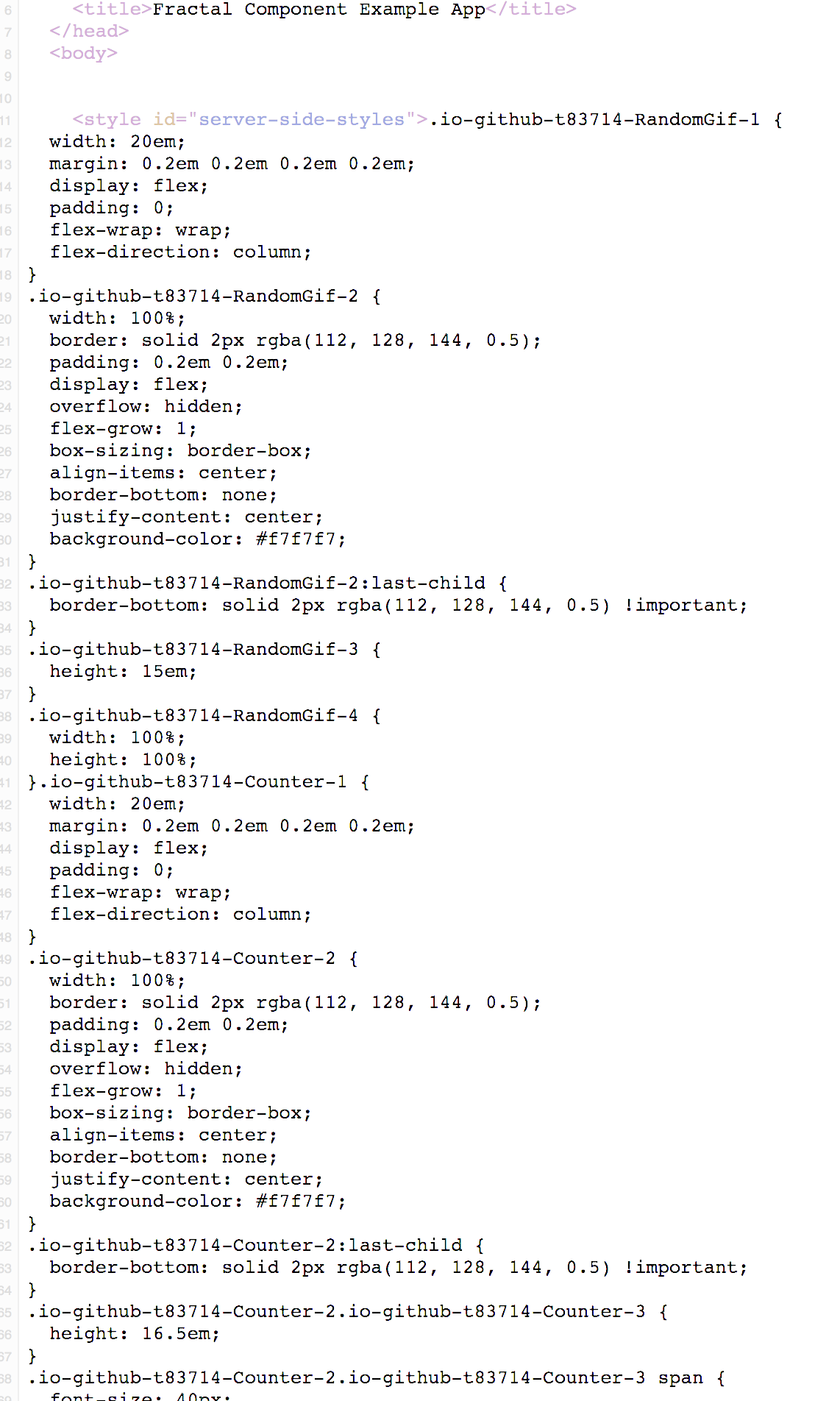
Here is an exampleApp if you're interested
 t83714
on 6 Sep 2018
t83714
on 6 Sep 2018
Related issues
 sys13
·
3Comments
sys13
·
3Comments
 ericraffin
·
3Comments
ericraffin
·
3Comments
 rbozan
·
3Comments
rbozan
·
3Comments
 mattmiddlesworth
·
3Comments
mattmiddlesworth
·
3Comments
 finaiized
·
3Comments
finaiized
·
3Comments
Most helpful comment
@CocoJr, I made this example application, here's the relevant line: https://github.com/mfellner/apollo-mui-ssr-example/blob/master/src/server.ts#L48 Maybe I'll write up a blog post on this topic in a while...
Hope this helps! Otherwise I'd suggest sharing your code on Stackoverflow so people can help you directly.