Material-ui: Warning: Failed context type
If I'm not at the right place for this issue, I apologize. Not sure where to get started to solve this error message.
Problem description
- a nextjs app which was made from with-material-ui-next, you can find the app having the issue here next-library-starter
- a npm package called next-library which depends on material-ui and is a dependency of next-library-starter (see The Goal below)
- everything works great, except I'm receiving an error message for each material-ui component.
Error messages
Warning: Failed context type: Invalid context 64a55d578f856d258dc345b094a2a2b3 of type Jss supplied to withStyles(ButtonBase), expected instance of Jss.
Warning: Failed context type: Invalid context d4bd0baacbc52bbd48bbb9eb24344ecd of type SheetsRegistry supplied to withStyles(TouchRipple), expected instance of SheetsRegistry.
The goal
The goal is to have that npm library with material-ui in order to quickly get started with new projects. This stuff is slightly beyond my understanding of npm packages & webpack and I might not be doing it the right way, if so, please kindly advise.
Steps to reproduce
git clone https://github.com/astenmies/next-library-starter.git && cd next-library-starter && yarn && yarn run dev
Versions
- Material-UI: next
- React: 15.6.1
- Browser: Chrome
 ghost
ghost
All 16 comments
We have been taking ownership on the next.js example. You can find a working example on our repository.
 oliviertassinari
on 15 Aug 2017
oliviertassinari
on 15 Aug 2017
Can you confirm this one is working?
oliviertassinari
on 15 Aug 2017
Thanks for your prompt reply @oliviertassinari .
Your nextjs example works without errors. When I use the same content in my npm package with webpack, I'm still getting the error though.
Any idea where I can get more advises on how to solve this if not here? I'm not sure if it's related to Nextjs, Material-UI or my Webpack config... I've been stuck for weeks with this error.
Basically I just want withRoot to be provided from my npm package, I never thought I'd struggle with that part of the project...
ghost
on 15 Aug 2017
This sounds like a duplication of jss or react-jss version.
oliviertassinari
on 16 Aug 2017
Removing react-jss from my npm package did not solve the issue. Where could the duplication be?
Steps to reproduce the full environment locally.
First
git clone https://github.com/astenmies/next.js-library.git && cd next.js-library && yarn && yarn run dev
Then in another tab of the terminal, in the same directory containing the above npm package...
git clone https://github.com/astenmies/next-library-starter.git && cd next-library-starter && yarn remove next-library && yarn add next-library@file:../next.js-library && yarn global add linklocal && linklocal && yarn run dev
Problem description
@oliviertassinari
- Using the following removes the error but styles are not rendered until the page finishes loading (more slowly). I've already had this issue several times recently with other nextjs projects + material-ui.
In render (){...}
if (process.browser) {
        return (
          <MuiThemeProvider theme={context.theme}>
            <AppWrapper>
              <ComposedComponent {...this.props} />
            </AppWrapper>
          </MuiThemeProvider>
        );
      }
I'm having a look at your reproduction example now.
oliviertassinari
on 16 Aug 2017
Ok, the warnings are coming from a duplicated jss version. It's installed once in the node_modules and bundled once in next-library.
oliviertassinari
on 16 Aug 2017
Material-UI source code is relying on this contextTypes of react-jss. We could soften the checks but you would have missed this important jss duplication error. So for now, let's keep it this way.
oliviertassinari
on 16 Aug 2017
Awesome @oliviertassinari many thanks for your help. You work's impressive man, keep it up! Cheers 🍻
ghost
on 16 Aug 2017
First, this project is incredible so thank you for what you're doing here.
This issue is still happening in the create-react-app example, and I'm not sure from reading this what the steps are to fix it, or if it matters at all. Is the guidance here that the PropType checks are being overly aggressive and that it's not an issue?
 baer
on 10 Oct 2017
baer
on 10 Oct 2017
I'm using server-side-rendering and still getting this warnings :/
we have our materialui-components in other repo and we use that like external library

 GiancarlosIO
on 10 Oct 2017
GiancarlosIO
on 10 Oct 2017
@GiancarlosIO It could be linked to mismatching version of jss installed.
oliviertassinari
on 10 Oct 2017
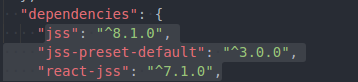
Yes!, I was using [email protected] and [email protected] so installed the same versions used in material-ui
GiancarlosIO
on 10 Oct 2017
@kof I don't think that the instanceOf is needed here https://github.com/cssinjs/react-jss/blob/master/src/contextTypes.js#L6. One could have a react-jss version relying on jss@8 and a material-ui version relying on jss@9. Given that the jss instance is injected by users, it doesn't matter what version of jss was installed on the react-jss lib. We can have duplicates. What matter is the scope of the jss version supported. What do you think?
oliviertassinari
on 10 Oct 2017
I can relax it to PropType.object
 kof
on 10 Oct 2017
kof
on 10 Oct 2017
Related issues
 chris-hinds
·
3Comments
chris-hinds
·
3Comments
 mattmiddlesworth
·
3Comments
mattmiddlesworth
·
3Comments
 newoga
·
3Comments
newoga
·
3Comments
 TimoRuetten
·
3Comments
TimoRuetten
·
3Comments
 pola88
·
3Comments
pola88
·
3Comments
Most helpful comment
Yes!, I was using [email protected] and [email protected] so installed the same versions used in material-ui
