Material-ui: style property does not affect component
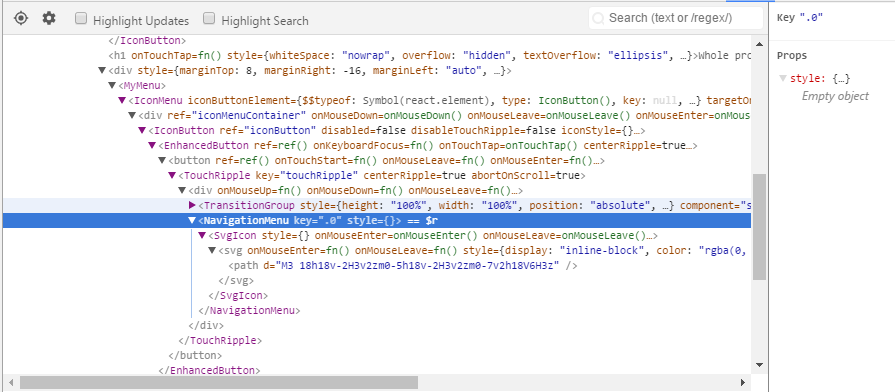
I set style on NavigationMenu component, but in the browser it does not affect component's style.
const MyMenu = (props) => (
    <IconMenu
        {...props}
        iconButtonElement={
            <IconButton>
                <NavigationMenu style={{color: '#ffffff', fill: '#ffffff'}} />
            </IconButton>
        }
        targetOrigin={{horizontal: 'right', vertical: 'top'}}
        anchorOrigin={{horizontal: 'right', vertical: 'top'}}
    >
        <MenuItem primaryText="Calculator" />
    </IconMenu>
);
I inspect with React plugin and I see this:
 croraf
All 6 comments
import React from 'react';
import pure from 'recompose/pure';
import SvgIcon from '../../SvgIcon';

let NavigationMenu = (props) => (
  <SvgIcon {...props}>
    <path d="M3 18h18v-2H3v2zm0-5h18v-2H3v2zm0-7v2h18V6H3z"/>
  </SvgIcon>
);
NavigationMenu = pure(NavigationMenu);
NavigationMenu.displayName = 'NavigationMenu';
NavigationMenu.muiName = 'SvgIcon';

export default NavigationMenu;
 Nagle
on 17 Jun 2017
Nagle
on 17 Jun 2017
Don't understand the point? Why it does not set my custom style? Is it pure that somehow blocks it?
croraf
on 23 Jun 2017
I have the same problem with Drawer but not with other things like Button
 majodu
on 5 Jul 2017
majodu
on 5 Jul 2017
Have the same issue with Drawer. Cannot manually style zIndex
 suaradial
on 15 Jul 2017
suaradial
on 15 Jul 2017
I think I found the solution.
In my case it's the IconButton that messes up. <NavigationMenu style={{color: '#ffffff', fill: '#ffffff'}} /> is its children, and in IconButton's code they use the following (shortened):
class IconButton extends Component {

  static defaultProps = {
    ....
    iconStyle: {},
    ...
  };

  render () {

      const childrenStyle = iconStyle;

      return (
        ...
        {extendChildren(children, {
          style: childrenStyle,
        })}
        ...
      );
  }
}
extendChildren takes the children, clones them and merges the properties given in the second argument. That's how my children's style gets overriden by iconStyle set to {} by default.
The solution is to set the iconStyle of wrapping element (IconButtonin my case), instead of setting style of the target element directly (NavigationMenu in my case).
croraf
on 16 Jul 2017
What do you guys have the Drawer wrapped in (give code excerpt)?
croraf
on 16 Jul 2017
Related issues
 ghost
·
3Comments
ghost
·
3Comments
 activatedgeek
·
3Comments
activatedgeek
·
3Comments
 iamzhouyi
·
3Comments
iamzhouyi
·
3Comments
 rbozan
·
3Comments
rbozan
·
3Comments
 finaiized
·
3Comments
finaiized
·
3Comments
Most helpful comment
I have the same problem with Drawer but not with other things like Button