Material-ui: The prop "underlineFocusStyle" of "TextField" doesn't work. Is this a bug?
borderColor does not work!
I copied the code from http://www.material-ui.com/#/components/text-field.
Styled examples
const styles = {
  errorStyle: {
    color: orange500,
  },
  underlineStyle: {
    borderColor: orange500,
  },
  floatingLabelStyle: {
    color: orange500,
  },
  floatingLabelFocusStyle: {
    color: blue500,
  },
};
// .......
<TextField
     hintText="Custom Underline Focus Color"
     underlineFocusStyle={styles.underlineStyle}
/>
It doesn't work, the border-corlor keeps in default.
borderBottomColor works well.
I tried to set borderBottomColor, and it works.
I don't know if it was a bug.

Chrome
create-react-app
 mrold
mrold
All 16 comments
I've also noticed that the underlineFocusStyle doesn't accept different colors.
However for some reason the issue seems to be only existing on Chrome.
 troip
on 1 Dec 2016
troip
on 1 Dec 2016
We noticed this today as well and spent the day reverting to old versions of material-ui and react and whatever else we could think of, but no luck.
EDIT: I take this back! We were relying on material-ui's default blue color that highlights and for some reason it was coming in black, but only in Chrome. When we directly modified the field like you are doing in your example, it appears to work, but I set the "color" property and not "borderColor". We are on version: 0.15.4
 R11
on 1 Dec 2016
R11
on 1 Dec 2016
I can also confirm the black-border issue in chrome. Maybe a css engine issue after a chrome update?
Tested versions 0.16.4 and 0.15.1
EDIT: The bug only seems to appear while the underline is rendering its animation. When entering an error state, the underline renders red and after leaving the error state, the underline is rendering the right color.
 mlukaszczyk
on 2 Dec 2016
mlukaszczyk
on 2 Dec 2016
@mrold I confirm the issue. I couldn't figure out what introduced this regression. Could be the latest React upgrade. I have fixed it with #5695.
Thanks for the report.
 oliviertassinari
on 2 Dec 2016
oliviertassinari
on 2 Dec 2016
@oliviertassinari this is still not working with material-ui@next
 naman03malhotra
on 8 Oct 2017
naman03malhotra
on 8 Oct 2017
Couldn't find the following props in @next version, any suggestions @oliviertassinari
floatingLabelFocusStyle
floatingLabelShrinkStyle
floatingLabelStyle
naman03malhotra
on 8 Oct 2017
@naman03malhotra We have reworked the styling solution in the v1-beta branch. Nested style properties are gone. Instead, we expose a classes property. It's the InputLabel component you are trying to customize.
oliviertassinari
on 8 Oct 2017
Thank for the quick reply @oliviertassinari, I'll look into it and get back to you.
naman03malhotra
on 9 Oct 2017
A custom input component I wrote
```javascript
import React, { Component } from 'react';
import PropTypes from 'prop-types';
import { withStyles } from 'material-ui/styles';
import classNames from 'classnames';
import Input, { InputLabel } from 'material-ui/Input';
import { FormControl, FormHelperText } from 'material-ui/Form';
import AppTheme from '../../../theme/variables';
const styles = theme => ({
textField: {
fontSize: AppTheme.spacingUnit * 2.2,
width: '100%'
},
colorPrimary: {
color: AppTheme.colorPrimary // Replace with your own color
},
uppercase: {
textTransform: 'uppercase'
},
inputField: {
'&:after': {
backgroundColor: AppTheme.colorPrimary
}
}
});
class CustomTextInput extends Component {
static propTypes = {
classes: PropTypes.object.isRequired,
label: PropTypes.string.isRequired,
helperText: PropTypes.string,
error: PropTypes.bool,
caps: PropTypes.bool
};
static defaultProps = {
error: false,
caps: false
};
state = {
focused: false
};
render() {
const { focused } = this.state;
const { classes, label, helperText, error, caps, ...inputProps } = this.props;
return (
[classes.colorPrimary]: !error && focused
},
{[classes.uppercase]: caps})}
>
{label}
[classes.inputField]: !error
})}
onFocus={() => this.setState({ focused: true })}
onBlur={() => this.setState({ focused: false })}
{...inputProps}
/>
[classes.colorPrimary]: !error && focused
})}
>
{helperText}
);
}
}
export default withStyles(styles)(CustomTextInput)```
naman03malhotra
on 30 Oct 2017
@oliviertassinari is it possible that FormControlClasses are not exposed to TypeScript? I have been trying to implement color change according to the docs, but the compiler is complaining about it being missing and won't compile.
 svachmic
on 12 Nov 2017
svachmic
on 12 Nov 2017
@svachmic Yes, it's should be working.
oliviertassinari
on 12 Nov 2017
Hey @oliviertassinari thanks for a quick response. Unfortunately, I can't confirm that it is, in fact, working:
<InputLabel
    FormControlClasses={{
        focused: classes.inputLabelFocused,
    }}
    htmlFor="custom-color-input"
>
Name
</InputLabel>
Yields an error:
[ts] Property 'FormControlClasses' does not exist on type 'IntrinsicAttributes & InputLabelProps & { children?: ReactNode; }'.
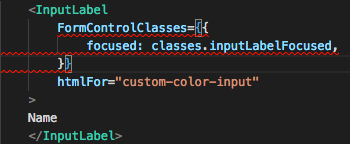
Similar error appears if I try this code:
<TextField
    InputLabelProps={{
        FormControlClasses: { focused: classes.inputLabelFocused }
    }}
    ...
[ts] ... Property 'FormControlClasses' does not exist on type 'InputLabelProps | undefined'.
Interestingly enough, the inkbar style injection works just fine. Either through InputProps on TextField or classes on Input. But those FormControlClasses are just not quite there.
EDIT: Just to make sure, I am on 1.0.0-beta.20.
svachmic
on 12 Nov 2017
@svachmic There is no reference to FormControlClasses in the docs nor in the source code. I thought you meant FormControl.classes. It's not supposed to work.
oliviertassinari
on 12 Nov 2017
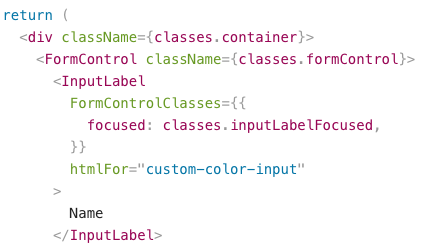 svachmic
on 12 Nov 2017
svachmic
on 12 Nov 2017
@svachmic Oh thanks for the link. FormControlClasses is missing in the /src/Input/InputLabel.d.ts definition. Do you want to submit a pull request to fix it?
oliviertassinari
on 12 Nov 2017
Opened a PR #9110
svachmic
on 12 Nov 2017
Related issues
 TimoRuetten
·
3Comments
TimoRuetten
·
3Comments
 sys13
·
3Comments
sys13
·
3Comments
 pola88
·
3Comments
pola88
·
3Comments
 FranBran
·
3Comments
FranBran
·
3Comments
 iamzhouyi
·
3Comments
iamzhouyi
·
3Comments
Most helpful comment
@mrold I confirm the issue. I couldn't figure out what introduced this regression. Could be the latest React upgrade. I have fixed it with #5695.
Thanks for the report.