Material-ui: [SelectField] Floating Labels broken in 0.15.3 release
Problem description
Floating Labels (0.15.3) render like this:

in 0.15.2 they looked like this:

Steps to reproduce
Go to http://www.material-ui.com/#/components/select-field and go to the Floating Label section.
const items = [
  <MenuItem key={1} value={1} primaryText="Never" />,
  <MenuItem key={2} value={2} primaryText="Every Night" />,
  <MenuItem key={3} value={3} primaryText="Weeknights" />,
  <MenuItem key={4} value={4} primaryText="Weekends" />,
  <MenuItem key={5} value={5} primaryText="Weekly" />,
];

        <SelectField
          value={this.state.value}
          onChange={this.handleChange}
          floatingLabelText="Floating Label Text"
        >
          {items}
        </SelectField>
Versions
- Material-UI: 0.15.3
- React: 15.3.0
- Browser: Chrome
 petermikitsh
All 16 comments
@nathanmarks Regarding our discussion on the visual testing. That's a perfect example of a regression that we could have avoided 😞 .
 oliviertassinari
on 3 Aug 2016
oliviertassinari
on 3 Aug 2016
We also ran into this issue - thanks for expediting the fix! In the future, I wonder if an approach like https://facebook.github.io/jest/blog/2016/07/27/jest-14.html or https://www.npmjs.com/package/react-cornea might help to catch these types of visual regressions?
 bpartridge
on 4 Aug 2016
bpartridge
on 4 Aug 2016
@bpartridge I was looking at leveraging https://github.com/Huddle/Resemble.js and taking cross-browser screenshots on browserstack
 nathanmarks
on 4 Aug 2016
nathanmarks
on 4 Aug 2016
Will this issue also address hint text?
 bramick
on 4 Aug 2016
bramick
on 4 Aug 2016
@zalmoxisus I have reverted the commit responsible for this behavior. I couldn't find a simple workaround. I think that fixing the regression is more important that the new feature.
Let's try to address your need properly.
oliviertassinari
on 4 Aug 2016
Is this related to #3738 in any way?
 mpontikes
on 5 Aug 2016
mpontikes
on 5 Aug 2016
so is future behavior expected to be that a SelectField can't be empty (per #4822)? It seems there are definitely use cases for not showing any of the menu items (i.e. selecting between 3 options and no default)
 DecSander
on 5 Aug 2016
DecSander
on 5 Aug 2016
i.e. selecting between 3 options and no default
From a data point of view, there is always a default implicit value. It's really about how users are perceiving it.
is future behavior expected to be that a SelectField can't be empty
As far as I see the issue, the closer the behavior is from a native select, the better.
oliviertassinari
on 6 Aug 2016
Ok, that makes sense, but that's seems like a pretty breaking change (my project was relying on there being an empty default), just a heads up. While i guess that behavior wasn't technically documented, it was on the component page, so it doesn't really fall into the class of strictly feature addition IMHO. Also I guess there's technically usually there's a default implicit value, but there are definitely some times when that isn't true
DecSander
on 10 Aug 2016
that makes sense, but that's seems like a pretty breaking change
I was considereing the old behavior as a bug. But you are right, people are relaying on this specific behavior. That sounldn't have been released in a patch version. Sorry guys.
oliviertassinari
on 10 Aug 2016
@oliviertassinari @DecSander
I'm also relying on the default behavior being empty. If that behavior is removed, I would very much like a way to get it back.
The floating label is beautiful and leverages the power of Material UI. But this change would mean that the floating label is essentially always fixed as if you had set floatingLabelFixed={true}.
Our designers and PMs really like the current look and feel of SelectField and how it mirrors the look and feel of TextField, particularly in regard to the floating label. Please don't remove that.
Just for the sake of documentation, here's the current behavior:
SelectFieldhas no default whenvalueis set tonullorundefinedSelectFielddoesn't fire anonChangeevent until user selects one of the dropdown items- Once an item has been selected, there's no way to go back to unselected state (but user can still switch to a different item)
Everyone here really likes the current floating label behavior. I really don't want to have to fork Material UI just to get that behavior back.
 mcmar
on 11 Aug 2016
mcmar
on 11 Aug 2016
@mcmar In hindsight, I think that we should keep the current behavior for _required_ fields. It doesn't make much sense to allow users to go back to an empty state.
For _non-required_ fields, I think that users should be able to go back to an empty state.
I like how Angular Material 1 is handling this problem.
required (as we do now):

non-required:

That would be a matter of adding a required property.
Regarding @zalmoxisus concern on being closer to the native select element.
I think that we should implement the logic that select the first value when there is no match only if required is false.
oliviertassinari
on 1 Oct 2016
I don't think it makes sense to select the first element automatically ever. It's poor UX as I laid out in my response for #4822.
It makes perfect sense for me to allow a
DropDownorSelectFieldto be empty. In a form, I want to force the user to fill out all of the fields. I don't want to set defaults because I want the user to actually enter the value themselves, and if they don't enter one my form validator is going to ensure that they enter a value into it.If you populate the field with a default value it could allow users to accidentally pass over a pre-filled field with the incorrect value. I want users to be forced to interact with the
SelectFieldto ensure they put in the right value.
You can always easily add the logic to select the first element by adding a higher-order-component to wrap the select element. If you implement this logic directly into the base there's no way for those of us who do not agree with this decision to undo the logic.
I will pretty much always vote for flexibility vs forcing a certain pattern on everyone using the library. Forcing selection removes flexibility that several people have voiced that they desire to have.
I would settle for meeting in a middle-ground where there is a prop that allows for turning on and off this logic (ie autoSelectFirstValue={false})
 clayne11
on 1 Oct 2016
clayne11
on 1 Oct 2016
If you populate the field with a default value it could allow users to accidentally pass over a pre-filled field with the incorrect value.
@clayne11 Following this direction, we will narrow the issue to the required=false scope.
Still, you are right.
Native <select /> elements are broken. React don't call onChange while the select box is showing a different value. Leading to the issue you are describing 😱 .
We have different options:
- Drop the auto selection behavior
- Add the auto selection behavior but call
onChangewhen this behavior is triggered. - Add the behavior with a
autoSelectFirstValue={false}property.
Well, feel like you are right again. I would rather keep the component simple and edge case free.
Hence dropping the auto selection behavior.
oliviertassinari
on 1 Oct 2016
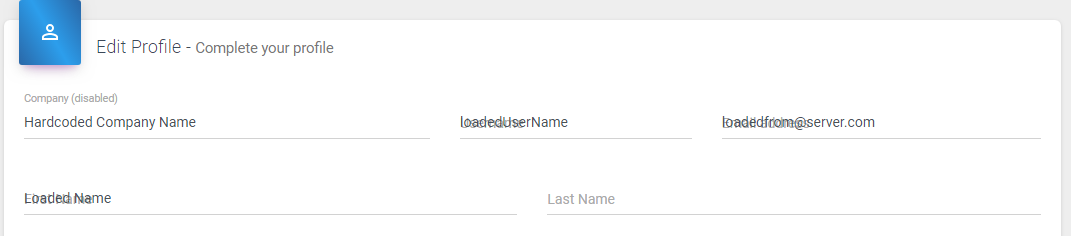
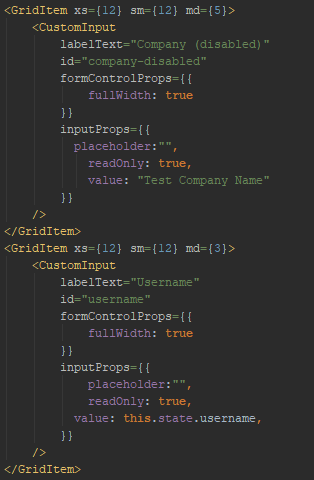
I have gone through all the issues that I could find relating to this, but I am still experiencing the floating label problem. When a value is hard coded in the page, there is not a problem. But when the value is updated be a state change, the labels do not move.
I feel like I missed something simple.
Can someone please help me out?
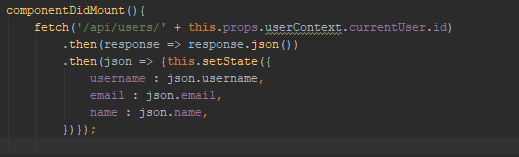
I have tried doing the fetch in componentWillMount() results were the same.
 AirborneEagle
on 31 Jul 2018
AirborneEagle
on 31 Jul 2018
Right after posting that comment, I found my silly mistake.
this is my initial state declaration.
constructor(userContext,...props) {
        super(userContext,...props);
        this.state = {
        }
    }
I forgot to include the states in the constructor. oops.
AirborneEagle
on 31 Jul 2018
Related issues
 revskill10
·
3Comments
revskill10
·
3Comments
 newoga
·
3Comments
newoga
·
3Comments
 ryanflorence
·
3Comments
ryanflorence
·
3Comments
 anthony-dandrea
·
3Comments
anthony-dandrea
·
3Comments
 finaiized
·
3Comments
finaiized
·
3Comments
Most helpful comment
@zalmoxisus I have reverted the commit responsible for this behavior. I couldn't find a simple workaround. I think that fixing the regression is more important that the new feature.
Let's try to address your need properly.