Material-ui: Support for indeterminate checkboxes
Description
It would be great to be able to set indeterminate={true} on the <Checkbox/> components. Any suggestions for this, or is there a plan to include this?
Thank you!
Images & references
-->
 tgoldenberg
All 24 comments
@tgoldenberg I'm not sure to understand. What's the use case?
 oliviertassinari
on 25 Jul 2016
oliviertassinari
on 25 Jul 2016
@tgoldenberg
You can target it with css using the :indeterminate selector: https://developer.mozilla.org/en-US/docs/Web/CSS/:indeterminate
 nathanmarks
on 25 Jul 2016
nathanmarks
on 25 Jul 2016
And you should be able to access the DOM element with refs (edit - via our component) to set the property.
nathanmarks
on 25 Jul 2016
@tgoldenberg https://github.com/facebook/react/issues/1798
nathanmarks
on 25 Jul 2016
yeah, I tried using refs via this.checkbox.refs.enhancedToggle.refs... but haven't gotten it to work yet. I'll try to post an example if I get it working.
tgoldenberg
on 26 Jul 2016
@tgoldenberg What happens? does the DOM property reset after you change it?
nathanmarks
on 26 Jul 2016
@nathanmarks Nothing happens. Nothing.


tgoldenberg
on 26 Jul 2016
@tgoldenberg Did you add any :indeterminate styling? It's a visual only property. It looks like it's being set to true from your console.log output there.
nathanmarks
on 26 Jul 2016
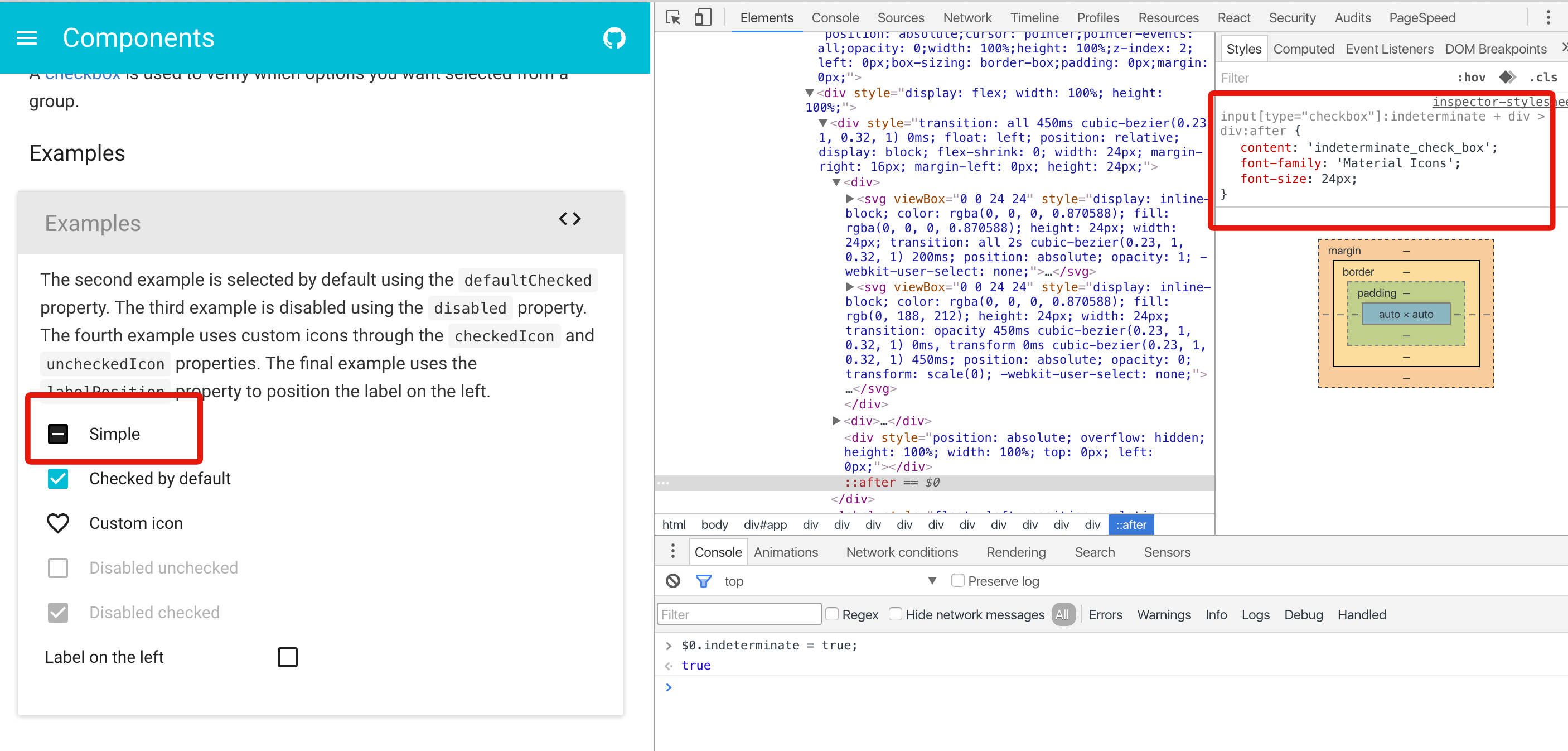
@tgoldenberg Just having a play with it now. I see the difficulty you're having here even with the property set. All I have right now with the current setup is something slightly hacky:
input[type="checkbox"]:indeterminate + div > div:after {
  content: 'indeterminate_check_box';
  font-family: 'Material Icons';
  font-size: 24px;
}
nathanmarks
on 26 Jul 2016
I'll look into supporting this better in the next branch.
nathanmarks
on 26 Jul 2016
Just my 2 cents. One way to support this (that I would prefer) is to allow checked to be either true, false or 'indeterminate' (or explicitly null - not undefined). Instead of adding a new attribute. A check box is a system with 3 states, the input should reflect this IMHO.
 Alxandr
on 27 Apr 2017
Alxandr
on 27 Apr 2017
@Alxandr I like the idea of keeping everything under one property as put a hard constraint. The state can't be 'indeterminate' and true or false at the same time => simplicity.
oliviertassinari
on 29 Apr 2017
Yeah. I seem to recall (from WPF in .NET or something similar) that checkboxes checked state was typed as a bool? (that is, either true, false or null). That made a lot of sense to me. Problem in javascript thought is that since it's untyped, using null has a tendency to be equated to undefined and false. But still, I think this makes sense:
const Test = () => (
  <div>
    <Checkbox /> // unchecked
    <Checkbox checked />  // checked
    <Checkbox checked={null} /> // indeterminate
  </div>
);
I think this is sufficiently explicit, though on the other hand it might be safer to do 'indeterminate'. But I still think it's better than adding a new prop nontheless.
Alxandr
on 29 Apr 2017
There is some trouble with null. If you initially pass null to component. It will be "uncontrolled". Once you play with component it will bring to "controlled".
SwitchBase is changing a controlled input of type checkbox to be uncontrolled. Input elements should not switch from controlled to uncontrolled (or vice versa). Decide between using a controlled or uncontrolled input element for the lifetime of the component. More info: https://fb.me/react-controlled-components.
React itself does not support indeterminate checkboxes https://github.com/facebook/react/issues/1798.
https://www.w3.org/TR/2014/WD-html51-20140617/forms.html#checkbox-state-(type=checkbox) says:
The control is never a true tri-state control, even if the element's indeterminate IDL attribute is set to true. The indeterminate IDL attribute only gives the appearance of a third state.
It can be better to set separate prop for it.
 gulderov
on 9 Jun 2017
gulderov
on 9 Jun 2017
It can be better to set separate prop for it.
@gulderov Yes, I agree. After benchmarking what other libraries are doing, I believe that blueprintjs is handling the problem very well. I would be awesome if we could do the same.
indeterminate boolean
Whether this checkbox is indeterminate, or "partially checked." The checkbox will appear with a small dash instead of a tick to indicate that the value is not exactly true or false.
oliviertassinari
on 9 Jun 2017
@gulderov There is no reason material-ui can't create a better abstraction on top of the one provided by React itself though. And sure, null might be problematic (didn't think about controlled vs uncontrolled), but a tri-state could be implemented as something like this (without any stying etc, ofcause):
const Checkbox = ({ checked }) => {
  const checkedState = checked === null
    ? null
    : checked === 'indeterminate' : true ? false;
  const indeterminate = checked === 'indeterminate';
  return <checkbox checked={checkedState} indeterminate={indeterminate} />
}
@Alxandr Don't we lose an extra information? Isn't the point to notify that the value is mostly true of false but not completely? Let's say it's used in a regular Form, what's the value sent to the server?
oliviertassinari
on 9 Jun 2017
Lose information? We lose no information.
A checkbox can be in one of 4 states technically:
- checked
- unchecked
- checked - indeterminate
- unchecked - indeterminate
If you change it to use only one prop, the only one you can't describe is unckeced - indeterminate, so then the question is does that make sense? I don't think it makes sense, hence I don't think we lose any information.
Alxandr
on 9 Jun 2017
An indeterminate checkbox should have different styling I feel. I like how primeng does it.
https://www.primefaces.org/primeng/#/tristatecheckbox
 Parthchokshi
on 26 Apr 2018
Parthchokshi
on 26 Apr 2018
@Parthchokshi The styling is different:

oliviertassinari
on 26 Apr 2018
I meant, we don't have a tristate checkbox, it just toggles the color when I click on that. We can have it change icon when user click on it. The initial indeterminate state should be blank. And then yes/no should be tick/cross icons.
This should be really useful in RSVP UI's, where user can say:
- coming
- not coming
- haven't said anything yet.
May be a new component all by itself or extend Checkbox.
Parthchokshi
on 26 Apr 2018
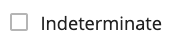
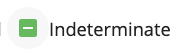
Is there an update on how to create an unchecked indeterminate state that's blank rather than with a grey/secondary color in the background of the checkbox? I've tried pulling in different checkbox icons from MUIs selection (i.e. IndeterminateCheckBoxOutlined.js) and added styles with the classes object to achieve what I want... but haven't had any luck going from unchecked indeterminate as an empty checkbox, to checked indeterminate using the default IndeterminateCheckBox icon/style
unchecked indeterminate
checked indeterminate
 veronicaerick
on 25 Jul 2019
veronicaerick
on 25 Jul 2019
@veronicaerick Please submit questions like this on StackOverflow next time. People answers on GitHub don't compound as much. I would try something like this:
import React from 'react';
import Checkbox from '@material-ui/core/Checkbox';
import CheckBoxOutlineBlank from '@material-ui/icons/CheckBoxOutlineBlank';

export default function Checkboxes() {
  const [state, setState] = React.useState({
    checkedF: true,
  });

  const handleChange = (name: string) => (event: React.ChangeEvent<HTMLInputElement>) => {
    setState({ ...state, [name]: event.target.checked });
  };

  return (
    <Checkbox
      checked={state.checkedF}
      indeterminateIcon={state.checkedF ? undefined : <CheckBoxOutlineBlank />}
      onChange={handleChange('checkedF')}
      value="checkedF"
      indeterminate
      inputProps={{
        'aria-label': 'indeterminate checkbox',
      }}
    />
  );
}
will do, thank you so much for the response this works perfectly! 👍
veronicaerick
on 29 Jul 2019
Related issues
 mb-copart
·
3Comments
mb-copart
·
3Comments
 finaiized
·
3Comments
finaiized
·
3Comments
 zabojad
·
3Comments
zabojad
·
3Comments
 FranBran
·
3Comments
FranBran
·
3Comments
 revskill10
·
3Comments
revskill10
·
3Comments
Most helpful comment
I'll look into supporting this better in the
nextbranch.