Material-ui: [IconMenu] Add ability to style underlying List inside of Menu.
Currently there is no way to style the underlying list when using IconMenu. This change would enable passing a listStyle object similar to how Menu already allows for and just pass the listStyles down to the Menu object.
const listStyles = { paddingTop: 0, paddingBottom: 0 };

<IconMenu listStyle={listStyles} menuStyle={...}>
  <MenuItem .../>
</IconMenu>
 jareddellitt
All 13 comments
That's a good point. Care to submit a PR?
Also @jareddellitt , What is your use-case exactly?
 tintin1343
on 21 Apr 2016
tintin1343
on 21 Apr 2016
Also, We are in the process of rewriting the menuItem component for the next version release. This might not even be needed by then. So , you will have to wait if you are banking on this change.
tintin1343
on 21 Apr 2016
@tintin1343 I just wanted to be able to style the underlying List (adjust padding) when using IconMenu, similar to what can be done when just using Menu. Will rewriting MenuItem allow for this?
jareddellitt
on 22 Apr 2016
@jareddellitt : We will make it more composable that way everyone will have the freedom and flexibility to design and make changes to the styles of the components. Right now some of the components are a mess. So a rewrite will allow for it.
tintin1343
on 22 Apr 2016
@tintin1343 gotcha - would it be more reasonable to add list to the set of components with overridable styles when defining a custom theme and pull those styles from context.muiTheme inside of List?
getMuiTheme({
list: {
paddingTop: 8,
paddingBottom: 8
}
})
List.js
const {muiTheme} = context;
const styles = {
root: {
padding: 0,
paddingBottom: muiTheme.list.paddingTop,
paddingTop: hasSubheader ? 0 : muiTheme.list.paddingBottom,
},
};
I guess I'm just looking for a way to override some of the static styles of components that are wrapped by higher level components. Is there a spot I can follow along/see the plan/help out for these rewrites?
jareddellitt
on 22 Apr 2016
Hello,
I understand that this component will be rewritted. I just want to highlight my issue with the autocomplete component. Indeed, this last one is using the menuItem, however, it is not possible to set the style into the div containing the text itself, so it is not possible for me to apply the css property text-overflow: ellipsis.

<div style="margin-left:0;padding-left:16px;padding-right:16px;padding-bottom:0;padding-top:0;position:relative;color:red;overflow:hidden;text-overflow:ellipsis;mui-prepared:;" data-reactid=".7.0.0.0.0.1:$0/=1$0.0.0.1">
<div style="mui-prepared:;" data-reactid=".7.0.0.0.0.1:$0/=1$0.0.0.1.$primaryText">a very very very very long text which cannot be summarized here</div>
</div>
Anyway, is there any work around until this rewriting?
 ekaradon
on 17 May 2016
ekaradon
on 17 May 2016
Will this make it possible to remove the padding: 8px 0; that is set on the inside div?.... was hoping listStyle={{ padding: 0 }} would do it, but it did nothing.
 bobmonteverde
on 14 Aug 2016
bobmonteverde
on 14 Aug 2016
I had a lot of trouble trying to remove the padding: 8px 0 as css classes couldn't reach the div and the menuStyle, lineSyle props didn't work either. However wrapping my listing content in a disabled menuItem and setting some negative margins works pretty good.
<IconMenu >
  <MenuItem className="icon-menu-wrapper" disabled={true}>
     <div>listing content</div>
     <div>more listing content</div>
     ...
  </MenuItem>
</IconMenu>
.icon-menu-wraper {
    margin: -8px 0 -8px 0; /* the real magic */
    padding: 0 !important; /* removes left and right padding */
    cursor: initial !important;
}
 hbeckeri
on 19 Oct 2016
hbeckeri
on 19 Oct 2016
The post above by @hbeckeri is really helpful, but it was confusing for me to wrap in a disable MenuItem. It works equally as well for me with a div:
<IconMenu >
  <div className="menu-hack">
     <div>listing content</div>
     <div>more listing content</div>
     ...
  </div>
</IconMenu>
.menu-hack {
    margin: -8px 0 -8px 0; /* the real magic */
    padding: 0 !important; /* removes left and right padding */
    cursor: initial !important;
}
 ekatzenstein
on 16 Mar 2017
ekatzenstein
on 16 Mar 2017
@ekatzenstein Are you getting any warnings from material-ui? If I recall correctly Menus require children to be MenuItems.
hbeckeri
on 21 Mar 2017
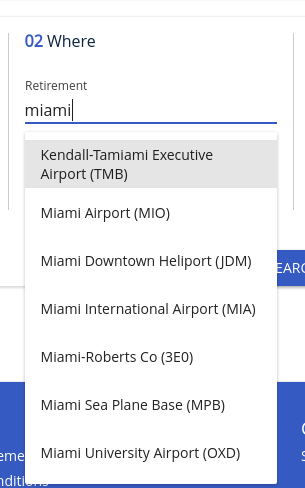
add
<autocomplete
        menuProps={{
          menuItemStyle: {
            whiteSpace: 'initial', lineHeight: 'normal',
            display: 'flex',justifyContent:'center',flexDirection:'column',
            fontSize: '14px'
          }
        }}
/>
 jomarquez21
on 30 Oct 2017
jomarquez21
on 30 Oct 2017
@hbeckeri
Are you getting any warnings from material-ui? If I recall correctly Menus require children to be MenuItems.
I wrapped the Menu with the div, rather than the other way around.
 carlgunderson
on 12 Jan 2018
carlgunderson
on 12 Jan 2018
Using MenuListProps should work.
jsx
<Menu  MenuListProps={{ style: { padding: 0 } }} >
  <MenuItem> First </MenuItem>
  <MenuItem> Second </MenuItem>
  <MenuItem> Third </MenuItem>
</Menu>
 mrprofessor
on 12 Feb 2019
mrprofessor
on 12 Feb 2019
Related issues
 chris-hinds
·
3Comments
chris-hinds
·
3Comments
 revskill10
·
3Comments
revskill10
·
3Comments
 newoga
·
3Comments
newoga
·
3Comments
 mattmiddlesworth
·
3Comments
mattmiddlesworth
·
3Comments
 finaiized
·
3Comments
finaiized
·
3Comments
Most helpful comment
I had a lot of trouble trying to remove the
padding: 8px 0as css classes couldn't reach the div and themenuStyle,lineSyleprops didn't work either. However wrapping my listing content in a disabled menuItem and setting some negative margins works pretty good.