Material-ui: [TextField] type="number" shows hintText when value has dots and commas
Problem Description
When using a TextField with type "number" and showing a hintText, if user types certain combinations of dots, commas and numbers, the hintText is shown.
Combinations that showed this behaviour:
123.
123.456,
123.456,78
123.456.
123.456.789
123,456,
123,456,789
123,456.789
import React from "react";
import { TextField } from "material-ui";

export class TextFieldTest extends React.Component {
    render() {
        let handleChangeValue = () => { console.log("args", arguments); };
        return (
            <TextField
                hintText="Type a number"
                fullWidth={true}
                type="number"
                onChange={handleChangeValue}
            />
        );
    }
}
Rendered component

Correct behaviour 1 (value: 123)

Correct behaviour 2 (value: 123.456)

Correct behaviour 3 (value: 123,456)

Wrong behaviour 1 (value: 123.)

Wrong behaviour 2 (value: 123.456,)

Wrong behaviour 3 (value: 123.456,78)

Wrong behaviour 4 (value: 123.456.)

Wrong behaviour 5 (value: 123.456.789)

Wrong behaviour 6 (value: 123,456,) even though it doesn't show the hintText, it is still not a number

Wrong behaviour 7 (value: 123,456,789)

Wrong behaviour 8 (value: 123,456.789)

Versions
- Material-UI: 0.14.1
- React: 0.14.7
- Browser: Chrome 49.0.2623.110 m
I haven´t been able to test with Material-UI HEAD, yet. I'll post results as soon as I do.
 tioback
All 14 comments
@tioback : I was not able to reproduce the error conditions on HEAD of docs.


Also, for type="number" you cannot enter "," . I would suggest an upgrade of MUI and try again on your side.
I am closing this for now as this is not an issue. Try upgrading Material-UI on your end and if the issue still exists do leave a comment below I will reopen the issue, if need be.
 tintin1343
on 21 Apr 2016
tintin1343
on 21 Apr 2016
same problem
Version
- Material-UI: 0.15.0-beta.2
- React: 0.14.8
- Browser: Chrome 50.0.2661.86 (64-bit)
 NickMalt
on 7 May 2016
NickMalt
on 7 May 2016
I have the same problem with 'e', allowed by input[type=number].
If the user enter a value which begin with 'e', the floating label will not float (a number starting by 'e' is not allowed by the w3c spec, but is a problem for usability IMO)


 noliiva
on 13 Dec 2016
noliiva
on 13 Dec 2016
e2 isn't a valid number, but I think a more generalized issue is that the floating label should float for all inputs, valid or not.
 mbrookes
on 13 Dec 2016
mbrookes
on 13 Dec 2016
Yes, that's what I meant. ^^'
noliiva
on 13 Dec 2016
Please go ahead and open a new issue using the issue template, and feel free to dig into the code if you're feeling adventurous!
mbrookes
on 13 Dec 2016
Ok, I add it to my todo. :)
noliiva
on 14 Dec 2016
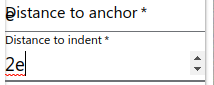
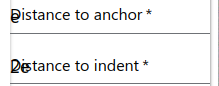
I'm having the same issue in [email protected].
Focus:
Blur:
 jpmn
on 3 Nov 2017
jpmn
on 3 Nov 2017
How about in material-ui latest version 0.19.4 ?
 gagahkharismanuary
on 7 Nov 2017
gagahkharismanuary
on 7 Nov 2017
@gagahkharismanuary for me it's working on 0.19.4 (:
 fcgomes92
on 14 Nov 2017
fcgomes92
on 14 Nov 2017
Latest version still has this issue. The bug is easily reproducible, simply let '.' be the first character entered into the field and you can see the problem. My guess is the field needs to clear hint text when ANY content is entered
 xximjasonxx
on 23 Apr 2018
xximjasonxx
on 23 Apr 2018
@xximjasonxx I'm having the same issue with entering '-' dashes as well, the hint text will appear whenever there is any dash entered
 aelayman
on 25 Apr 2018
aelayman
on 25 Apr 2018
Seems to rooted in the detection of non number characters as a pre
condition for clearing the hint text.
On Wed, Apr 25, 2018 at 10:14 AM, Ann Layman notifications@github.com
wrote:
@xximjasonxx https://github.com/xximjasonxx I'm having the same issue
with entering '-' dashes as well, the hint text will appear whenever there
is any dash entered—
You are receiving this because you were mentioned.
Reply to this email directly, view it on GitHub
https://github.com/mui-org/material-ui/issues/4050#issuecomment-384323740,
or mute the thread
https://github.com/notifications/unsubscribe-auth/AARh9PdJnMWBo5CEEeRW3OtSw0UeSnk8ks5tsJLFgaJpZM4IMFtz
.
xximjasonxx
on 25 Apr 2018
Huh! A year passed and still "minus" symbol cannot be entered into the input for starting negative number. Any solution to that?
 ivellios
on 9 Jun 2019
ivellios
on 9 Jun 2019
Related issues
 ericraffin
·
3Comments
ericraffin
·
3Comments
 finaiized
·
3Comments
finaiized
·
3Comments
 rbozan
·
3Comments
rbozan
·
3Comments
 iamzhouyi
·
3Comments
iamzhouyi
·
3Comments
 anthony-dandrea
·
3Comments
anthony-dandrea
·
3Comments
Most helpful comment
Latest version still has this issue. The bug is easily reproducible, simply let '.' be the first character entered into the field and you can see the problem. My guess is the field needs to clear hint text when ANY content is entered