Material-ui-pickers: DateRangePicker: onError called with undefined error

Environment
| Tech | Version |
| -------------------- | ------- |
| @material-ui/pickers | 4.0.0-alpha.5 |
| material-ui | 4.9.12 |
| TypeScript | |
| React | 16.13.1 |
| Browser | Chrome v81 |
| Peer library | date-fns v2.12.0 | |
Steps to reproduce
- Use the
DateRangePickercomponent - trigger an error (e.g. keyboard input a date before 1900/the default
minDate)
Expected behavior
onErrorto be called with the error message/node as first parameter, and the values array as the second parameter
Actual behavior
onErroris called withundefinedas the first parameter (the second parameter is correct)
Live example
https://codesandbox.io/s/elated-shirley-8pspg?file=/src/App.jsx
I can't get the CodeSandbox to work with the aforementioned setup (similar to #805?), but that code is reproduceable on my local.
 jozsi
jozsi
All 8 comments
Yes, it needs to make possible to clear the error value in the form.
 dmtrKovalenko
on 29 Apr 2020
dmtrKovalenko
on 29 Apr 2020
Makes sense, but I can never trigger an error with it. Unlike with v3 and KeyboardDatePicker
jozsi
on 29 Apr 2020
What’s the problem to check it firstly on ‘
if (error)
dmtrKovalenko
on 29 Apr 2020
But it never gets an error e.g. Invalid Date Format or Date should not be before minimal date (actually there is #1720 for that). The online demo can reproduce this as well: https://next.material-ui-pickers.dev/demo/daterangepicker (while for DatePicker it works nicely)
In v3, if I remember correct, the error first hit onChange and I needed to set value in order for it to be interpreted by onError. However, with v4, DateRangePicker onChange only gets either a Date object, either null.
jozsi
on 29 Apr 2020
I suppose it is already fixed on the next branch -> http://dev.material-ui-pickers.dev/guides/form-integration
dmtrKovalenko
on 29 Apr 2020
Dear @dmtrKovalenko,
I forked and built the latest next branch (can confirm that it now requires a renderInput prop), but unfortunately, DatePicker handles errors well, but DateRangePicker does not:
1.

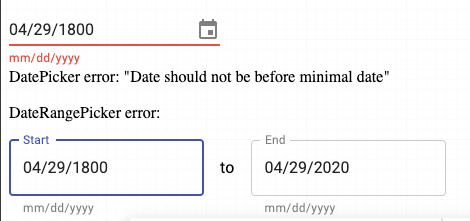
How could I help?
jozsi
on 29 Apr 2020
Thanks. It is expected. I am working right now on better validation strategy and will fix missing date range validation.
dmtrKovalenko
on 29 Apr 2020
Working as expected in v4.0.0-alpha6, thanks!
Note to self: in onChange, you must set the value as the received Date object. If you format it, onError won't pick up the error. Solution: use onAccept to format it.
TL;DR: in case of DateRangePicker, onError receives the following arguments: ([startDateReason, endDateReason], [startDateValue, endDateValue])
Example code below (with a lot of repetition), based on the Formik guide:
const DatePickerField = ({
  startField,
  endField,
  maxDate = new Date('2100-01-01'),
  minDate = new Date('1900-01-01'),
  ...props
}) => {
  const {
    errors,
    setErrors,
    setFieldTouched,
    setFieldValue,
    touched,
    values,
  } = useFormikContext();
  const startDateError = errors[startField];
  const toShowStartDateError = Boolean(startDateError && touched[startField]);
  const endDateError = errors[endField];
  const toShowEndDateError = Boolean(endDateError && touched[endField]);
  const errorMessages = {
    invalidDate: 'Invalid date format',
    disablePast: 'Values in the past are not allowed',
    maxDate: `Date should not be after ${format(maxDate, 'P')}`,
    minDate: `Date should not be before ${format(minDate, 'P')}`,
  };

  return (
    <DateRangePicker
      value={[values[startField], values[endField]]}
      inputFormat="yyyy-MM-dd"
      mask="____-__-__"
      minDate={minDate}
      maxDate={maxDate}
      onChange={([startDate, endDate]) => {
        setFieldValue(startField, startDate, false);
        setFieldValue(endField, endDate, false);
      }}
      renderInput={(startProps, endProps) => (
        <>
          <TextField
            {...startProps}
            name={startField}
            error={toShowStartDateError}
            helperText={
              toShowStartDateError
                ? startDateError ?? startProps.helperText
                : undefined
            }
            onBlur={() => setFieldTouched(startField, true, false)}
          />
          <DateRangeDelimiter> to </DateRangeDelimiter>
          <TextField
            {...endProps}
            name={endField}
            error={toShowEndDateError}
            helperText={
              toShowEndDateError
                ? endDateError ?? endProps.helperText
                : undefined
            }
            onBlur={() => setFieldTouched(endField, true, false)}
          />
        </>
      )}
      onError={(
        [startDateReason, endDateReason],
        [startDateValue, endDateValue],
      ) =>
        setErrors({
          ...errors,
          [startField]: errorMessages[startDateReason],
          [endField]: errorMessages[endDateReason],
        })
      }
      {...props}
    />
  );
};
Related issues
 katy6514
·
3Comments
katy6514
·
3Comments
 sakulstra
·
3Comments
sakulstra
·
3Comments
 filipenevola
·
4Comments
filipenevola
·
4Comments
 Harasz
·
3Comments
Harasz
·
3Comments
 dandv
·
3Comments
dandv
·
3Comments
Most helpful comment
Thanks. It is expected. I am working right now on better validation strategy and will fix missing date range validation.