Material-ui-pickers: Add option to totally ignore inbound validation
Is your feature request related to a problem? Please describe.
I want to use your DatePicker with external validation. Though I'd like to have onChange to trigger even for invalid inputs.
Describe the solution you'd like
Some new prop like ignoreInvalid. And if it's set to true, then onChange will always get called with either a valid or invalid value. It could even trigger for every key stroke. Just like a normal input does.
And the input should always display the value. And not display "Invalid value" or "unknown".
Describe alternatives you've considered
I already tried to use onError to catch the invalid value. But this will then pass this value again into the DatePicker, which results into the input displaying "Unknown" and then it's impossible to edit again, because onError will trigger again and again.
I also tried using labelFunc with labelFunc={(moment) => moment._i || moment.format("D.M.YYYY")}. But this again will make the input impossible to edit.
Additional context
I'm using formik. Though onError={value => formik.setFieldValue(fieldName, value)} will pass the invalid value to <DatePicker value={...} />. And then it won't work anymore.
Here's a Code Sandbox: https://codesandbox.io/s/1zzzkrwx7l
If you clear the DatePicker it will display "required".
If you input something invalid, it will display "must be valid"
But when it's invalid, you won't be able to edit anymore.
 benneq
All 29 comments
Here is working example with formik. And we will not trigger onChange with invalid dates.
 dmtrKovalenko
on 6 Jan 2019
dmtrKovalenko
on 6 Jan 2019
That‘s not the problem. The validation integration between material-ui-pickers and formik does not work well in real world applications. formik.setFieldError is useless when you want use a validationSchema. I'll provide a better Code Sandbox in a minute.
Am 06.01.2019 um 05:23 schrieb Dmitriy Kovalenko notifications@github.com:
Closed #836.
—
You are receiving this because you authored the thread.
Reply to this email directly, view it on GitHub, or mute the thread.
benneq
on 6 Jan 2019
I just copied and slightly modified the code you referenced: https://codesandbox.io/s/645q7p8qqk
I added a TextField to the form and a submit button.
Then I added some extra validation for the whole form using Formik.validate:
dateis requiredstringis required
(The same applies when using Formik.validationSchema with yup).
Steps to reproduce the issue:
- Make the
dateinvalid. Now the error message fromDatePicker.onErrorappears.isValidis nowfalse. - Blur the
TextField. Now the "required" error message forstringappears.isValidis stillfalse. - Insert some text into the
TextField. Now the error onDatePickerdisappears, because formik'svalidatemethod will overwrite the wholeerrorsobject. AndisValidis nowtrue.
What's the issue with that?
The user sees the date field "randomly" becoming valid by changing the string field. And even worse: The form completely forgets about the date error, and the user is able to submit it, because isValid is true.
benneq
on 6 Jan 2019
@benneq I see your problem. Only I can suggest - fully override native pickers validation. If you want to use our inbound do not use global 'validate' function, use field-level validation instead. For my point of view it is also much readable than 1 function.
We cannot do anything with that, cause the idea of global form-level validation is pure function validate(values) - but picker's inbound date validation are side-effect from this prospective.
if you are using validationSchema you can easily override picker's validation with a help of yup's date.
dmtrKovalenko
on 6 Jan 2019
It should be added as a not to the documentation
dmtrKovalenko
on 6 Jan 2019
I am using validationSchema. (The validate(values) was just a quick and dirty example).
But with validationSchema you still get the same behavior. You can't simply override the picker's validation, because it won't provide the invalid values.
Here's Code Sandbox with validationSchema and yup: https://codesandbox.io/s/91pm30mrmw
This is the same code as above. I just exchanged validation for validationSchema with yup.
Within validationSchema there's a test method which should check for invalid dates. But it cannot work, because the value from the picker is always either valid or null.
benneq
on 6 Jan 2019
You can do smth like and forgot about validation.
onError={(value) => onChange({ target: { value }})}
Or use setFieldValue method.
onError={(value) => setFieldValue(field.name, value)}
Nope. This won't work. Because then formik will provide a new invalid value to the picker.
See here: https://codesandbox.io/s/488xon8n59
The result is something like <DatePicker value={moment("invalid value")} ... />. This will clear the input (when using mask) or set "Unknown" in the input (without mask). And then it's impossible to edit the input.
EDIT: I already tried a lot of different things. Nothing works well.
At the moment I'm experimenting with something like this:
<DatePicker
    labelFunc={(value) => {
        value = value || field.value; // fallback to field.value, because value is not set on first call
        return value
            ? value.isValid()
                ? value.format(format)
                : typeof value._i === "string" // using undocumented momentjs internals
                    ? value._i
                    : ''
            : '';
    }}

    format={format}

    onInputChange={(e: any) => { // provided type of e is faulty, because it has no "target.value"
        setFieldValue(field.name, moment(e.target.value, format, true))
    }}

    value={props.value
        ? field.value.isValid()
            ? value
            : typeof field.value._i === "string" // using undocumented momentjs internals
                ? field.value._i
                : null
        : null
    }
/>
This is extremely error-prone. It's kinda working, but has still some issues, and it's really ugly.
benneq
on 6 Jan 2019
Yeeeah, thats really trickyy.
dmtrKovalenko
on 6 Jan 2019
That's why I suggested to add some kind of ignoreInvalid property, which will skip all kinds of validation and trigger onChange even with invalid values 😆
Then hopefully it would work just out of the box.
benneq
on 6 Jan 2019
@benneq but it will not save you, after dispatching onChange with invalidValue you will see 'unknown' label.
dmtrKovalenko
on 6 Jan 2019
One option I can see, its to save 2 values in the field. Something like { lastInputDate, acceptedDate }. Then pass to the picker only accepted date but for validation use lastInput
dmtrKovalenko
on 6 Jan 2019
https://codesandbox.io/s/o7rqymw9w9
smth like that, looks also very tricky, but will work for you. I will think about better way to accomplish better way for validationSchema integration with picker
dmtrKovalenko
on 6 Jan 2019
Yeah, right. "Unknown" is still a problem... Is there any way to display the invalid value within the picker instead of "Unknown"?
I didn't find any public method for moment to access the invalid value. That's why I use moment._i within labelFunc...
And for luxon it doesn't even store any invalid values internally...
Really really tricky.
Thank you. I'll have a look at your code.
In the meantime, I made it work using labelFunc and some really strange workarounds... If anyone is interested:
<DatePicker
    labelFunc={(value) => {
        value = (value || props.value); // because value is not set on first call
        return value
            ? value.isValid()
                ? value.format(format)
                : typeof value._i === "string" // warning: moment internals. make sure that moment._i !== NaN
                    ? value._i // warning: moment internals
                    : ''
            : '';
    }}
    keyboard={true}
    clearable={props.clearable}
    format={props.format}
    onInputChange={(e: any) => { // provided type of e is faulty, because it has no "target.value"
        if(props.clearable && !e.target.value) {
            props.onChange(null);
        } else {
            props.onChange(moment(e.target.value, format, true));
        }
    }}
    value={props.value
        ? props.value.isValid()
            ? props.value
            : typeof props.value._i === "string" // warning: moment internals. make sure that moment._i !== NaN
                ? props.value
                : null
        : null
    }
/>
Here's a working Code Sandbox: https://codesandbox.io/s/0pjyymkq5v
string is required
date is required, and must be valid
Errors appear when fields are touched. And after touch errors will be shown live while editing the fields.
benneq
on 6 Jan 2019
I maybe have another idea for "ignore inbound validation":
The picker has it's internal state. That's fine. We can use this!
<DatePicker value={valid} />This will display the value as usual- edit the
DatePickerinput and make it invalid. Because we edited it manually the picker knows the invalid value. - pass in a new invalid value via props:
<DatePicker value={invalid} />. Just display the "last known invalid value".
Of course there are 3 small issues:
- It's not possible to sync 2
DatePickers values, while they are invalid. (I don't know why anyone would want that, but maybe 😆 ) - It's not possible to override an invalid value using props from the outside with another invalid value, because the picker will then just re-display the "last known invalid value". (basically the same as issue 1. )
- If there's no "last known invalid value", but you pass in an invalid value, there must be a default like in the current version. Just display "Unknown". But don't clear the field, because that could also mean
null.
benneq
on 6 Jan 2019
Shipped in v3
dmtrKovalenko
on 10 Apr 2019
@dmtrKovalenko @benneq so how do I actually use it now with a validationSchema? Are you able to please provide an example?
 dan-turner
on 17 Sep 2019
dan-turner
on 17 Sep 2019
@dmtrKovalenko i also look for a validation example...
 adhenrique
on 27 Sep 2019
adhenrique
on 27 Sep 2019
@dmtrKovalenko @benneq Something still doesn't seem to be working quite right here with the documented example, or maybe I'm missing something (this is my first time trying this out).
I too am looking to use the Formik Form Integration example with Yup for schemaValidation.
Check out this Code Sandbox here: https://codesandbox.io/s/material-ui-pickers-playground-qxlh1
Things that work:
- Invalid Date Format built-in from the picker: type a "1" into the date field and you'll see it show up and the error message persists
Things not working:
- The validations from Yup are triggering and blocking submission, but they are not showing up correctly in the error label -- they flash on screen before being cleared away
How to reproduce:
- Set the start date to 10/5/2019 and the end date to 10/1/2019
- The error message will flash below the field
- Start typing in the string field -- every keystroke will cause the error message to briefly flash below the field, but it looks like it re-renders the component with an empty error message after which clears it away
Formik/Yup again seems to know about the error internally and prevents submission properly, but there is no error messaging shown to the user.
Any thoughts? I may be doing something wrong on the Formik or Yup side too of course, but so far it's working fine for the built-in components.
 Android3000
on 2 Oct 2019
Android3000
on 2 Oct 2019
Okay, looks like a documentation update issue. It appears the onError is simply not needed and is what is causing the problems. The example in the documentation also doesn't account for preserving helperText and checking whether the field is touched or not before displaying the error.
I'm trying to get the touched part straightened out now (for some reason the touch isn't updating on touch), and I'll post a new code sandbox to see if it looks okay. If so it may be good to update the Formik Integration documentation with a fixed example.
Android3000
on 2 Oct 2019
Yeah, I am sorry for that. It looks like a real issue in our docs. onError is just a way to preserve our internal validation error. But if you are using some validation schema you are porbably want to make your own validation.
So simply pass helperText and error similar to mui text field and show errors. @Android3000 thanks for your help. If you don't mind you can open a PR to improve our documentation with your code sample :)
dmtrKovalenko
on 2 Oct 2019
Thanks @dmtrKovalenko! I may just do that. I used some of the awesome examples from @benneq above as well and figured out the rest of where I was missing stuff. Works like a charm now!
(for anyone that finds this before a documentation PR, I updated my original code sandbox above to be accurate)
Android3000
on 2 Oct 2019
I have this code:
<KeyboardDatePicker
          id="startDate"
          name="startDate"
          className={`tst_datepicker_start ${classes.span2columns}`}
          format="MM/dd/yyyy"
          label="Start Date"
          minDate={new Date()}
          helperText={currentError}
          error={Boolean(currentError)}
          onError={error => {
            if (error !== currentError) {
              setFieldError('startDate', 'error');
            }
          }}
          onChange={event => {
            handleStartDateChange(event);
          }}
          disablePast
          value={values.startDate}
          variant="inline"
        />
I am using a validation schema of withFormik(0 hook to validate the start date is less than the end date.
I want to set the errors.startDate/errors.endDate when a user types an invalid date. But if I add setFieldError then my component is rendering infinite times.
 nilamsavani91
on 2 Dec 2019
nilamsavani91
on 2 Dec 2019
You must make sure that you are not calling setFieldError when error is already set
dmtrKovalenko
on 2 Dec 2019
You must make sure that you are not calling setFieldError when error is already set
Here is my sandbox example: https://codesandbox.io/s/competent-bose-nihj1?fontsize=14&hidenavigation=1&theme=dark
nilamsavani91
on 2 Dec 2019
You must make sure that you are not calling setFieldError when error is already set
If I uncomment useEffect code then it is going infinite loop. You can check by looking at the console. Here is the update codesandbox: https://codesandbox.io/s/react-87n3w?fontsize=14&hidenavigation=1&theme=dark
The start and end date validation is also flashing.
nilamsavani91
on 3 Dec 2019
I use redux-form rather than formik, and I'm also having problems with the inbound validation. I liked the idea of ignoreInvalid but it looks like that never came to fruition.
My use case is that I have the disablePast property set, and the incoming data is sometimes in the past. I would like to handle this error situation myself, and not have the control shown in an "error state" as below:
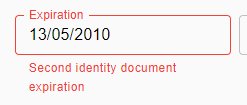
The reason I don't want to show the error state is because data comes from two places: either inbound, or from the data picker popup. The popup already handles making sure dates are only picked in the future. Inbound data may be in the past, but I only care when a field is touched.
 shiraze
on 11 Aug 2020
shiraze
on 11 Aug 2020
Oh man, I feel like a right numpty. The fix to my problem is just to set error={false}.
shiraze
on 11 Aug 2020
Related issues
 dandv
·
3Comments
dandv
·
3Comments
 basselAhmed
·
3Comments
basselAhmed
·
3Comments
 danmce
·
3Comments
danmce
·
3Comments
 harvitronix
·
3Comments
harvitronix
·
3Comments
 brett-patterson
·
3Comments
brett-patterson
·
3Comments
Most helpful comment
Thanks @dmtrKovalenko! I may just do that. I used some of the awesome examples from @benneq above as well and figured out the rest of where I was missing stuff. Works like a charm now!
(for anyone that finds this before a documentation PR, I updated my original code sandbox above to be accurate)