Material-ui-pickers: Add minTime & minDateTime props to disable period of time
Just a suggestion, I have a case where I need the earliest time selectable to be exactly 24 hours ago.
 demiters
All 15 comments
Actually this is a big scope of work - to disable the part of hour. It will not be implemented in the nearest relase. But maybe it would be better to validate this by yourself - and additionally show the error?
 dmtrKovalenko
on 23 Jul 2018
dmtrKovalenko
on 23 Jul 2018
It would be great if disablePast on <DateTimePicker also respected the time constraint.
 klassicd
on 26 Jul 2018
klassicd
on 26 Jul 2018
It would be great if disablePast on
Woah, thanks for pointing out that it doesn't. I totally assumed it did.
 rkrueger11
on 30 Aug 2018
rkrueger11
on 30 Aug 2018
Any news whether this feature will be implemented? I hope so since it's quite an important requirement in our App.
Is the only alternative for now is to overwrite the TextFieldComponent and have the full control of the validation handling? Any suggestions?
Thanks :^^
 jieming
on 9 Oct 2018
jieming
on 9 Oct 2018
This issue is caused by the recent change(https://github.com/dmtrKovalenko/material-ui-pickers/pull/658/commits/b556698997ec874667f4cce98a6e093e1456d15c).
Suggest we can change the DateTimePicker passing a flag => ModalWrapper => DateTextField, if the flag is datetime, don't apply utils.endOfDay and utils.startOfDay when getError().
 tangzhen
on 12 Oct 2018
tangzhen
on 12 Oct 2018
Any feedback about this issue status?
 antonioferngarcia
on 28 Feb 2019
antonioferngarcia
on 28 Feb 2019
This issue needs a lot of work. And low priority for us. But if you want you can submit a PR
dmtrKovalenko
on 28 Feb 2019
Hi, I tried forking this package from the master branch to add this functionality but got the following errors when doing npm install :
Module not found: Error: Can't resolve 'material-ui-pickers/DateTimePicker'
Module not found: Error: Can't resolve 'material-ui-pickers/MuiPickersUtilsProvider'
This is the command that I used: npm install material-ui-pickers@github:dmtrKovalenko/material-ui-pickers
When I opened the material-ui-pickers folder in the node_modules, there's no lib file in there, which I believe is what's causing the error. Can anyone help?
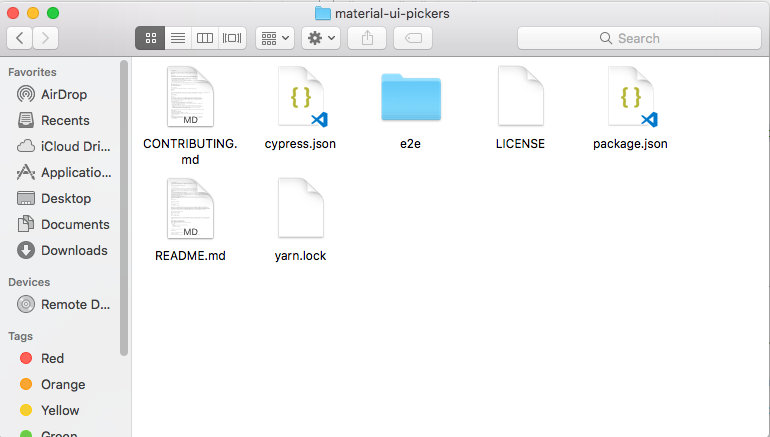
 dustxd
on 16 Mar 2019
dustxd
on 16 Mar 2019
That’s strange. If you want to contribute checkout CONTRIBUTORS.md
dmtrKovalenko
on 16 Mar 2019
Any updates regarding this?
Would be quite useful for many of us!
 vaibhavsanghigor
on 27 Sep 2019
vaibhavsanghigor
on 27 Sep 2019
Is there any update on this ? 🧐
 rommelmamedov
on 13 Nov 2019
rommelmamedov
on 13 Nov 2019
any news?
 iaomar
on 10 Dec 2019
iaomar
on 10 Dec 2019
Hi everyone 👋
Any news about this feature?
 jonathangiamp
on 17 Feb 2020
jonathangiamp
on 17 Feb 2020
Nice to see that this feature with land in v4.
However, is there any good workaround for now?
I thought about showing an error message to the user if the selected time is invalid, but how could we achieve that? Of course I'd like to re-use the error label that is generated by the picker itself so that error messages are conistent.
 baba43
on 1 Apr 2020
baba43
on 1 Apr 2020
I got a little workaround for minTime and maxTime, though I couldn't get the component's native error message to trigger, so I created my own.
I created a component called CustomTimePicker:
import React from "react";
import moment from "moment";
import MomentUtils from "@date-io/moment";
import { MuiPickersUtilsProvider, TimePicker } from "@material-ui/pickers";

function CustomTimePicker(props) {
    return (
        <MuiPickersUtilsProvider utils={MomentUtils}>
            <div className="timepicker">
                <TimePicker
                label={props.label ? props.label : "Time Picker"}
                value={
                    props.value
                    ? moment(props.value, "HH:mm")
                    : moment("00:00", "HH:mm")
                }
                ampm={false}
                autoOk={true}
                minutesStep={1}
                onChange={(time) => props.setSelectedTime(time)}
                error={props.errorMessage ? true : false}
                />
                {props.errorMessage && (
                <span className="error">{props.errorMessage}</span>
                )}
            </div>
        </MuiPickersUtilsProvider>
    );
}

export default CustomTimePicker;
Then I use it like this:
let { error } = this.state;

<CustomTimePicker
    label="My Time Picker"
    value={"8:00"}
    setSelectedTime={(time) => {
        const minTime = moment("4:59", "HH:mm");
        const maxTime = moment("9:01", "HH:mm");
        if (minTime.isBefore(time) && maxTime.isAfter(time)) {
            this.changeTime(time.format("HH:mm"));
            error = false;
        } else {
            error = "Select between 5:00 and 9:00";
        }
        this.setState({ error });
    }}
    errorMessage={error}
/>;
Do your own testing, I created this quickly just now and it seems to be working for me fine. The error message will need some CSS styling to look pretty and it can all probably be improved upon.
Cheers.
 ColdTuna
on 4 Apr 2020
ColdTuna
on 4 Apr 2020
Related issues
 danmce
·
3Comments
danmce
·
3Comments
 aditya81070
·
3Comments
aditya81070
·
3Comments
 brett-patterson
·
3Comments
brett-patterson
·
3Comments
 idrm
·
3Comments
idrm
·
3Comments
 sakulstra
·
3Comments
sakulstra
·
3Comments
Most helpful comment
It would be great if
disablePaston<DateTimePickeralso respected the time constraint.