Material-table: Material Table freezes Browser
Guidelines
Please include a demo of the issue/behavior/question you have
Please try to be as detailed as possible
You may fork one of the following starter templates if you would like:
- #### CodeSandbox
- #### StackBlitz
Describe the bug
A clear and concise description of what the bug is.
Material Table freezes the screen when trying to reload new data. I have an input field and making a service call with that input field and adding the new data to the state(state contains the data supplied to the table). And also for every change in input value Material table is rerendered and it's slowing down the page
To Reproduce
Steps to reproduce the behavior:
- Enter value in input field
- Enter search button(Make a service call and update state with newdata)
- For the 2nd search the browser is becoming slow
- For the 3rd search the browser completely becomes unresponsive
Expected behavior
A clear and concise description of what you expected to happen.
Material Table should not freeze the screen
Screenshots
If applicable, add screenshots to help explain your problem.
Desktop (please complete the following information):
OS: windows server 2016 standard(64 bit),
Browser:Chrome
Version:85.0.4183.102
Smartphone (please complete the following information):
- Device: [e.g. iPhone6]
- OS: [e.g. iOS8.1]
- Browser [e.g. stock browser, safari]
- Version [e.g. 22]
Additional context
Add any other context about the problem here.
Using Materiaa Table version 1.62.0
 Sandy2691
All 24 comments
please refer to my previous issue Poor performance. Page gets unresponsive #2433 I found the same problem so as a few others. Till this is resolved, I've moved back to core material-ui table
 DewangS
on 13 Sep 2020
DewangS
on 13 Sep 2020
Downgraded the package to 1.61.0 and the issue is resolved.
Sandy2691
on 15 Sep 2020
Also linked #2418 and potentially #2425
There seems to be a large json object called tableData added to the column data:
https://github.com/mbrn/material-table/issues/2433#issuecomment-690290099
Possibly this has cyclic references, objects are not immutably recreated and parsing enters an infinite loop / memory leak
 arelra
on 15 Sep 2020
arelra
on 15 Sep 2020
as per someone else it's pretty stable anything below v.1.67.0
DewangS
on 16 Sep 2020
+1 on this issue. Works well when downgrading to 1.67.0
 jonassvalin
on 18 Sep 2020
jonassvalin
on 18 Sep 2020
This just saved me hours of debugging...Thanks! +1.
 tybeck
on 21 Sep 2020
tybeck
on 21 Sep 2020
v1.68.0 works fine for me. Browser freeze occurs when I use v1.68.1 + the jspdf warning.
 sujay-gandham-by
on 21 Sep 2020
sujay-gandham-by
on 21 Sep 2020
please refer to my previous issue Poor performance. Page gets unresponsive #2433 I found the same problem so as a few others. Till this is resolved, I've moved back to core material-ui table
As much as i like mbrn/material-table i'm also done with it for now. Will also move back to core material-ui table. Recently this library is giving me nothing but work and problems, and unfortunately pull requests take an eternity to be merged and released to a new version :(
Downgrading is a pretty bad option considering the bugs previous versions had
Btw: I'm starting a new leightweight side- project based on core-material-table (which can be just copied). Check it out its still early stage though and supports only a few features: https://github.com/masbaehr/core-material-table . Ultimately the goal is to replace
 masbaehr
on 21 Sep 2020
masbaehr
on 21 Sep 2020
use v.1.67.0
 nightwolf-041
on 23 Sep 2020
nightwolf-041
on 23 Sep 2020
Downgraded the package to 1.61.0 and the issue is resolved.
It works properly in the 1.67.0
nightwolf-041
on 23 Sep 2020
I don't really understand. when I put column as a variable and put it outside the react component. my browser always hangs
const COLUMNS = [
  {
    title: 'Name',
    field: 'name',
  },
{
    title: 'test',
    field: 'test',
  },
}]
const myTable = () => {
 <MaterialTable
      columns={COLUMNS}
      ...
   />
but if I put it directly in the props column it works fine, I'm using version v.1.69.0
```
{
title: 'Name',
field: 'name',
},
{
title: 'test',
field: 'test',
},
}]
...
/>
 ilhamsa1
on 25 Sep 2020
ilhamsa1
on 25 Sep 2020
also experiencing this issue when columns are passed to the material-table as props from a parent component. downgrading to 1.67 has resolve the issue for now.
 saunlani
on 2 Oct 2020
saunlani
on 2 Oct 2020
I have 2 routed pages which both contains a material-table, when I switch the 2 pages back and forth by clicking route link, the browser freezes.
Version: 1.69.0
OS: Mac Catalina
Chrome: v85.0.4183.121
 swiftech
on 4 Oct 2020
swiftech
on 4 Oct 2020
I have 2 routed pages which both contains a material-table, when I switch the 2 pages back and forth by clicking route link, the browser freezes.
Same on my side with 1.69.1
 chrisbag
on 14 Oct 2020
chrisbag
on 14 Oct 2020
I don't really understand. when I put column as a variable and put it outside the react component. my browser always hangs
const COLUMNS = [
  {
    title: 'Name',
    field: 'name',
  },
{
    title: 'test',
    field: 'test',
  },
}]
const myTable = () => {
 <MaterialTable
      columns={COLUMNS}
      ...
   />
but if I put it directly in the props column it works fine, I'm using version v.1.69.0
 <MaterialTable
      columns={ [
  {
    title: 'Name',
    field: 'name',
  },
{
    title: 'test',
    field: 'test',
  },
}]
 ...
/>
This fixed the freezing issue for me.
I have custom filters for data which causes the table to re-render and after few changes to the table the browser tab starts to slow and eventually freeze/crash.
 samje
on 26 Oct 2020
samje
on 26 Oct 2020
but if I put it directly in the props column it works fine, I'm using version v.1.69.0
 <MaterialTable
      columns={ [
  {
    title: 'Name',
    field: 'name',
  },
{
    title: 'test',
    field: 'test',
  },
}]
 ...
/>
this works but it's not optimal :)
 alexdobsom
on 11 Nov 2020
alexdobsom
on 11 Nov 2020
I don't really understand. when I put column as a variable and put it outside the react component. my browser always hangs
const COLUMNS = [
  {
    title: 'Name',
    field: 'name',
  },
{
    title: 'test',
    field: 'test',
  },
}]
const myTable = () => {
 <MaterialTable
      columns={COLUMNS}
      ...
   />
but if I put it directly in the props column it works fine, I'm using version v.1.69.0
 <MaterialTable
      columns={ [
  {
    title: 'Name',
    field: 'name',
  },
{
    title: 'test',
    field: 'test',
  },
}]
 ...
/>
This works for me as well, but it's weird, I'm not sure why this has anything to do with the issue! the only difference that I can see is the constant (COLUMNS) is declared outside material-table scope.
 yassinejebli
on 27 Nov 2020
yassinejebli
on 27 Nov 2020
It still freezes even when I downgrade to 1.67.0. It works only if I declare columns directly inside the component
 AnimeshTimsina
on 29 Nov 2020
AnimeshTimsina
on 29 Nov 2020
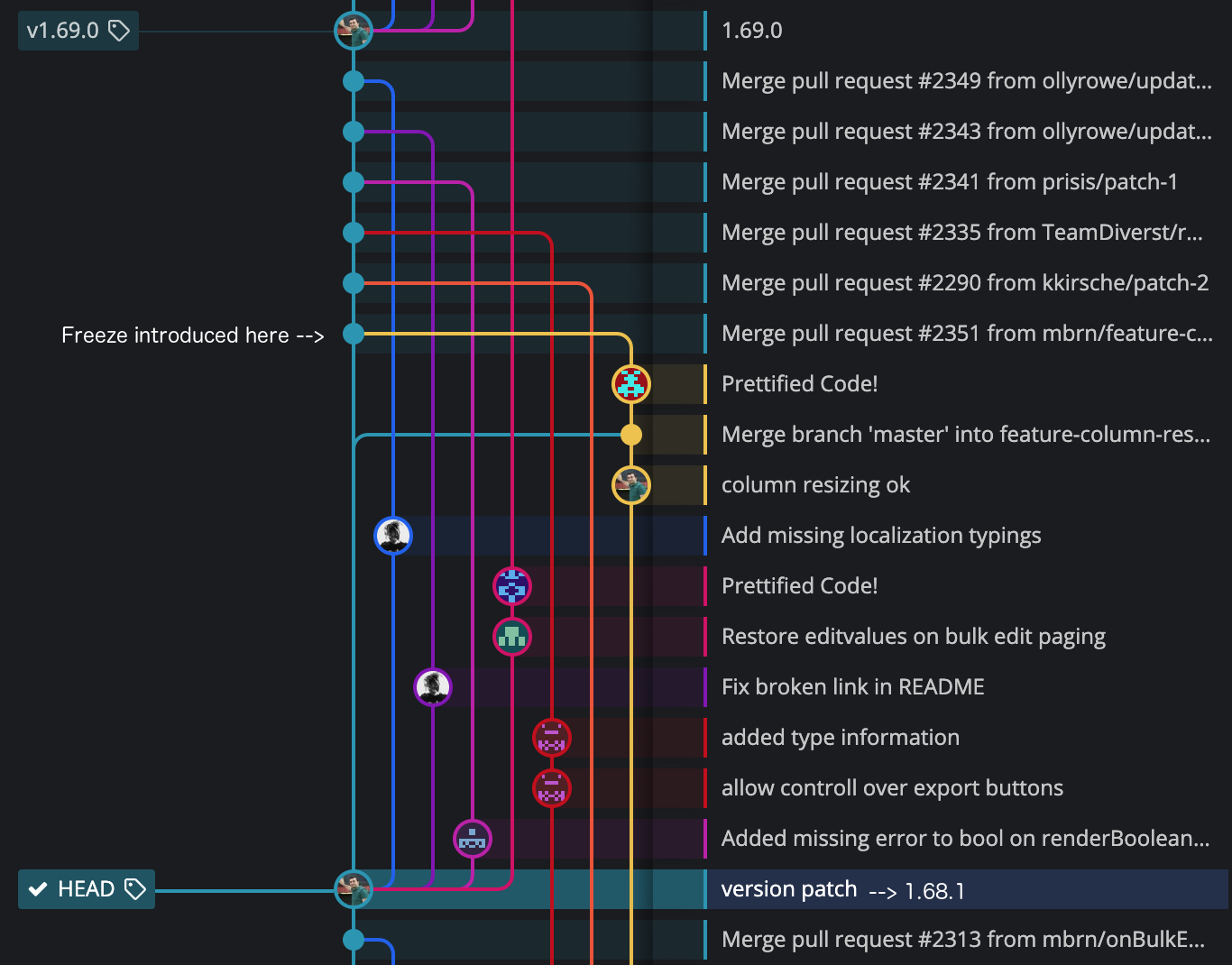
I was able to narrow this down to PR #2351 by testing using a binary git commit search. That commit is between 1.68.1 and 1.69.0, the first one post-1.68.1. There are many changes in that commit, and I'll need to isolate it further.
 peacechen
on 11 Dec 2020
peacechen
on 11 Dec 2020
@AnimeshTimsina
That's odd. Mine works fine with 1.67.0 having column declaration separate as an array.
DewangS
on 11 Dec 2020
Commit 9c32f97d83e9c47c01512331e848176176b0a38a is the culprit (amusingly titled "last" 🤣 ).
The code that triggers this is in data-manager.js:
      if (columnDef.tableData.width !== undefined) {
        usedWidth.push(columnDef.tableData.width);
      }
https://github.com/mbrn/material-table/blob/master/src/utils/data-manager.js#L89
Reverting this prevents freezing up the browser:
      if (columnDef.width !== undefined) {
        usedWidth.push(columnDef.width);
      }
Obviously that in itself isn't the root cause. It's triggering other parts of the code that appear to be related to auto sizing. @mbrn would you provide some insight into how this works?
My app is using remote data and handles the data fetching and sorting API calls. I've tested the API and it's performing properly (it's the first thing I made sure was ok).
There are numerous other issues reporting freezes that may be related: #2685 #2650 #2643 #2581 #2514 #2486
Update: See PR #2689 for the fix
peacechen
on 11 Dec 2020
what's the status on this? which version should we revert to?
 yehonadav
on 12 Dec 2020
yehonadav
on 12 Dec 2020
For me I had to revert to 1.65, 1.67 still froze, as others have mentioned I have column definitions defined outside of the component.
But I've also found a workaround:
export const SongTable = ({ songs= [] }: Props) => {
  console.log("songtable");
  return <MaterialTable data={songs} columns={columns()} />;
};

const columns = () => [
  { title: "Title", field: "title" },
  { title: "Orchestra", field: "orchestra" },
  { title: "Singer", field: "singer" },
  { title: "Year", field: "year" },
  { title: "Genre", field: "genre" },
  { title: "Length", field: "length" },
];
Since it seems like the only difference in declaring the columns outside the component is whether there's a static references or its an anonymous array, I did it like this, so the array is recreated each render. Not pretty but seems to solve the hanging.
EDIT: This workaround works for me on 1.69.2, which was hanging without function-ifying the columns
 VFC-elindgren
on 15 Dec 2020
VFC-elindgren
on 15 Dec 2020
1.68.0 worked for me,
also, i created my columns inside zustand (a state manager),
so maybe we should check out if creating the columns inside a state, or inside an object can work around this:
examples:
// this would cause problems
const columns = [
  { title: "Title", field: "title" },
  { title: "Orchestra", field: "orchestra" },
];

// this might work ?
const container = {
  columns: [
    { title: "Title", field: "title" },
    { title: "Orchestra", field: "orchestra" },
  ],
};
Related issues
 Mihier-Roy
·
3Comments
Mihier-Roy
·
3Comments
 kfirshahar
·
3Comments
kfirshahar
·
3Comments
 KKrisu
·
3Comments
KKrisu
·
3Comments
 Likurg2010
·
3Comments
Likurg2010
·
3Comments
 VipinJoshi
·
3Comments
VipinJoshi
·
3Comments
Most helpful comment
Downgraded the package to 1.61.0 and the issue is resolved.