Material-table: How to programmatically reset searchtext
I am trying to reset my searchText programmatically I can reset the searchText in the state op the table with a tableRef but in the searchfield the searchtext is still visible. I reset the searchText with the following code:
        if (tableRef.current){
            tableRef.current.setState({ searchText: "" });
            tableRef.current.dataManager.changeSearchText("");
            console.log(tableRef.current);
        }
When it is executed the data in table is good but the searchText is still visible and this will give some confusion.
Picture of the table after it was reset programmatically:
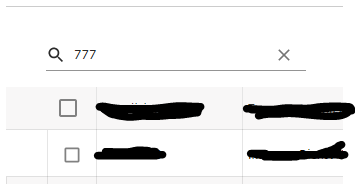
You see that 777 is still visible when the tableRef.current.state is printed out the searchText is reset:
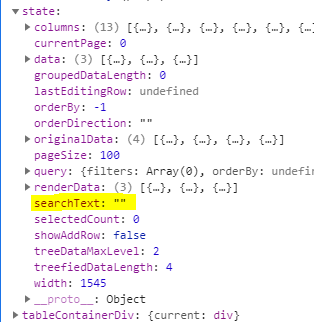
I have also looked in the code of the reset action of the iconButton and the same logic is used in the onSearchChange function of the m-table-toolbar.
I am on the version v.1.63.X
Why is the text not removed from the field?
 LeanderCoevoet
All 8 comments
Hello maybe you can use the following snippet:
tableRef.current.onSearchChange("")
Exito
 rheazyk
on 20 Aug 2020
rheazyk
on 20 Aug 2020
OnsearchChanged is the trigger for the user to make use of a filter change not to trigger a change
LeanderCoevoet
on 20 Aug 2020
+1. We also need this. We would also like to pass the searchText as a prop so that we load from outside query. How can we set searchtext programmatically so the table renders after that? Is this possible? We are unable to pass new values to searchText programmatically.
 jinman
on 23 Sep 2020
jinman
on 23 Sep 2020
This works for me.
rheazyk
on 23 Sep 2020
@rheazyk thanks! but for some reason, we are getting onSearchChange is not a function in the latest version. Does this work in your latest version as well?
jinman
on 23 Sep 2020
It got renamed to onSearchChangeDebounce it seems like.
 Domino987
on 1 Oct 2020
Domino987
on 1 Oct 2020
Is onSearchChangeDebounce documented ?
I tried to use it but nothing happens.
Sandbox
 emanuelef
on 8 Nov 2020
emanuelef
on 8 Nov 2020
@rheazyk thanks! but for some reason, we are getting onSearchChange is not a function in the latest version. Does this work in your latest version as well?
I have tried this on my view and found that setting the text directly (as show in @rheazyk's sandbox) does work as far as applying the filter, but the text value in the search box itself does not render the search text.
I am using version -- 1.67.0
 freddymercury
on 18 Dec 2020
freddymercury
on 18 Dec 2020
Related issues
 diegosps
·
3Comments
diegosps
·
3Comments
 lazeebee
·
3Comments
lazeebee
·
3Comments
 Likurg2010
·
3Comments
Likurg2010
·
3Comments
 timrchavez
·
3Comments
timrchavez
·
3Comments
 slevy85
·
3Comments
slevy85
·
3Comments