Material-table: MaterialTable with column type "date" is off by one
Guidelines
To Reproduce
const columns = [
            {
                title: "foo",
                field: "date",
                headerStyle: {textTransform: "capitalize"},
                type: "date",
                sorting: false
            },
            {title: "Views", field: "visits", type: "numeric"},
            {
                title: "Time Spent",
                field: "timeSpent",
                type: "numeric",
                render: (row) => prettyMilliseconds(row.timeSpent)
            }
        ];
data = [
            {
                date: '2020-06-13',
                timeSpent: 3,
                visits: 2,
            },
        ];

<MaterialTable
          columns={columns}
          data={data}
          title={title}
          icons={tableIcons}
        />
Expected behavior
The table should have one row with date 6/13/2020
Screenshots
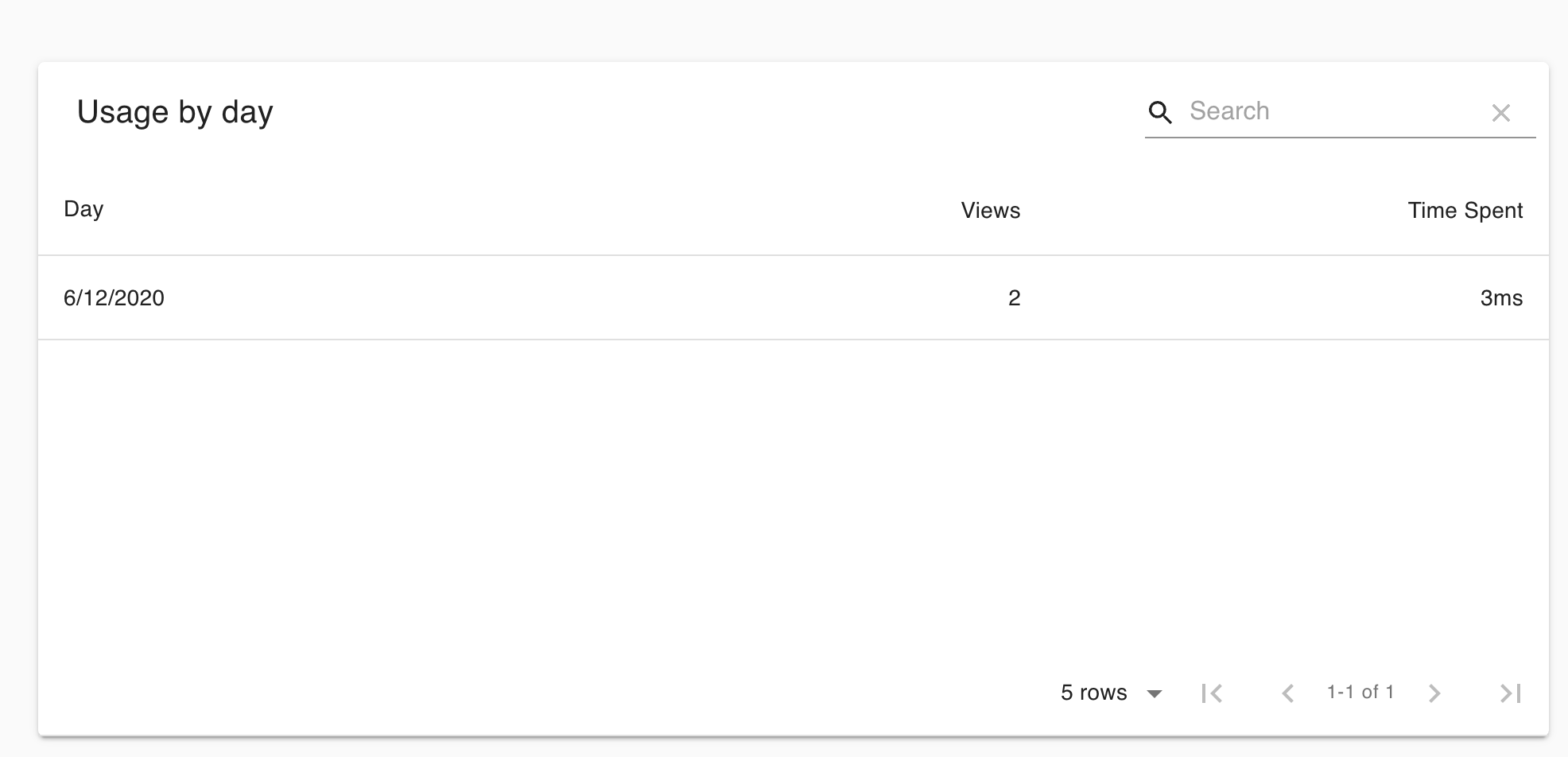
Workaround
I can get the correct date to show by removing the line type: 'date' which gives me 2020-06-13 which isn't aesthetic but is correct.
Latest Chrome MacOS Mojave
material-table 1.62.0
 wontonst
All 4 comments
I noticed this issue too. I noticed that if you specify time as well, it is rendered correctly, for example 2020-06-13T12:00:00.
 stevechae
on 23 Jun 2020
stevechae
on 23 Jun 2020
I cannot reproduce this. Can you provide a sandbox? Its most likely connected to time zone differences. One work around could also be to provide a Date object instead of the string.
 Domino987
on 25 Jun 2020
Domino987
on 25 Jun 2020
This is how the standard Date object behaves in JavaScript (and is timezone dependent, as @Domino987 mentioned). Here's an example in the Firefox console in my timezone:

Looking at the source, I believe these two lines are the culprit. A small change to use date-fns's parse function should do the trick. Here's a quick test with that date in RunKit using the version of date-fns specified in package.json:
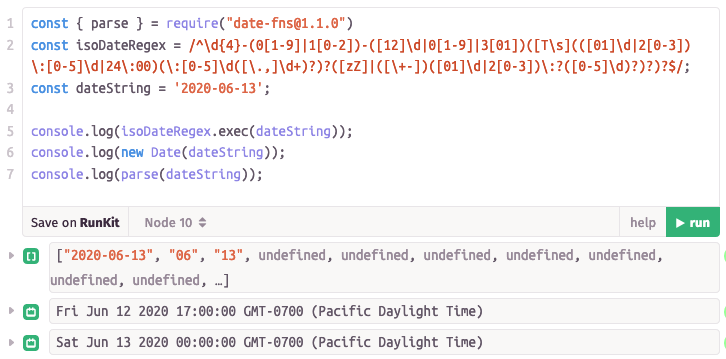
EDIT I'm working on a PR and while the above theory is correct, the implementation will be slightly different. I misread the package.json file and instead of parse we should use parseISO. The version of date-fns is also v2.0.0-alpha.27, not v1.1.0.
 ajmueller
on 26 Jun 2020
ajmueller
on 26 Jun 2020
I am not sure if that will be a breaking change. We should understand it first completely.
So new Date will parse the date into the local time zone. So Fri Jun 12 2020 GTM -0700 is actually the correct time stamp.
Just due to the offset (time zone), the previous day will be shown.
So I will look into that too.
Domino987
on 26 Jun 2020
Related issues
 timrchavez
·
3Comments
timrchavez
·
3Comments
 lazeebee
·
3Comments
lazeebee
·
3Comments
 behrouz-s
·
3Comments
behrouz-s
·
3Comments
 revskill10
·
3Comments
revskill10
·
3Comments
 ps1011
·
3Comments
ps1011
·
3Comments
Most helpful comment
This is how the standard Date object behaves in JavaScript (and is timezone dependent, as @Domino987 mentioned). Here's an example in the Firefox console in my timezone:
Looking at the source, I believe these two lines are the culprit. A small change to use date-fns's
parsefunction should do the trick. Here's a quick test with that date in RunKit using the version of date-fns specified in package.json:EDIT I'm working on a PR and while the above theory is correct, the implementation will be slightly different. I misread the package.json file and instead of
parsewe should useparseISO. The version of date-fns is also v2.0.0-alpha.27, not v1.1.0.