Material-table: onRowUpdate input value emitting as [object Object]
Describe the bug
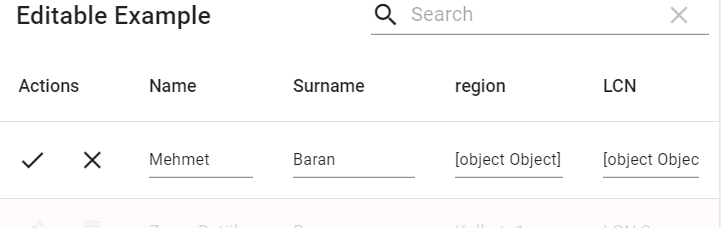
onclick of onRowUpdate button input value emitting as [object Object] and if there is two input, act as two way data binding please see the StackBlitz:
To Reproduce
Steps to reproduce the behavior:
- Click on 'update/edit icon'
- there 3rd & 4th input (" [object Object] ")
- its seems there is two way data binding
Expected behavior
On click all input should be able to show placeholder data & there should not be two way data binding
Desktop (please complete the following information):
- OS: Windows
- Browser : chrome
- Version : 83.0.4103.106
sorry for my bad english.
 rkpip3
All 2 comments
Once you define the field of the column as 'birthCity', the value that will be attributed to the column is data[currentIndex].birthCity, which is an object. Because of that you wrote render: (rowData) => rowData.birthCity[0].region, to display the correct data. So you'd do the same to the editComponent. I'll show you 2 ways to fix this:
Change the field property to
field: "birthCity[0].region",Set a editComponent:
editComponent: (props) => (
          <Input
            {...props}
            value={props.rowData.birthCity[0].region}
            onChange={(e) => {
              const currentObject = props.rowData.birthCity[0];
              currentObject.region = e.target.value;

              // This works like setState
              props.onChange([currentObject,props.rowData.birthCity.slice(1)])
            }}
          />
        )
 VLRTroll
on 19 Jun 2020
VLRTroll
on 19 Jun 2020
@VLRTroll Thank you very much Its works...
rkpip3
on 20 Jun 2020
Related issues
 revskill10
·
3Comments
revskill10
·
3Comments
 balibou
·
3Comments
balibou
·
3Comments
 Likurg2010
·
3Comments
Likurg2010
·
3Comments
 lazeebee
·
3Comments
lazeebee
·
3Comments
 VipinJoshi
·
3Comments
VipinJoshi
·
3Comments
Most helpful comment
Once you define the field of the column as 'birthCity', the value that will be attributed to the column is data[currentIndex].birthCity, which is an object. Because of that you wrote
render: (rowData) => rowData.birthCity[0].region,to display the correct data. So you'd do the same to the editComponent. I'll show you 2 ways to fix this:Change the field property to
field: "birthCity[0].region",Set a editComponent: