Material-table: Actions column occupies the width of all hidden columns when viewed in Firefox.
Hi there! Very nice table component!
But I have run into this issue.
Describe the bug
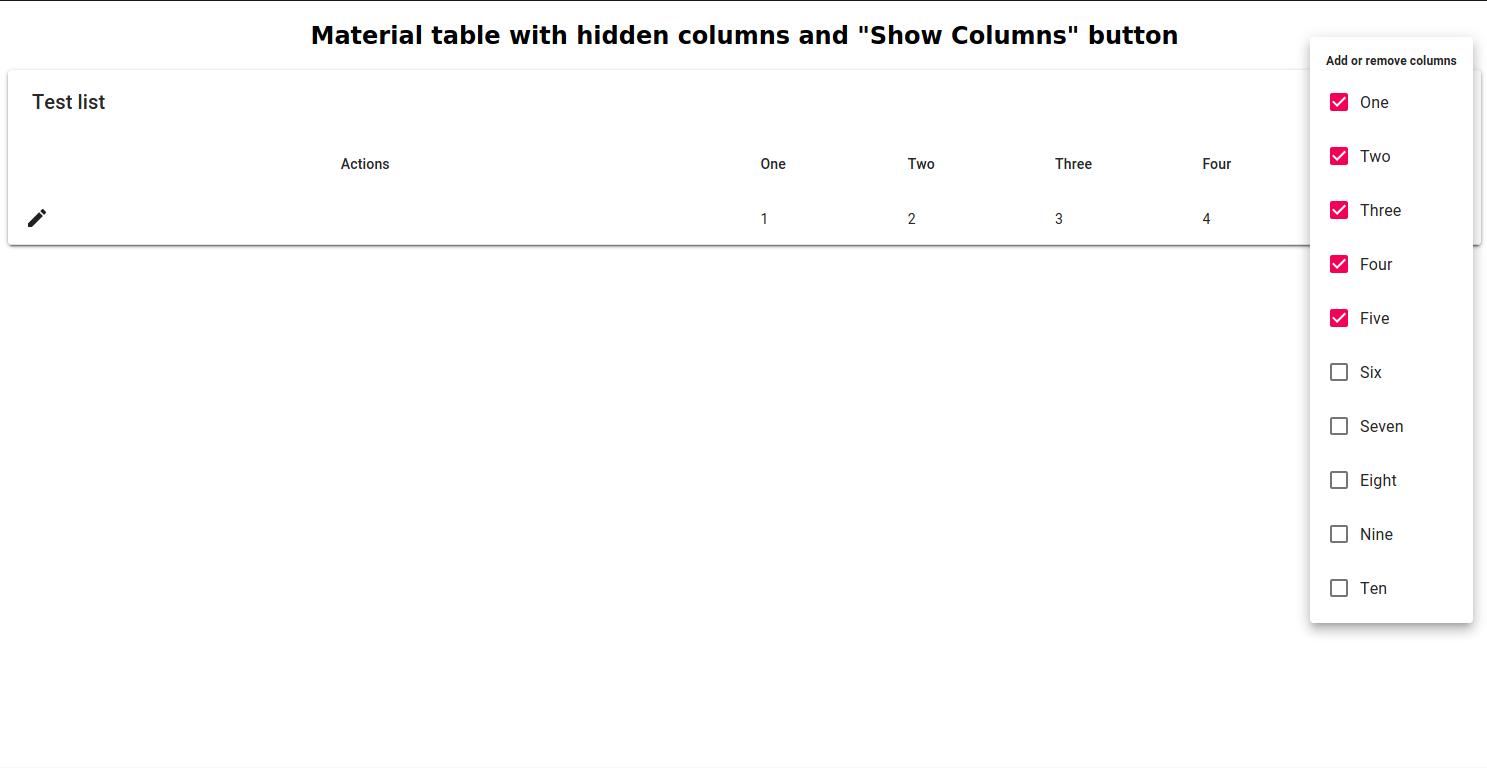
Actions column width is much bigger than expected, when the table with hidden columns is browsed in Firefox. The same component looks as expected when browsed in Chrome.
To Reproduce
Create the table component with some hidden columns and "Show columns" button, and some in-row actions like edit or delete.
Set options columnsButton: "true" and tableLayout: "fixed".
Add some data.
Open the result in firefox.
See an example on Codesandbox
Expected behavior
The actions column occupies a small fixed size. Non-hidden columns occupies almost all the space of the table.
Actual behavior when browsed in Firefox
Desktop:
- OS: [Linux Mint 19]
- Browser [Firefox for Linux Mint]
- Version [75.0 (64-bit)]
 telperion357
All 8 comments
also in chrome
 nick-romano0
on 12 May 2020
nick-romano0
on 12 May 2020
Dealing with this now, it might have to do with how the action cell is styled.
I've been plugging in random style objects from this thread to get the action buttons to center.
 nickdnickd
on 29 May 2020
nickdnickd
on 29 May 2020
Hi guys, I managed to monkey patch this as follows. Basically we have to filter out hidden columns when setting the width and we need to recalculate that more often.
import DataManager from 'material-table/dist/utils/data-manager'
import MT from 'material-table/dist/material-table'

MT.prototype.componentWillUpdate = function(nextProps) {
    const props = this.getProps(nextProps);
    this.dataManager.setColumns(props.columns);
}

DataManager.prototype.setColumns = function(columns) {
    const undefinedWidthColumns = columns.filter(c => c.width === undefined);
    let usedWidth = ["0px"];

    this.columns = columns.map((columnDef, index) => {
        columnDef.tableData = {
            columnOrder: index,
            filterValue: columnDef.defaultFilter,
            groupOrder: columnDef.defaultGroupOrder,
            groupSort: columnDef.defaultGroupSort || 'asc',
            width: columnDef.width,
            ...columnDef.tableData,
            id: index,
        };

        if(columnDef.width !== undefined) {
            if(typeof columnDef.width === "number") {
                usedWidth.push(columnDef.width + "px");
            }
            else {
                usedWidth.push(columnDef.width);
            }
        }

        return columnDef;
    });

    usedWidth = "(" + usedWidth.join(' + ') + ")";
    const undefinedVisibleColumns = undefinedWidthColumns.filter(columnDef => !columnDef.hidden)
    undefinedWidthColumns.forEach(columnDef => {
        columnDef.tableData.width = `calc((100% - ${usedWidth}) / ${undefinedVisibleColumns.length})`;
    });
}
 JoeryH
on 5 Jun 2020
JoeryH
on 5 Jun 2020
This issue has been automatically marked as stale because it has not had recent activity. It will be closed if no further activity occurs. Thank you for your contributions. You can reopen it if it required.
![stale[bot] picture](https://avatars3.githubusercontent.com/in/1724?v=4&s=40) stale[bot]
on 3 Sep 2020
stale[bot]
on 3 Sep 2020
Try set width: 0 within hidden columns:
{ title: 'Type', field: 'type', hidden: true, width: 0},
...
 marioscialpi
on 5 Sep 2020
marioscialpi
on 5 Sep 2020
Try set
width: 0within hidden columns:{ title: 'Type', field: 'type', hidden: true, width: 0}, ...
Not sure why, but totally worked for me for a weird issue. When setting
 rodrigoverasantis
on 22 Sep 2020
rodrigoverasantis
on 22 Sep 2020
I also have this issue but not due to the "Add or remove column". I use a lot of editable tables and in all of them I have an id column that is needed to post updates to the database, but it is hidden from the user in the tables. This causes the action column to be super wide though. Any ideas how to make this work well?
 jonbjo
on 16 Nov 2020
jonbjo
on 16 Nov 2020
This is definitely still an issue. If action is hidden, it should not be included in the calculation of the action column width.
 Sefton419
on 4 Dec 2020
Sefton419
on 4 Dec 2020
Related issues
 victorwvieira
·
3Comments
victorwvieira
·
3Comments
 slevy85
·
3Comments
slevy85
·
3Comments
 roseak
·
3Comments
roseak
·
3Comments
 timrchavez
·
3Comments
timrchavez
·
3Comments
 lazeebee
·
3Comments
lazeebee
·
3Comments
Most helpful comment
also in chrome