Material-table: Table Cell Formatting Width
Describe the bug
The table cells are rendering at - what appears to be - fixed widths, which pushes the height to accommodate cell content
To Reproduce
Steps to reproduce the behavior:
Create a table using material table ver 1.57.1+ and add a somewhere around 90 characters of text to the cell
Expected behavior
The table cell size should adapt to content
Screenshots
Previously with Version 1.56.1
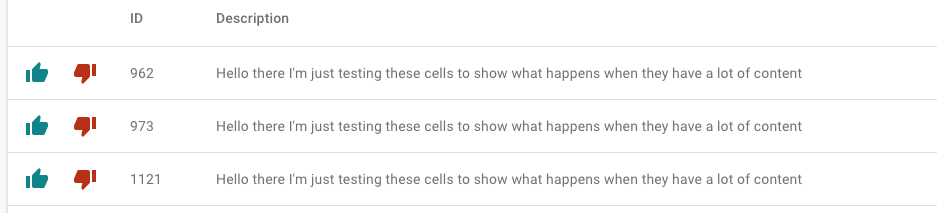
Now with Version 1.57.1+

Desktop (please complete the following information):
- OS: [e.g. iOS]
- Browser [e.g. chrome, safari]
- Version [e.g. 22]
Smartphone (please complete the following information):
- Device: desktop
- OS: mac mojave
- Browser: all
- Version
 p45mark
All 16 comments
I can confirm the same behavior. With 1.57.2 it seems as if the tableLayout setting is being ignored. Setting it to auto does not seem to affect the table at all. Even overwriting the cellStyle and headerStyle with width: auto doesn't work.
 beevelop
on 11 Feb 2020
beevelop
on 11 Feb 2020
I have the same issue, now all the columns are forced to the same width, instead of adapting to content. I believe it is caused by this commit.
There also appear to be a new columns prop, width, that is not mentioned in the documentation
 bastienmenis
on 13 Feb 2020
bastienmenis
on 13 Feb 2020
Looks to me like the code from L87 onwards should be skipped for tableLayout=auto?
beevelop
on 13 Feb 2020
Same here for row selection,

The width seems fixed to a number of pixels for the first column but not others columns :

 ricostone
on 17 Feb 2020
ricostone
on 17 Feb 2020
Also the typescript definition of new prop 'width' is missing right now
 ifndefdeadmau5
on 20 Feb 2020
ifndefdeadmau5
on 20 Feb 2020
yep, width settings are ignored.
 skitsanos
on 26 Feb 2020
skitsanos
on 26 Feb 2020
I can also confirm that version 1.57.2 ignores width of headers and cells, had to downgrade to version 1.57.0
 gabolucuy
on 26 Feb 2020
gabolucuy
on 26 Feb 2020
Until this is fixed, I have added temporary fix in my theme file rather than downgrading to 1.57.0
overrides: {
MuiTableCell: {
root: { width: 'auto !important' }
}
}
 vikramkute
on 6 Mar 2020
vikramkute
on 6 Mar 2020
You can use width property on column directly by setting tableLayout: 'fixed, while the documentation not updated yet
 WangYidao
on 18 Apr 2020
WangYidao
on 18 Apr 2020
Even if you set tableLayout to 'fixed', it wont actually help. Just tested on 2.14.0,
{
field: 'id',
title: 'Id',
headerStyle: {
width: '5ch',
backgroundColor: 'red'
}
}
_width_ was not applied, but _backgroundColor_ was...
skitsanos
on 20 Apr 2020
is this fixed yet?
 amanjain14
on 29 Apr 2020
amanjain14
on 29 Apr 2020
@amanjain14 no its not. There hasn't been any more releases since 1.57.2
I don't understand how a breaking change like this hasn't been addressed for so long (3 months now) but then again judging by the fact the repo has 712 issues open right now I have little hope of it being fixed any time soon 😓
I know that I'm edging into the whiny OSS user territory but I can't find another repo that has 712 issues, is recommended by a pretty large UI library and doesn't have issues being curated/closed/maintained so at the very least I believe it's a fair comment.
 South-Paw
on 4 May 2020
South-Paw
on 4 May 2020
You can add width property to items in columns array, like so:
const columns = [
  { title: 'Title', field: 'fieldName', width: 'auto' },
];
 uraz
on 25 May 2020
uraz
on 25 May 2020
@uraz thanks for the info, with width attrib on column directly it does works, so the width shouldn't be at headerStyle
skitsanos
on 25 May 2020
This worked for me.
cellStyle: {
width: "25%",
},
 tadstratford
on 25 Jul 2020
tadstratford
on 25 Jul 2020
This issue has been automatically marked as stale because it has not had recent activity. It will be closed if no further activity occurs. Thank you for your contributions. You can reopen it if it required.
![stale[bot] picture](https://avatars3.githubusercontent.com/in/1724?v=4&s=40) stale[bot]
on 23 Oct 2020
stale[bot]
on 23 Oct 2020
Related issues
 terapepo
·
3Comments
terapepo
·
3Comments
 timrchavez
·
3Comments
timrchavez
·
3Comments
 balibou
·
3Comments
balibou
·
3Comments
 Mihier-Roy
·
3Comments
Mihier-Roy
·
3Comments
 kfirshahar
·
3Comments
kfirshahar
·
3Comments
Most helpful comment
You can add
widthproperty to items in columns array, like so:const columns = [ { title: 'Title', field: 'fieldName', width: 'auto' }, ];