Material-table: hello guys I need summary row
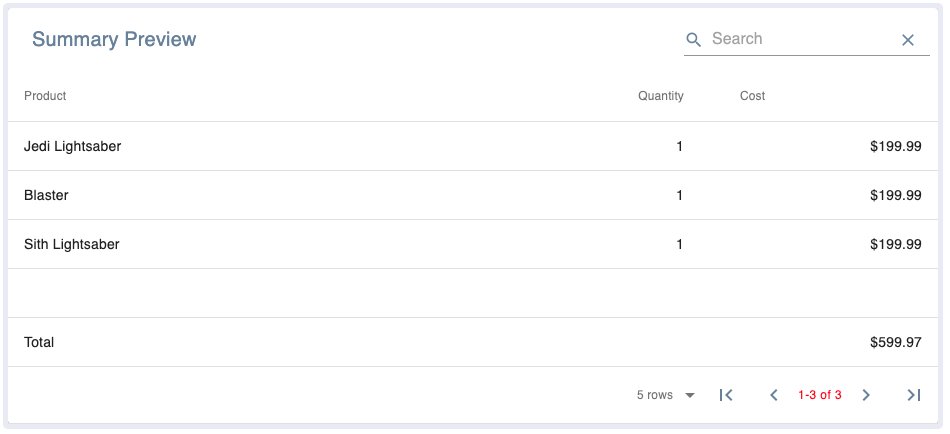
how to like total row
I cant do it
Help me Thanks
 zilkenberg22
All 10 comments
up
zilkenberg22
on 6 Dec 2019
752 try looking at my comment and seeing if that works for you.
 tylercaceres
on 11 Dec 2019
tylercaceres
on 11 Dec 2019
hi can u give me full example
On Wed, Dec 11, 2019 at 12:18 PM Tyler Caceres notifications@github.com
wrote:
752 https://github.com/mbrn/material-table/issues/752 try looking at
my comment and seeing if that works for you.
—
You are receiving this because you authored the thread.
Reply to this email directly, view it on GitHub
https://github.com/mbrn/material-table/issues/1419?email_source=notifications&email_token=AH6NA44UUHYQEK5KPLXAKRLQYBSYBA5CNFSM4JVVY7G2YY3PNVWWK3TUL52HS4DFVREXG43VMVBW63LNMVXHJKTDN5WW2ZLOORPWSZGOEGR2KTY#issuecomment-564372815,
or unsubscribe
https://github.com/notifications/unsubscribe-auth/AH6NA45NLTI6YKQYP4POIG3QYBSYBANCNFSM4JVVY7GQ
.
zilkenberg22
on 18 Dec 2019
Well, might not be the best solution but I made my Total row by overriding Pagination component. I'm not going to need paging anyways and that rows stays nicely on the bottom so that's nice.
components={{
Pagination: () => <div>Total: .... </div>
}}
 pabichw
on 31 Jan 2020
pabichw
on 31 Jan 2020
If someone needs a simple datatable with summary footer row this should work - https://github.com/codenamethanos/materialui-table
Just 500 lines of code
 codenamethanos
on 5 May 2020
codenamethanos
on 5 May 2020
Any way to do this and keep the content of the summary row aligned with the columns?
 thedmeyer
on 7 May 2020
thedmeyer
on 7 May 2020
Has anyone been able to successfully show a summary row like in the original poster's screenshot? Any help would be appreciated!
 johnsintal
on 17 Jul 2020
johnsintal
on 17 Jul 2020
Has anyone been able to successfully show a summary row like in the original poster's screenshot? Any help would be appreciated!
This is what I'm doing for summary rows and it's working pretty well. I'm using subtotal and total rows that are already in my DB, so no heavy lifting is being done in the browser. Note that you have to add a tableData to the dataset being used in renderData object. Sorting ignores the second MTableBody object :)
<MaterialTable
                title={title}
                columns={columns}
                components={{
                    Body: (props) => (
                        <>
                            <MTableBody {...props} />
                            <MTableBody
                                {...props}
                                renderData={claimTypeHistory
                                    .filter((claimType) =>
                                        ['TOTAL', 'TOTFAC', 'TOTPRO'].includes(claimType.claim_type)
                                    )
                                    .map((row, i) => ({ ...row, tableData: { id: i } }))}
                                options={{
                                    rowStyle: (_, i) =>
                                        i === 0
                                            ? { borderTop: 3, borderTopStyle: 'solid', paddingLeft: 4, paddingRight: 4 }
                                            : i % 2 === 0
                                            ? { paddingLeft: 4, paddingRight: 4 }
                                            : { backgroundColor: colors.grey[200], paddingLeft: 4, paddingRight: 4 },
                                }}
                            />
                        </>
                    ),
                }}
                data={claimTypeHistory.filter(
                    (claimType) => !['TOTAL', 'TOTFAC', 'TOTPRO'].includes(claimType.claim_type)
                )}
                icons={{
                    SortArrow: ArrowUpward,
                    ViewColumn,
                }}
                options={{
                    columnsButton: true,
                    draggable: false,
                    emptyRowsWhenPaging: false,
                    headerStyle: {
                        paddingTop: 0,
                        paddingBottom: 0,
                        paddingLeft: 4,
                        paddingRight: 4,
                        fontSize: 10,
                        alignItems: 'end',
                        lineHeight: 1,
                    },
                    padding: 'dense',
                    pageSize: 50,
                    pageSizeOptions: [50],
                    paging: false,
                    rowStyle: (_, i) =>
                        i % 2 === 0
                            ? { paddingLeft: 4, paddingRight: 4 }
                            : { backgroundColor: colors.grey[200], paddingLeft: 4, paddingRight: 4 },
                    search: false,
                }}
            />
Sorry for the lack of formatting, but Prettier should fix you right up
 janderson215
on 26 Aug 2020
janderson215
on 26 Aug 2020
Thanks so much, this is exactly what I was looking for!
 elias-thok
on 27 Aug 2020
elias-thok
on 27 Aug 2020
This issue has been automatically marked as stale because it has not had recent activity. It will be closed if no further activity occurs. Thank you for your contributions. You can reopen it if it required.
![stale[bot] picture](https://avatars3.githubusercontent.com/in/1724?v=4&s=40) stale[bot]
on 25 Nov 2020
stale[bot]
on 25 Nov 2020
Related issues
 KKrisu
·
3Comments
KKrisu
·
3Comments
 victorwvieira
·
3Comments
victorwvieira
·
3Comments
 rasheedb
·
3Comments
rasheedb
·
3Comments
 ModPhoenix
·
3Comments
ModPhoenix
·
3Comments
 jlgreene2
·
3Comments
jlgreene2
·
3Comments
Most helpful comment
This is what I'm doing for summary rows and it's working pretty well. I'm using subtotal and total rows that are already in my DB, so no heavy lifting is being done in the browser. Note that you have to add a
tableDatato the dataset being used in renderData object. Sorting ignores the second MTableBody object :)<MaterialTable title={title} columns={columns} components={{ Body: (props) => ( <> <MTableBody {...props} /> <MTableBody {...props} renderData={claimTypeHistory .filter((claimType) => ['TOTAL', 'TOTFAC', 'TOTPRO'].includes(claimType.claim_type) ) .map((row, i) => ({ ...row, tableData: { id: i } }))} options={{ rowStyle: (_, i) => i === 0 ? { borderTop: 3, borderTopStyle: 'solid', paddingLeft: 4, paddingRight: 4 } : i % 2 === 0 ? { paddingLeft: 4, paddingRight: 4 } : { backgroundColor: colors.grey[200], paddingLeft: 4, paddingRight: 4 }, }} /> </> ), }} data={claimTypeHistory.filter( (claimType) => !['TOTAL', 'TOTFAC', 'TOTPRO'].includes(claimType.claim_type) )} icons={{ SortArrow: ArrowUpward, ViewColumn, }} options={{ columnsButton: true, draggable: false, emptyRowsWhenPaging: false, headerStyle: { paddingTop: 0, paddingBottom: 0, paddingLeft: 4, paddingRight: 4, fontSize: 10, alignItems: 'end', lineHeight: 1, }, padding: 'dense', pageSize: 50, pageSizeOptions: [50], paging: false, rowStyle: (_, i) => i % 2 === 0 ? { paddingLeft: 4, paddingRight: 4 } : { backgroundColor: colors.grey[200], paddingLeft: 4, paddingRight: 4 }, search: false, }} />Sorry for the lack of formatting, but Prettier should fix you right up