Material-table: External Export Option
There is some option to add a new dropdown export option like a EXCEL then use another library to generate the excel using the data filtered or result of search?
 Edisonsan
All 8 comments
Yes: https://material-table.com/#/docs/features/export. Basically you can export whatever is currently visible in the table or do some monkey-patching and decide what gets exported yourself.
 jayarjo
on 27 Sep 2019
jayarjo
on 27 Sep 2019
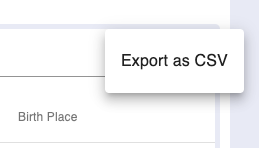
I mean how to add a new option there, to Export as XLS or PDF using another component or function for that purpose. I mean create an override as ToolBar override to create a new option to export external function with the filtered rows.
Edisonsan
on 28 Sep 2019
You can add custom actions: https://material-table.com/#/docs/features/actions. Check a Free Action Example specifically.
jayarjo
on 29 Sep 2019
You can add custom actions: https://material-table.com/#/docs/features/actions. Check a Free Action Example specifically.
You Can Add External Button Not Inside Export's Button
 kwasik-com
on 18 Oct 2019
kwasik-com
on 18 Oct 2019
Bad News, Why not give the opportunity to add other buttons to an existing dropdown?
 MrChe
on 27 Feb 2020
MrChe
on 27 Feb 2020
The built in Export button only have one option but still show a dropdown, which could not be modified and set disableScrollLock to false. This needs more work.
 ChanhLy
on 6 Mar 2020
ChanhLy
on 6 Mar 2020
You can add custom actions: https://material-table.com/#/docs/features/actions. Check a Free Action Example specifically.
You Can Add External Button Not Inside Export's Button
How can we get the filtered/sorted/searched data there in custom free action component?
 ervikashkumar
on 16 Apr 2020
ervikashkumar
on 16 Apr 2020
@ervikashkumar u can't atm and this is so sad XD
 Jsalvat
on 9 Jun 2020
Jsalvat
on 9 Jun 2020
Related issues
 bohrsty
·
3Comments
bohrsty
·
3Comments
 Mihier-Roy
·
3Comments
Mihier-Roy
·
3Comments
 balibou
·
3Comments
balibou
·
3Comments
 jlgreene2
·
3Comments
jlgreene2
·
3Comments
 behrouz-s
·
3Comments
behrouz-s
·
3Comments
Most helpful comment
I mean how to add a new option there, to Export as XLS or PDF using another component or function for that purpose. I mean create an override as ToolBar override to create a new option to export external function with the filtered rows.