Material-table: Custom Action Appearing In Header
Describe the bug
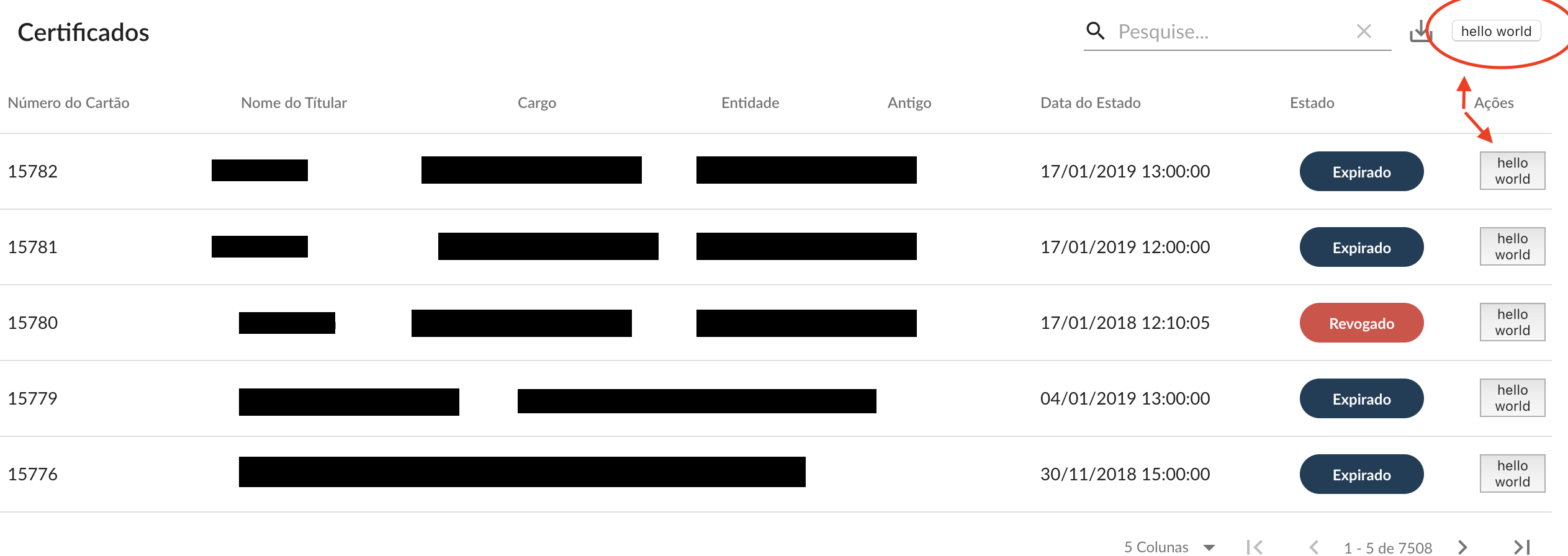
I'm trainng to use custom action like this:
 components={{
                    Container: props => <Paper {...props} elevation={0} />,
                    Actions: ({ data }) => <button>hello world</button>
                }}
and this action is appearing in the head of the compoment
To Reproduce
Steps to reproduce the behavior:
 <MaterialTable
                title={'Certificados'}
                columns={columns}
                components={{
                    Container: props => <Paper {...props} elevation={0} />,
                    Actions: ({ data }) => <button>hello world</button>
                }}
                actions={[
                    {
                        icon: 'reativar',
                        tooltip: 'Reativar',
                        onClick: (event, rowData) => alert(rowData)
                    },
                ]}
                options={{
                    debounceInterval: 200,
                    exportAllData: true,
                    exportButton: true,
                    draggable: false,
                    sorting: true,
                    actionsColumnIndex: -1,
                }}
                data={query =>
                    new Promise((resolve, reject) => {
                        const url = `?searchString=${query.search}&page=${query.page + 1}&limit=${
                            query.pageSize
                        }`
                        api.get(url).then(response => {
                            const { data, headers } = response
                            resolve({
                                data: data.payload,
                                page: query.page,
                                totalCount: data.count,
                            })
                        })
                    })
                }
                localization={localizationOptions}
            />
 "dependencies": {
        "@material-ui/core": "^4.4.2",
        "@material-ui/icons": "^4.4.1",
        "material-table": "^1.50.0",
        "react": "^16.7.0",
        "react-dom": "^16.7.0",
    },
Screenshots
If applicable, add screenshots to help explain your problem.
- chrome
 ronaiza-cardoso
All 3 comments
Change Actions to Action in components
 punnadittr
on 19 Sep 2019
punnadittr
on 19 Sep 2019
👍2
Thank you!
ronaiza-cardoso
on 19 Sep 2019
@ronaiza-cardoso I encourage you to ask material-table related questions on StackOverflow, so that others could benefit from them as well.
 jayarjo
on 28 Sep 2019
jayarjo
on 28 Sep 2019
Was this page helpful?
0 / 5 - 0 ratings
Related issues
 balibou
·
3Comments
balibou
·
3Comments
 ps1011
·
3Comments
ps1011
·
3Comments
 slevy85
·
3Comments
slevy85
·
3Comments
 Mihier-Roy
·
3Comments
Mihier-Roy
·
3Comments
 bohrsty
·
3Comments
bohrsty
·
3Comments
Most helpful comment
Change
ActionstoActionin components