Material-table: The sort arrows are too big
Describe the bug
When sorting a column, the sort arrow is too big and clipped
To Reproduce
Steps to reproduce the behavior:
- Go to https://material-table.com/#/docs/features/sorting
- Click on a column header
- See error
Expected behavior
Smaller sort arrow
Screenshots
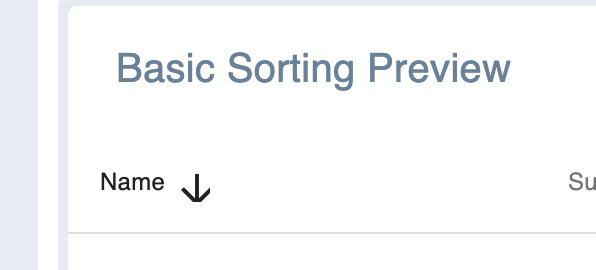
 Jak3b0
All 6 comments
I added the following in the theme overrides:
``` overrides: {
MuiIcon: {
root: {
fontSize: "1.4rem" // <-- Or "1.3rem", "1.2rem" If you want a smaller icon
}
}
}
 KasparasGud
on 1 Sep 2019
KasparasGud
on 1 Sep 2019
For me this fixed it:
.material-icons {
inline-size: auto !important;
line-height: inherit !important;
}
I have a better solution below for TypeScript users
 Totalbug92
on 3 Sep 2019
Totalbug92
on 3 Sep 2019
This solution does not affect other icons but you need to import ArrowUpwardIcon from @material-ui/icons:
icons={{
SortArrow: props => <ArrowUpwardIcon {...props} fontSize="small" />,
}}
 punnadittr
on 13 Sep 2019
punnadittr
on 13 Sep 2019
icons={{
SortArrow: props =>,
}}
Dont know if this is related to typescript, but that didn't work for me. This however did:
icons={{
   SortArrow: React.forwardRef((props, ref) => <ArrowUpward {...props} fontSize="small" ref={ref}/>)
}}
with import:
import {ArrowUpward} from '@material-ui/icons'
Totalbug92
on 23 Sep 2019
The @Totalbug92 solution works fine for typescript, but I think that this is a bug of the library and should be fixed. The project's styles do not have to affect the library behavior unless it is intentional
 cargallo
on 30 Sep 2019
cargallo
on 30 Sep 2019
This issue has been automatically marked as stale because it has not had recent activity. It will be closed if no further activity occurs. Thank you for your contributions. You can reopen it if it required.
![stale[bot] picture](https://avatars3.githubusercontent.com/in/1724?v=4&s=40) stale[bot]
on 15 Jun 2020
stale[bot]
on 15 Jun 2020
Related issues
 terapepo
·
3Comments
terapepo
·
3Comments
 roseak
·
3Comments
roseak
·
3Comments
 slevy85
·
3Comments
slevy85
·
3Comments
 Likurg2010
·
3Comments
Likurg2010
·
3Comments
 diegosps
·
3Comments
diegosps
·
3Comments
Most helpful comment
Dont know if this is related to typescript, but that didn't work for me. This however did:
with import:
import {ArrowUpward} from '@material-ui/icons'