Material-table: Warning on disabled edit buttons
Describe the bug
If a specific row has got Edit/Delete actions disabled, there is a warning in console:
index.js:1375 Warning: Material-UI: you are providing a disabled `button` child to the Tooltip component.
A disabled element does not fire events.
Tooltip needs to listen to the child element's events to display the title.

Place a `div` container on top of the element.
    in Tooltip (created by WithStyles(Tooltip))
    in WithStyles(Tooltip) (created by MTableAction)
    in MTableAction (created by MTableActions)
    in MTableActions (created by MTableBodyRow)
    in MTableBodyRow (at TableGrid.tsx:258)
Expected behavior
No warning in the console
The reproducer:
    <MaterialTable
        columns={[
            {
                field: 'id',
                title: 'ID'
            }
        ]}
        data={[{ id: 'a' }]}
        editable={{
            isEditable: rowData => false,
            onRowUpdate: (newData, oldData) => Promise.resolve()
        }}
    />
 avkonst
All 16 comments
I'm having a similar warning. Probably corresponds to the same issue.
backend.js:1 Warning: Material-UI: you are providing a disabled button child to the Tooltip component.
A disabled element does not fire events.
Tooltip needs to listen to the child element's events to display the title.
Place a div container on top of the element.
 aglt93
on 29 Aug 2019
aglt93
on 29 Aug 2019
If you need a quick workaround this problem, you can create an Action that appears under condition with the hidden prop.
const actions={
  [
    rowData => ({
      icon: 'delete',
      isFreeAction: false,
      tooltip: 'Delete User',
      hidden: !rowData.deletable
      onClick:() => {...}
      })
  ]}
See the Conditionals Actions Example for more info
 mstke
on 2 Sep 2019
mstke
on 2 Sep 2019
@avkonst can you supply the code you are using? An example? Anything...? Are you using custom actions or the built in editable prop?? Going to need more info to help you out.
 oze4
on 3 Sep 2019
oze4
on 3 Sep 2019
Hi @oze4 Thank you for considering the ticket. Here is the information I can provide:
Are you using custom actions or the built in editable prop?
I use both. For editable, the code looks like this:
      editable={{
            isEditable: (rowData) => false, // real code uses some logic to make certain rows non editable
            isDeletable: (rowData) => false,
            ....
        }}
For custom actions I use either:
const actions = []
actions.push((rowData) => ({
      hidden: true,
      icon: '',
      onClick: () => { return; }
}))
....
actions={actions}
or this:
const actions = []
actions.push((rowData) => ({
                disabled: true,
                iconProps: {
                    fontSize: 'small'
                },
                icon: () => <>1234</>,
                onClick: () => {
                    ....
                }
            }))
....
actions={actions}
I also override MTableBodyRow component like the following (the purpose is to remove (not disable) per row edit and delete actions for some rows):
const MTableBodyRowOverride = (rowProps: any) => {
        return <MTableBodyRow
                {...rowProps}
                // the following basically removes all actions added by the material-table
                // all my custom actions are marked with the hidden HiddenGroupFold field
                actions={rowProps.actions.filter((i: Function) => !i[HiddenGroupFold])}
            />
        }</>
    }
...
components={{
            Row: MTableBodyRowOverriden
        }}
@avkonst you use all of the above examples in a single instance of Material Table? I am interested in the exact case that brought you here.
I use both. For editable, the code looks like this:
  editable={{
        isEditable: (rowData) => false, // real code uses some logic to make certain rows non editable
        isDeletable: (rowData) => false,
        ....
    }}
I am specifically interested in the logic that makes certain rows "non editable".
All in all I think it would be easiest if you supplied a reproducible example that mirrors your issue as close as possible.
oze4
on 4 Sep 2019
For example, the following code does not produce any errors:

export default function AppTable() {
  return (
    <MaterialTable
      actions={[
        rowdata => ({
          icon: () => <DeleteOutlined />,
          disabled: true,
          tooltip: "Delete"
        })
      ]}
      icons={tableIcons}
      data={[
        {
          name: "Rock",
          id: 1
        },
        {
          name: "Paper",
          id: 2
        },
        {
          name: "Scissors",
          id: 3
        }
      ]}
      columns={[
        {
          title: "Item",
          field: "name"
        },
        {
          title: "Item ID",
          field: "id"
        }
      ]}
    />
  );
}
I will try to find a reproducer. I will try to put some time tomorrow for this. I am sure it is isEditable: (rowData) => false causes this. The logic behind this function is less important. In my app it is some rows which do not have permissions to be edited, but you can make every second row non editable, for example.
avkonst
on 4 Sep 2019
Here is the reproducer:
<MaterialTable
        columns={[
            {
                field: 'id',
                title: 'ID'
            }
        ]}
        data={[{ id: 'a' }]}
        editable={{
            isEditable: rowData => false,
            onRowUpdate: (newData, oldData) => Promise.resolve()
        }}
    />
@avkonst
Here is the reproducer:
<MaterialTable
        columns={[
            {
                field: 'id',
                title: 'ID'
            }
        ]}
        data={[{ id: 'a' }]}
        editable={{
            isEditable: rowData => false,
            onRowUpdate: (newData, oldData) => Promise.resolve()
        }}
    />
This does not cause an error... Can you either supply code that actually reproduces the error you are getting, or close this issue out?? It would seem the issue is with your logic, not with Material Table.
Help me help you.
export default function AppTable() {
  return (
    <MaterialTable
      icons={tableIcons}
      data={[
        {
          name: "Rock",
          id: 1
        },
        {
          name: "Paper",
          id: 2
        },
        {
          name: "Scissors",
          id: 3
        }
      ]}
      columns={[
        {
          title: "Item",
          field: "name"
        },
        {
          title: "Item ID",
          field: "id"
        }
      ]}
      editable={{
        isEditable: rowData => false,
        onRowUpdate: (newData, oldData) => Promise.resolve()
      }}
    />
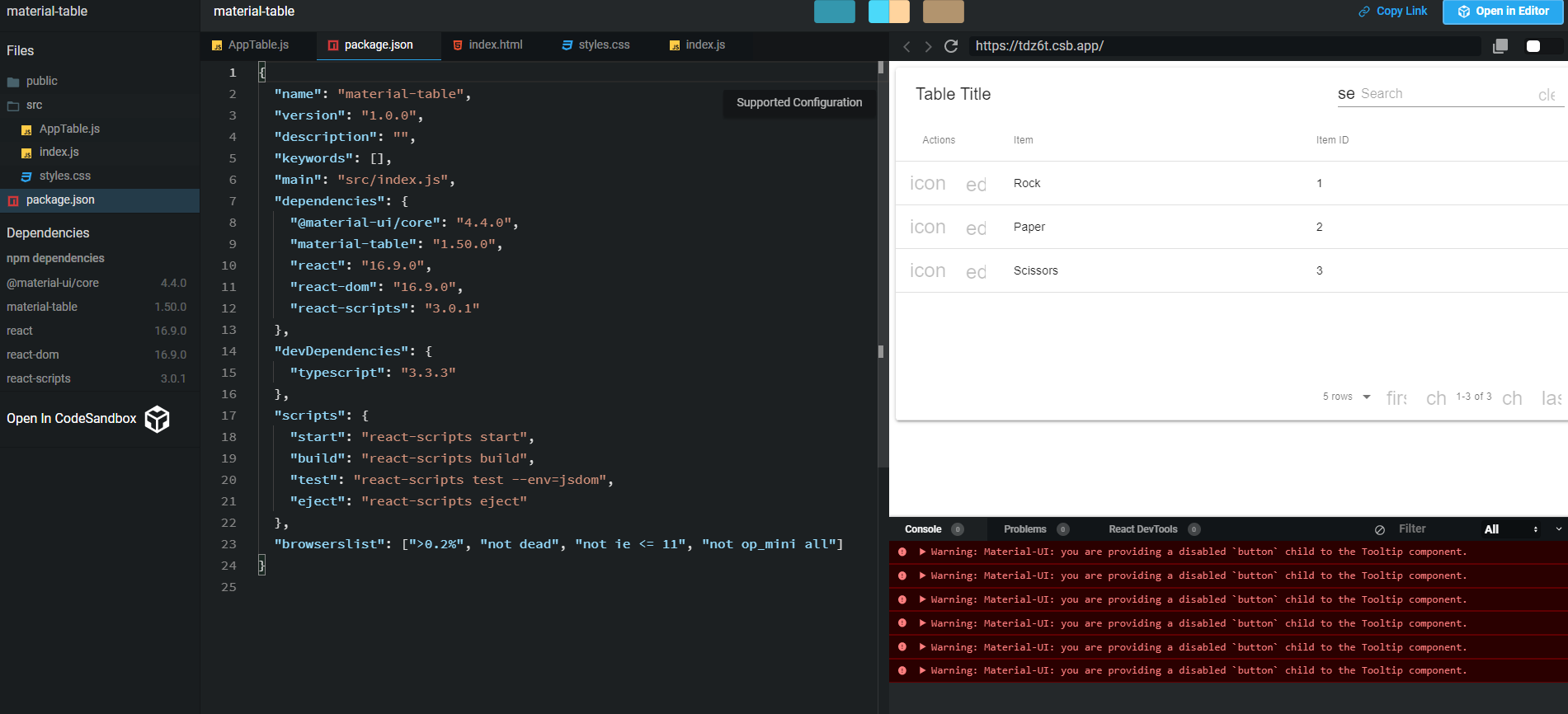
Upgrade dependencies to latest and you will reproduce it:
Sandbox is here
avkonst
on 6 Sep 2019
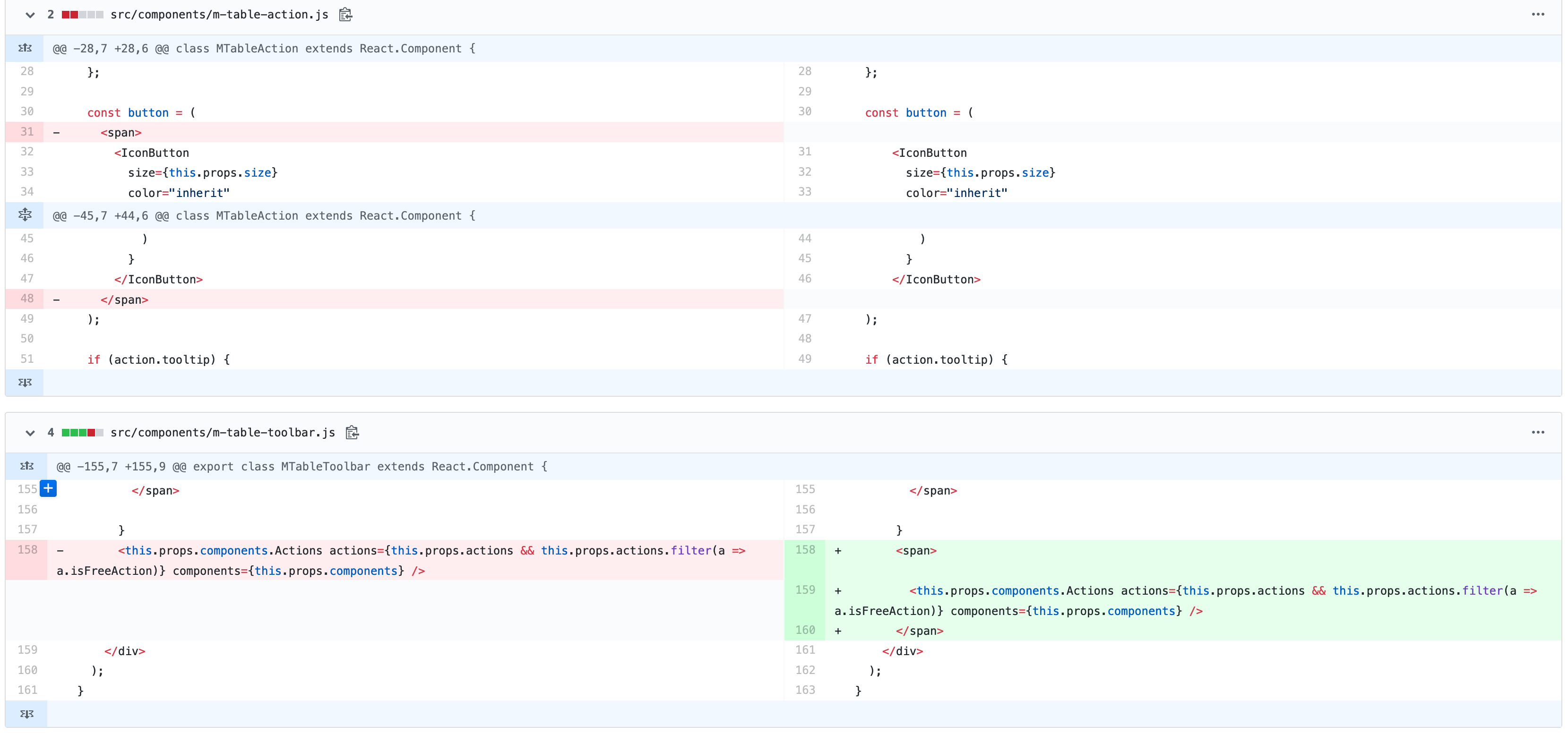
It looks like this started happening in v1.49.0 - it doesn't happen prior to that version. It looks like this commit is the culprit.
I'm 95% positive that removing the <span>'s around the <IconButton>'s is what caused this..
oze4
on 6 Sep 2019
@avkonst I have submitted a pull request that resolves this issue.. Hopefully it will be merged soon.
oze4
on 7 Sep 2019
Thanks
On Sun, Sep 8, 2019 at 6:02 AM Matt Oestreich notifications@github.com
wrote:
@avkonst https://github.com/avkonst I have submitted a pull request
that resolves this issue.. Hopefully it will be merged soon.—
You are receiving this because you were mentioned.
Reply to this email directly, view it on GitHub
https://github.com/mbrn/material-table/issues/1049?email_source=notifications&email_token=AA6JSVJA5WGBUBN53J523WLQIPUB5A5CNFSM4ISCJ4DKYY3PNVWWK3TUL52HS4DFVREXG43VMVBW63LNMVXHJKTDN5WW2ZLOORPWSZGOD6E6O4Q#issuecomment-529131378,
or mute the thread
https://github.com/notifications/unsubscribe-auth/AA6JSVP72H3445D4VLAJAU3QIPUB5ANCNFSM4ISCJ4DA
.
avkonst
on 7 Sep 2019
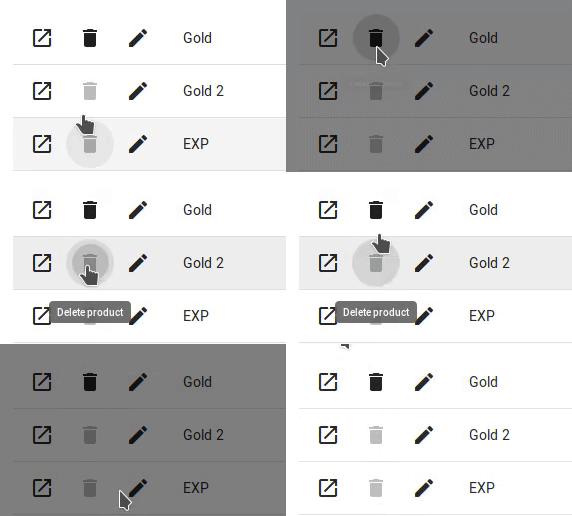
@avkonst that's my workaround, at least I don't receive that error in the console.
actions={[
    rowData => ({
        icon: () => (
            <Delete
                color={
                    !rowData.disabled
                        ? 'inherit'
                        : 'disabled'
                }
            />
        ),
        tooltip: 'Delete product',
        onClick: (event, rowData) => {
            if (!rowData.disabled) {
                // do stuff
            } else {
                return null;
            }
        },
    })
]}
 arkadiusz-wieczorek
on 10 Oct 2019
arkadiusz-wieczorek
on 10 Oct 2019
 rkram3r
@rkram3r I've been waiting a loong while to get that simple PR merged lol... :cry:
Sorry =/
oze4
on 18 Oct 2019
Related issues
 rasheedb
·
3Comments
rasheedb
·
3Comments
 revskill10
·
3Comments
revskill10
·
3Comments
 Mihier-Roy
·
3Comments
Mihier-Roy
·
3Comments
 victorwvieira
·
3Comments
victorwvieira
·
3Comments
 terapepo
·
3Comments
terapepo
·
3Comments