Material-table: Server side filtering with onFilterChange function.
I am using Reactjs and Material Table, I want to handle server-side filtering with actions and reducers, the table data which is stored on redux store will be updated every time filter event is called, then the table data is updated as well. I don't want to use Remote data because it doesn't apply redux cycle.
It would better if we have the custom event for filter
 hungbang
All 18 comments
Sounds like we have the same/similar issue but for searching:
 m5tt
on 13 Aug 2019
m5tt
on 13 Aug 2019
Great! after spending 3 hours for research, I am temporary moving to another library that has the server-side filtering. In the meantime, I will continue following this issue.
hungbang
on 14 Aug 2019
Hi @hungbang and @m5tt
Please use version 1.49.0
example:
 <MaterialTable
     ...
     onSearchChange={(e) => console.log("search changed: " + e)}
     ...
  />
 emrekara37
on 15 Aug 2019
emrekara37
on 15 Aug 2019
Great! after spending 3 hours for research, I am temporary moving to another library that has the server-side filtering. In the meantime, I will continue following this issue.
what library?
 EVRUSIN
on 15 Aug 2019
EVRUSIN
on 15 Aug 2019
Hi @hungbang and @m5tt
Please use version1.49.0
example:<MaterialTable ... onSearchChange={(e) => console.log("search changed: " + e)} ... />
Thank you for your reply.
is there callback method for filter change as well?
Update: I've updated the version to 1.49.0 and double-checking. The onSearchChange is working properly but there is no callback method for filtering.
hungbang
on 15 Aug 2019
Great! after spending 3 hours for research, I am temporary moving to another library that has the server-side filtering. In the meantime, I will continue following this issue.
what library?
hungbang
on 15 Aug 2019
Hi @hungbang and @m5tt
Please use version1.49.0
example:<MaterialTable ... onSearchChange={(e) => console.log("search changed: " + e)} ... />Thank you for your reply.
is there callback method for filter change as well?Update: I've updated the version to 1.49.0 and double-checking. The onSearchChange is working properly but there is no callback method for filtering.
@hungbang @emrekara37 How were you able to get it working? Passing the prop exactly as he did above on version 1.49.0 does nothing.
 ImOnMars
on 15 Aug 2019
ImOnMars
on 15 Aug 2019
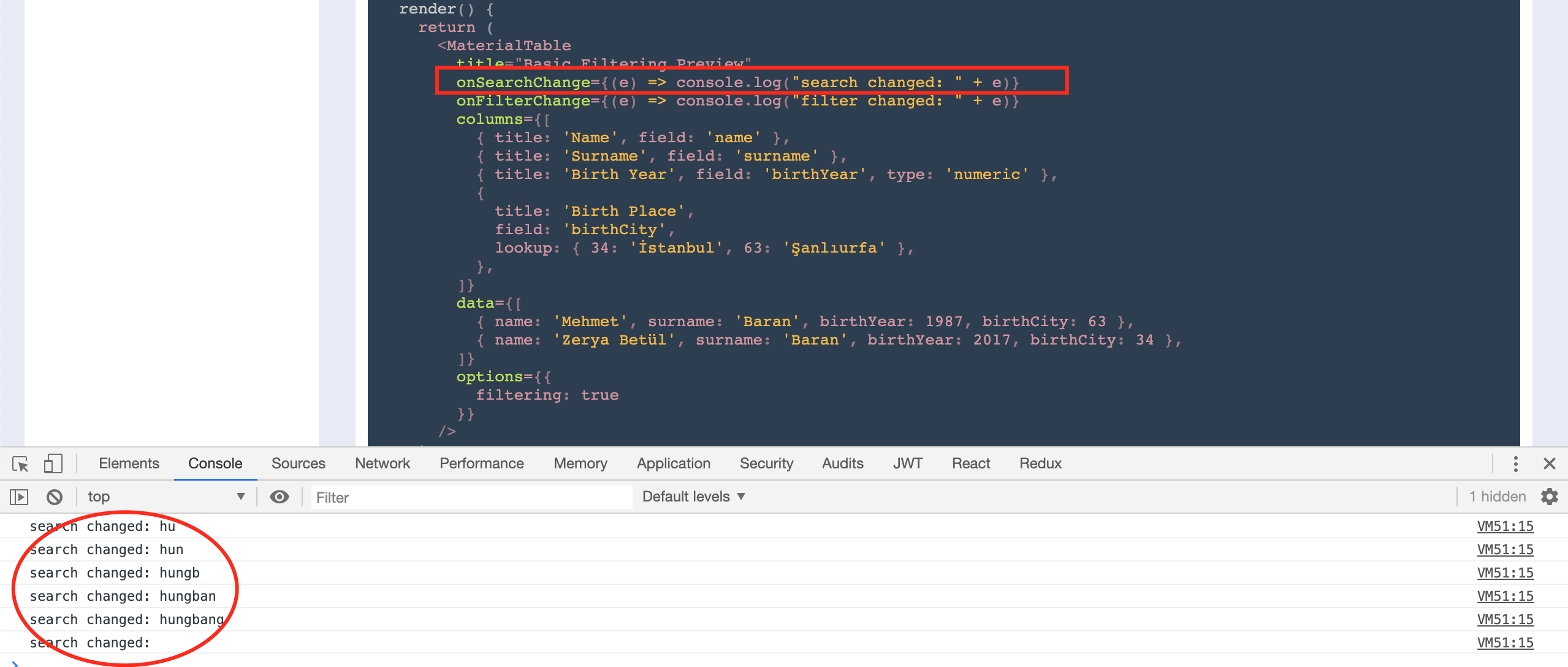
Hi @hungbang and @m5tt
Please use version1.49.0
example:<MaterialTable ... onSearchChange={(e) => console.log("search changed: " + e)} ... />Thank you for your reply.
is there callback method for filter change as well?
Update: I've updated the version to 1.49.0 and double-checking. The onSearchChange is working properly but there is no callback method for filtering.@hungbang @emrekara37 How were you able to get it working? Passing the prop exactly as he did above on version 1.49.0 does nothing.
hungbang
on 16 Aug 2019
@hungbang Yes - according to this comment on this issue it is because the callback is disabled in some way when material table sees that you're using remote data, which is pretty absurd.
ImOnMars
on 16 Aug 2019
@emrekara37 Do you plan to someway handle server-side filtering? The onSearchChange is not helping for this usecase.
 simromm
on 18 Aug 2019
simromm
on 18 Aug 2019
@emrekara37 is there any update for this?
hungbang
on 22 Aug 2019
@emrekara37 is there any update for this?
 zhohon
on 6 Sep 2019
zhohon
on 6 Sep 2019
@mbrn, @emrekara37 - I'm trying to use your workaround found here with the custom Body component onFilterChanged behavior. I'm running into an issue though when trying to set state on my component in the event handler. Using a hook or a redux action causes the table to 'reset'? I type a filter and the event is handled, but as soon as the call is made that reaches out of the scope of the handler, the table clears. I get the behavior I'm looking for out of the onSearchChange event handler of MaterialTable component. Could you help me figure out how to get this workaround working, or let me know if there's something I could do to help you get onFilterChange implemented on the MaterialTable component?
here's my code:
components={{
    Body: bodyProps => (
    <MTableBody
        {...bodyProps}
        onFilterChanged={(columnId: number, value: string) => {
            // get column's fieldName
                        // get data whose prop has same value as filter

                        // redux action, tried using local hook for state as well
            props.setSummaryData(matchingRows);

            bodyProps.onFilterChanged(columnId, value);
        }}
/>),
}}
and here's the behavior I'm seeing:

If I remove the props.setSummaryData call, the table filters as expected.
I'm using v 1.52.0
 seanmccay
on 25 Oct 2019
seanmccay
on 25 Oct 2019
fixed my issue by using the remote data feature and then storing my columns in component state so that they don't reset when you type a filter.
code:
const [columns] = useState<Array<Column<ProposalModels.Proposal>>>([
        // a bunch of column objects
    ]);

.......................................................................................................................

<MaterialTable
    columns={columns}
    data={async (query: Query<ProposalModels.Proposal>) => {
        console.log(query);
        let proposals = props.proposals.length > 0 ? props.proposals : await props.getProposals();
        if (!TextHelper.isEmptyOrWhitespace(query.search)) {
            proposals = proposals.filter(p => {
                let hasMatch = false;
                for (const property in p) {
                    if (p.hasOwnProperty(property)) {
                        const val = p[property] + '';
                        hasMatch = val.toLowerCase().includes(query.search.toLowerCase());
                        if (hasMatch) {
                            break;
                        }
                    } else {
                        continue;
                    }
                }

                return hasMatch;
            });
        }

        if (query.filters.length > 0) {
            let filter: Filter<ProposalModels.Proposal>;
            for (filter of query.filters) {
                if (filter.column.field === undefined) {
                    continue;
                }
                proposals = proposals.filter(p => {
                    const thisVal = p[filter.column.field as string] as string;
                    return thisVal.toLowerCase().includes(filter.value);
                });
            }
        }

        setSummaryData(proposals);

        return {
            data: proposals,
            page: query.page,
            totalCount: proposals.length,
        };
    }}
    // some other props
/>
Would have preferred to have an onFilterChange event though... Oof.
seanmccay
on 30 Oct 2019
Maybe the best way is to customize the Toolbar
 juliosilvacwb
on 11 Mar 2020
juliosilvacwb
on 11 Mar 2020
use query.search if using remote-data
`function remoteData(query: Query
console.log(query);
return new Promise((resolve, reject) => {
  api({
    url: 'enderecos',
    params: {
      limit: query.pageSize,
      page: query.page + 1,
      search: query.search || ' ',
    },
  })
    .then((response) => {
      resolve({
        data: response.data.map((row: Row) => {
          const {
            rua, bairro, cep, cidade,
          } = row;
          return {
            rua, bairro, cep, cidade,
          };
        }),
        page: query.page,
        totalCount: Number(response.headers['x-total-count']),
      });
    })
    .catch((erro) => reject(erro));
});
}`
 fabiosoliveira
on 16 Jun 2020
fabiosoliveira
on 16 Jun 2020
This issue has been automatically marked as stale because it has not had recent activity. It will be closed if no further activity occurs. Thank you for your contributions. You can reopen it if it required.
![stale[bot] picture](https://avatars3.githubusercontent.com/in/1724?v=4&s=40) stale[bot]
on 14 Sep 2020
stale[bot]
on 14 Sep 2020
Related issues
 victorwvieira
·
3Comments
victorwvieira
·
3Comments
 diegosps
·
3Comments
diegosps
·
3Comments
 VipinJoshi
·
3Comments
VipinJoshi
·
3Comments
 jlgreene2
·
3Comments
jlgreene2
·
3Comments
 lazeebee
·
3Comments
lazeebee
·
3Comments
Most helpful comment
@hungbang @emrekara37 How were you able to get it working? Passing the prop exactly as he did above on version 1.49.0 does nothing.