Material-table: How to set type Date output format?
I need to config output format, to edit some fields defined as type Date.
question
 matiasthompson
All 2 comments
I don't know if it is the case, but you can make a custom output using render attribute on the header prop, like this:
  <Table
    headers={[
        { field: 'date', title: 'Date', render: rowData => new Date(rowData.date).toLocaleDateString() }
    ]}
  >
On render, you need to return a function that receives the object in that row, that function need to return a string, or a jsx attribute.
 kostadriano
on 15 Aug 2019
kostadriano
on 15 Aug 2019
👍2
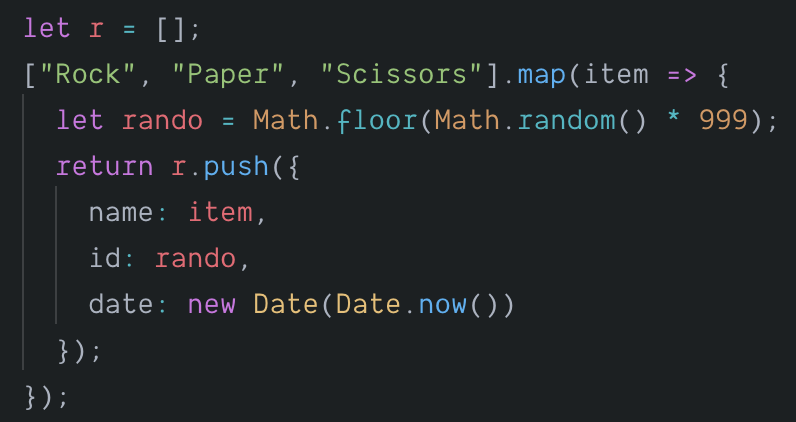
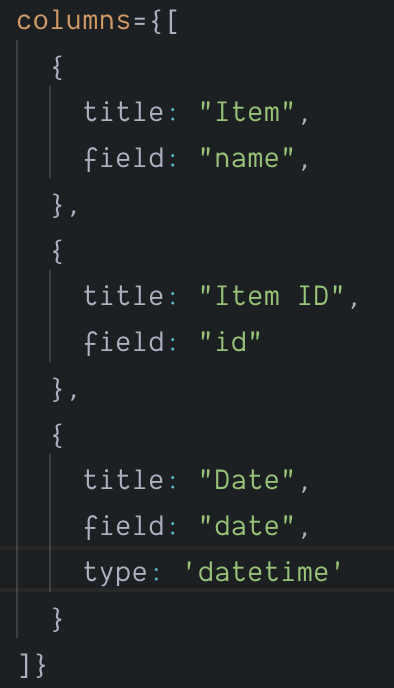
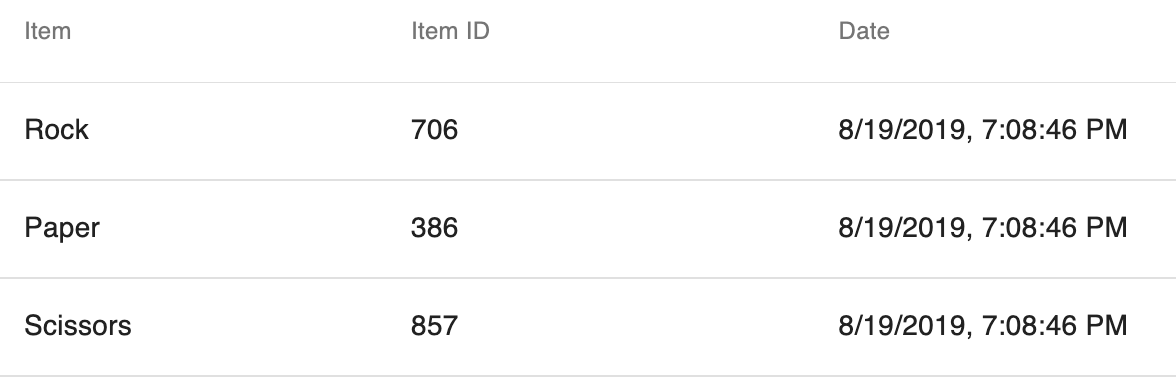
I am not sure if this is what you're looking for, but you can specify date, datetime, or time as the type property within columns:

This is the code that builds my data:
The columns object:
Rendered:
 oze4
on 20 Aug 2019
oze4
on 20 Aug 2019
👍1
Was this page helpful?
0 / 5 - 0 ratings
Related issues
 lazeebee
·
3Comments
lazeebee
·
3Comments
 behrouz-s
·
3Comments
behrouz-s
·
3Comments
 victorwvieira
·
3Comments
victorwvieira
·
3Comments
 rasheedb
·
3Comments
rasheedb
·
3Comments
 timrchavez
·
3Comments
timrchavez
·
3Comments
Most helpful comment
I don't know if it is the case, but you can make a custom output using render attribute on the header prop, like this:
On render, you need to return a function that receives the object in that row, that function need to return a string, or a jsx attribute.