Material-table: Virtualized scroll for table data
Is your feature request related to a problem? Please describe.
I have got many many rows in the table data. Pagination is not usable in this case. Rendering all rows and using external div-scrollbar is doable, but large dataset slows down rendering, so it is not practical to use. Instead, I would like to see virtualized scrolling over the data.
Describe the solution you'd like
The table should render only "visible" rows. "Visible" according to the current scroll position. The table should show scroll bar on right to indicate how much data to scroll and the current relative position of the data.
Additional context
Add any other context or screenshots about the feature request here.
Here is the example from another project: https://devexpress.github.io/devextreme-reactive/react/grid/docs/guides/virtual-scrolling/
 avkonst
All 20 comments
I want to contribute, just let me know how.
 sshanzel
on 20 Aug 2019
sshanzel
on 20 Aug 2019
I was able to pull this off by implementing a custom column renderer that has a built in visibility detection to render, using react-waypoint.
I also use the following options:
options={{
    paging: false,
    maxBodyHeight: height,
    headerStyle: { position: 'sticky', top: 0 },
}}
I am left with one odd limitation, rendering after search filters results that have yet to render. This doesn't fire the waypoint. I have a question in an issue of that repo, and may explore another library in the mean time.
 klappy
on 3 Oct 2019
klappy
on 3 Oct 2019
@sshanzel would be great if you could come up with a way to solve this yourself somehow :) Also there are lots of simpler issues in the backlog marked as help wanted - in case you are looking for an easier entry point.
 jayarjo
on 4 Oct 2019
jayarjo
on 4 Oct 2019
Would definitely give it a shot! Thanks a lot for letting me know!
sshanzel
on 4 Oct 2019
Has anyone successfully implemented virtualization for material-table?
 arheinjohnson
on 30 Apr 2020
arheinjohnson
on 30 Apr 2020
Sadly, I feel that the maintainer of this package has been busy for a long time and the library has become overwhelming. This has been a great package though. With that I understand people have priorities in life, and I wanna thank everyone!
sshanzel
on 7 May 2020
I was able to pull this off by implementing a custom column renderer that has a built in visibility detection to render, using react-waypoint.
I also use the following options:
options={{
    paging: false,
    maxBodyHeight: height,
    headerStyle: { position: 'sticky', top: 0 },
}}
I am left with one odd limitation, rendering after search filters results that have yet to render. This doesn't fire the waypoint. I have a question in an issue of that repo, and may explore another library in the mean time.
@klappy, would you be able to share an example codepen with this implementation? I'm working through this for my table right now, and it would be super helpful to have a reference.
 dwootton
on 20 Jun 2020
dwootton
on 20 Jun 2020
@dwootton: Here's a library that we use material-table implementation that you can see it functioning at multiple levels of stickiness.:
https://datatable-translatable.netlify.app/
The trick was a combination of setting maxBodyHeight like I mentioned above but the rest was handled in the MUI Theme overrides:
https://github.com/unfoldingWord/datatable-translatable/blob/master/src/components/datatable/muiTheme.js
klappy
on 20 Jun 2020
The stickiness looks great @klappy! Did you happen to ever get virtualization working for Material Table so that it only renders the rows that are scrolled into view?
dwootton
on 20 Jun 2020
Hi all,
I'd like to share my virtualization concept for material-table using react-virtualized (react-window and react-virtual works the same way for me)
demo: https://28umv.csb.app/
source: https://codesandbox.io/s/virtualized-material-table-28umv
Be aware that my solution isn't perfect yet but I hope maybe we could extend material-table by this feature someday.
Following issues appear:
- [x] styling: the traditional way of width setting and text aligning (using
columns: https://material-table.com/#/docs/features/styling) don't work as expected (edit: partly fixed) - [x] filtering option doesn't work as expected, probably because of a lack of
tbodyelement. - [ ]
validateDOMNesting(...)warning because of incorrect element nesting (not so crucial)
Feel free to share your experience with a combination material-table and virtualization solution for extending such a nice library as it is!
Best regards,
Maciej
 mackankowski
on 27 Aug 2020
mackankowski
on 27 Aug 2020
@mackankowski do you have an idea about how to do this with variable row heights? Right now if the row height is larger than the specified props.headerHeight in TableBody the layouting breaks. I don't know upfront what the height of elements will be (also, they can change when making the window narrower). Any suggestions?
 yurivangeffen
on 23 Sep 2020
yurivangeffen
on 23 Sep 2020
Never mind, using the CellMeasurer this is fixed :+1: . How would you suggest to set cell widths?
yurivangeffen
on 23 Sep 2020
Never mind, using the CellMeasurer this is fixed 👍 . How would you suggest to set cell widths?
Yes, I define some custom function that is spread into each column definition like this:
 const columns =
      {
        field: 'someColumnId',
        title: 'someColumnTitle.',
        tooltip: 'someColumnTooltip',
        ...columnStyle(50, 'center'),
      },
      ...
import { CSSProperties } from '@material-ui/core/styles/withStyles';

export const columnStyle = (
  width: CSSProperties['width'],
  align?: CSSProperties['textAlign'],
): CSSProperties => ({
  width: width,
  maxWidth: width,
  cellStyle: {
    width: width,
    maxWidth: width,
    textAlign: align,
    textOverflow: 'ellipsis',
    whiteSpace: 'nowrap',
    overflow: 'hidden',
  },
  headerStyle: {
    width: width,
    maxWidth: width,
    textAlign: align,
    textOverflow: 'ellipsis',
    whiteSpace: 'nowrap',
    overflow: 'hidden',
  },
});
You can try to manipulate with some different sizes and text alignment as params. Take a notice that also there's text truncation already implemented.
Let me know if it helps,
BR,
Maciej
mackankowski
on 30 Sep 2020
Hi all,
I'd like to share my virtualization concept for material-table using react-virtualized (react-window and react-virtual works the same way for me)
demo: https://28umv.csb.app/
source: https://codesandbox.io/s/virtualized-material-table-28umvBe aware that my solution isn't perfect yet but I hope maybe we could extend material-table by this feature someday.
Following issues appear:
- styling: the traditional way of width setting and text aligning (using
columns: https://material-table.com/#/docs/features/styling) don't work as expected (edit: partly fixed)- filtering option doesn't work as expected, probably because of lack of
tbodyelement.validateDOMNesting(...)warning because of incorrect element nesting (not so crucial)Feel free to share your experience with combination material-table and virtualization solution for extending such a nice library as it is!
Best regards,
Maciej
Hi All,
Together with my teammate @keemor, we figured out how to makes filters working. I've already updated the previous link.
Enjoy!
mackankowski
on 23 Oct 2020
Hi @mackankowski ,
I've been trying your approach, but it is not working for me in sandbox. I see the 1000 rows in DOM but if I increment to 10k, table starts with performance issues... am I missing something?
Best regards!
 jgleal
on 28 Oct 2020
jgleal
on 28 Oct 2020
Hi @mackankowski ,
I've been trying your approach, but it is not working for me in sandbox. I see the 1000 rows in DOM but if I increment to 10k, table starts with performance issues... am I missing something?
Best regards!
Hi @jgleal ,
I guess that codesandbox is pretty slow - try to render 10k rows in the production build on the local environment.
I've already extended my sample to 10k records and no issues have been noticed (although the initial loading of codesandbox preview is not so fast).
Good luck!
mackankowski
on 28 Oct 2020
Morning @mackankowski,
I'm not talking about loading (although it is slow too). The DOM always has all rows.

If you remove MTableBody, it works fine, but lost table body styles and appear UI issues (incorrect alignment, etc.)
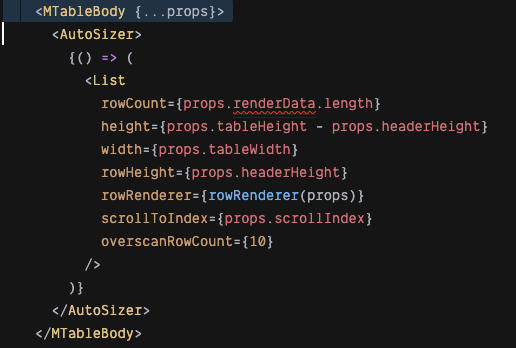
Thanks
jgleal
on 29 Oct 2020
Hey @jgleal, thanks for getting attention!
You're completely right and this is my little oversight during the implementation of filters... I have already a working solution but let me provide the final code later today...
UPDATE: My sample should work fine again - with sticky filters and a text truncation.
BR,
Maciej
mackankowski
on 29 Oct 2020
Thanks @mackankowski !!! great job!!
If you want improve it, another thing that is not working with your virtualization approach, is grouping 😸
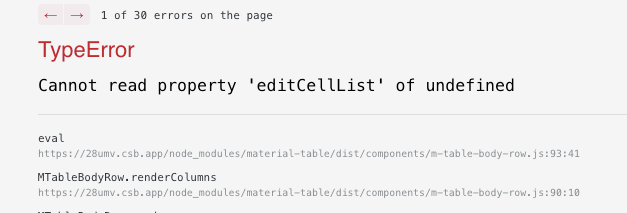
Best regards!
jgleal
on 30 Oct 2020
Hi @jgleal, I will consider it one day... If you need this quicker, you can follow the material-table source code:
https://github.com/mbrn/material-table/blob/master/src/components/m-table-body.js
Let's start from line 202 - there's a code that I reused in my sample. By following line 261, you can see the logic for grouped/ungrouped rows (missing in my sample).
mackankowski
on 30 Oct 2020
Related issues
 ps1011
·
3Comments
ps1011
·
3Comments
 balibou
·
3Comments
balibou
·
3Comments
 terapepo
·
3Comments
terapepo
·
3Comments
 ModPhoenix
·
3Comments
ModPhoenix
·
3Comments
 victorwvieira
·
3Comments
victorwvieira
·
3Comments
Most helpful comment
Hi all,
I'd like to share my virtualization concept for material-table using react-virtualized (react-window and react-virtual works the same way for me)
demo: https://28umv.csb.app/
source: https://codesandbox.io/s/virtualized-material-table-28umv
Be aware that my solution isn't perfect yet but I hope maybe we could extend material-table by this feature someday.
Following issues appear:
columns: https://material-table.com/#/docs/features/styling) don't work as expected (edit: partly fixed)tbodyelement.validateDOMNesting(...)warning because of incorrect element nesting (not so crucial)Feel free to share your experience with a combination material-table and virtualization solution for extending such a nice library as it is!
Best regards,
Maciej