Material-table: Overriding Component "Actions" also overrides all "Action" components
Describe the bug
When overriding the "Actions" component in the "component" prop that is passed to MaterialTable, it also overrides all "Action" (s) on each row. The documentation seems to imply that the "Actions" component refers to the top right area where the search input field is typically located. In my project I am trying to add a "Add New User" component in that specific section using the override option, but it is adding this component to each row and overriding each action mapped to those rows (using the "actions" prop on MaterialTable component). See Screenshots below:

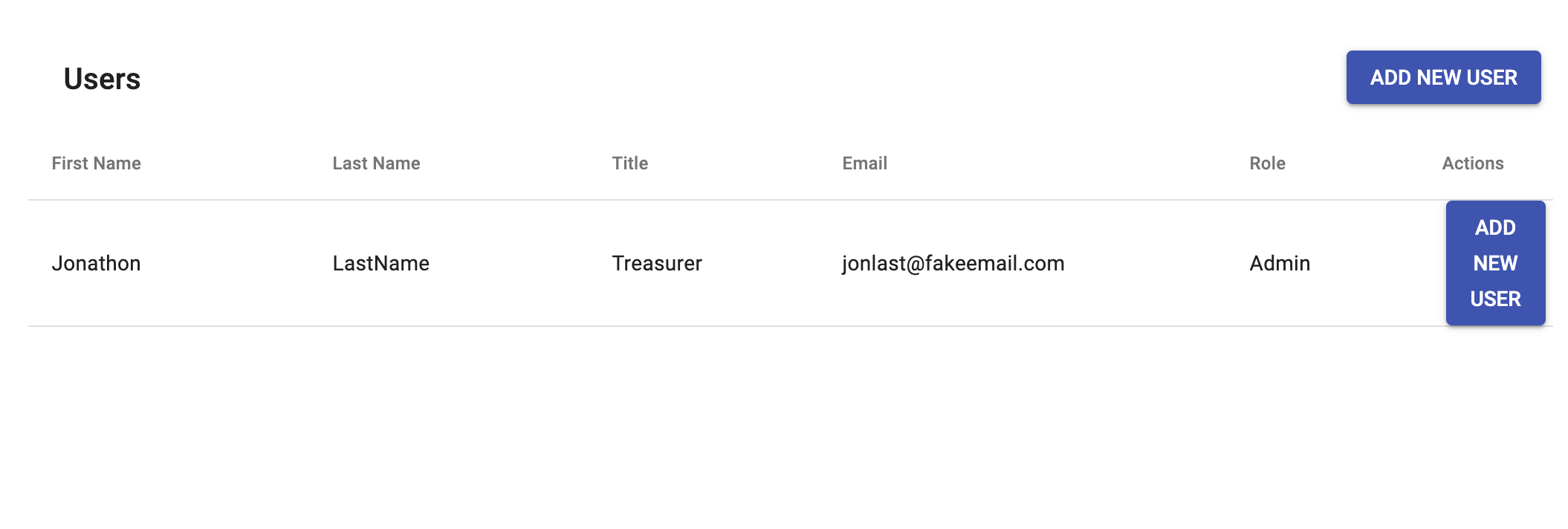
To Reproduce
Steps to reproduce the behavior:
- Spin the code up and see the frontend:
import React, { Component } from "react";
import ReactDOM from "react-dom";
import MaterialTable from "material-table";

class App extends Component {
  render() {
    return (
      <div style={{ maxWidth: "100%" }}>
        <MaterialTable
          columns={[
            {
              title: "First Name",
              field: "fname"
            },
            {
              title: "Last Name",
              field: "lname"
            },
            {
              title: "Title",
              field: "title"
            },
            {
              title: "Email",
              field: "email"
            },
            {
              title: "Role",
              field: "role"
            }
          ]}
          data={[
            {
              fname: "Jonathon",
              lname: "LastName",
              title: "Treasurer",
              email: "[email protected]",
              role: "Admin"
            }
          ]}
          title="Users"
          options={{
            search: false,
            actionsColumnIndex: -1
          }}
          actions={[
            {
              icon: props => <p>Manage</p>, // <--- This will be overridden by the components prop Actions
              tooltip: "Manage User",
              onClick: (event, rowData) =>
                console.log("You are editing " + rowData.fname)
            }
          ]}
          components={{
            Actions: props => (
              <Button
                onClick={(event, rowData) =>
                  console.log("add user", rowData, props)
                }
              >
                Add New User
              </Button>
            )
          }}
        />
      </div>
    );
  }
}

ReactDOM.render(<App />, document.getElementById("react-div"));
Expected behavior
I expect the override for the "Actions" to only override the top right action, not both the "Actions" and the "Action" in the component prop. I also expect the data passed to the actions prop to at least override the global "Action" override in the component. In other words, I expect the following to have priority:
actions={[
            {
              icon: props => <p>Manage</p>, // <--- This will be overridden by the components prop Actions
              tooltip: "Manage User",
              onClick: (event, rowData) =>
                console.log("You are editing " + rowData.fname)
            }
          ]}
Desktop (please complete the following information):
- OS: [e.g. iOS] MacOs Mojave 10.14.5
- Browser [e.g. chrome, safari] Chrome
- Version [e.g. 22] Version 75.0.3770.100
Additional context
If this is expected behavior, any suggestions? My only other idea is overriding the search component, which would be hacky.
 andrewbiang888
All 4 comments
Here is my suggested changes. I was unable to contribute: Permission denied.
File: m-table-body-row.js
import MTableActions from './m-table-actions' // <-- Add this import
// replace this method in m-table-body-row.js
renderActions() {
const size = this.getElementSize();
const baseIconSize = size === 'medium' ? 42 : 26;
const actions = this.props.actions.filter(a => !a.isFreeAction && !this.props.options.selection);
return (
<TableCell size={size} padding="none" key="key-actions-column" style={{ width: baseIconSize * actions.length, padding: '0px 5px', ...this.props.options.actionsCellStyle }}>
<div style={{ display: 'flex' }}>
{this.props.components.Action
? (<this.props.components.Action data={this.props.data} actions={actions} components={this.props.components} size={size} />)
: (<MTableActions data={this.props.data} actions={actions} components={this.props.components} size={size} />)
}
</div>
</TableCell>
);
}
Ok. Upon further investigation into the documentation & code, I think I understand what is happening. This probably is not a bug. In order to customize the top right action I should not have used the components prop at all and only use the actions prop. I should have given the top right action an isFreeAction: true key-pair, which detaches it form the rows. So in other words this code:
          actions={[
            {
              icon: props => <p>Manage</p>,
              tooltip: "Manage User",
              onClick: (event, rowData) =>
                console.log("You are editing " + rowData.fname)
            }
          ]}
          components={{
            Actions: props => (
              <Button
                onClick={(event, rowData) =>
                  console.log("add user", rowData, props)
                }
              >
                Add New User
              </Button>
            )
          }}
Should look like this:
          actions={[
            {
              icon: props => <p>Manage</p>,
              tooltip: "Manage User",
              onClick: (event, rowData) =>
                console.log("You are editing " + rowData.fname)
            },
            {
              icon: props => (
              <Button
                onClick={(event, rowData) =>
                  console.log("add user", rowData, props)
                }
              >
                Add New User
              </Button>
            )
              tooltip: "Add New User",
              isFreeAction: true,   // <--- add this to prevent action from taking over row actions
              onClick: (event, rowData) =>
                console.log("You are editing " + rowData.fname)
            },
          ]}
I'm also going to casually ignore the fact that this is trying to put a button into another button. Going to close the comment. Hopefully this helps someone else find their way.
andrewbiang888
on 2 Jul 2019
Opening issue and resolving it :). Thanks @andrewbiang888
 mbrn
on 2 Jul 2019
mbrn
on 2 Jul 2019
even putting isFreeAction: true, // <--- add this to prevent action from taking over row actions my custom action is overrinding the component header actionsn
 ronaiza-cardoso
on 17 Sep 2019
ronaiza-cardoso
on 17 Sep 2019
Related issues
 ps1011
·
3Comments
ps1011
·
3Comments
 VipinJoshi
·
3Comments
VipinJoshi
·
3Comments
 roseak
·
3Comments
roseak
·
3Comments
 jlgreene2
·
3Comments
jlgreene2
·
3Comments
 ModPhoenix
·
3Comments
ModPhoenix
·
3Comments
Most helpful comment
Ok. Upon further investigation into the documentation & code, I think I understand what is happening. This probably is not a bug. In order to customize the top right action I should not have used the components prop at all and only use the actions prop. I should have given the top right action an
isFreeAction: truekey-pair, which detaches it form the rows. So in other words this code:Should look like this:
I'm also going to casually ignore the fact that this is trying to put a button into another button. Going to close the comment. Hopefully this helps someone else find their way.