Material-table: Error : getFieldValue is not a function when editing a child (Tree Data)
Describe the bug
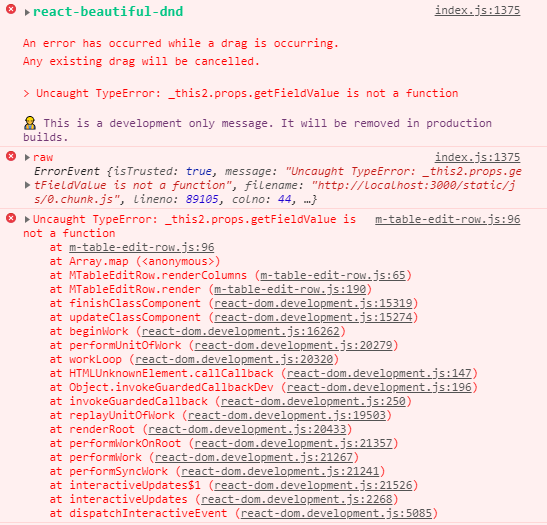
When I click on the "edit" action button of a child row of a Tree Data table with parameter _editable: "onAdd"_ on one of the columns, I get the error :
Uncaught TypeError: _this2.props.getFieldValue is not a function
To Reproduce
Steps to reproduce the behavior:
- Create a Tree Data table with the parameter editable: "onAdd" on (at least) one column
- Add a row
- Add one or more children to this row
- Click on the Edit action button
- See the error
Expected behavior
Ability to edit the fields of the row.
Screenshots
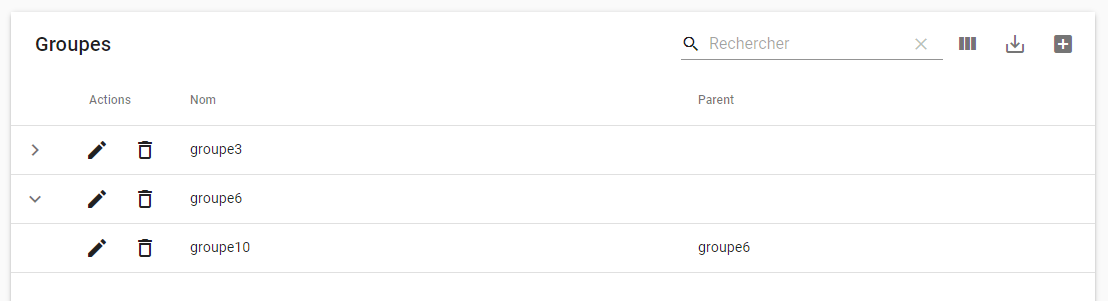
Clicking on the edit action button of the row "groupe10" :
Desktop (please complete the following information):
- OS: Windows 10
- Browser : Chrome
- Version 74.0.3729.169
 jessy-bgl
All 8 comments
Having the same error message pop up. Everything appears to work correctly, but the React error is concerning.
 Xzas22
on 1 Jul 2019
Xzas22
on 1 Jul 2019
Same here when setting a column editable param to 'never'. Upon clicking the edit button my browser screen goes white and have to refresh to display the content again.
I was able to get around this for now (seems to work) by commenting out var readonlyValue = ...
and changing value: readonlyValue
to value: value:
        if (!columnDef.field || !allowEditing) {
          // var readonlyValue = _this2.props.getFieldValue(_this2.state.data, columnDef);

          return React.createElement(_this2.props.components.Cell, {
            icons: _this2.props.icons,
            columnDef: columnDef,
            value: value, //readonlyValue,
            key: columnDef.tableData.id,
            rowData: _this2.props.data
          });
        } else {
 theodore-koch
on 1 Jul 2019
theodore-koch
on 1 Jul 2019
Getting the same error on clicking Add Icon for the first time after page loads, when using editComponent, later the error goes away on it's own.
 foramshah1112
on 3 Jul 2019
foramshah1112
on 3 Jul 2019
Same here.
Warning: React does not recognize the
getFieldValueprop on a DOM element. If you intentionally want it to appear in the DOM as a custom attribute, spell it as lowercasegetfieldvalueinstead. If you accidentally passed it from a parent component, remove it from the DOM element.
Also would be great to have column drag&drop logic configurable, so that it could be switched off if required (observing the same react-beautiful-dnd error here).
 jayarjo
on 7 Jul 2019
jayarjo
on 7 Jul 2019
Is there any fix available right now??
 HazilMohamed
on 12 Jul 2019
HazilMohamed
on 12 Jul 2019
Same issue here. Adding "editable: 'never'" to a column causes the issue when clicking on Edit.
 cristiadis
on 31 Jul 2019
cristiadis
on 31 Jul 2019
any updates on this? ☹️
 rommelmamedov
on 1 Oct 2019
rommelmamedov
on 1 Oct 2019
This issue has been automatically marked as stale because it has not had recent activity. It will be closed if no further activity occurs. Thank you for your contributions. You can reopen it if it required.
![stale[bot] picture](https://avatars3.githubusercontent.com/in/1724?v=4&s=40) stale[bot]
on 15 Jun 2020
stale[bot]
on 15 Jun 2020
Related issues
 rasheedb
·
3Comments
rasheedb
·
3Comments
 jlgreene2
·
3Comments
jlgreene2
·
3Comments
 ModPhoenix
·
3Comments
ModPhoenix
·
3Comments
 revskill10
·
3Comments
revskill10
·
3Comments
 Likurg2010
·
3Comments
Likurg2010
·
3Comments
Most helpful comment
Same here when setting a column editable param to 'never'. Upon clicking the edit button my browser screen goes white and have to refresh to display the content again.
I was able to get around this for now (seems to work) by commenting out
var readonlyValue = ...and changing
value: readonlyValueto
value: value: