Material-table: 'Select all' also selects disabled checkboxes / rows
Describe the bug
A disabled checkbox can't be checked normally, but when you click 'select all', the disabled checkboxes are selected. The header bar indicates the selected rows as well.
To Reproduce
Add
'selection: true', and something like
selectionProps: (rowData) => ({
   disabled: rowData.active === 'no'
})
Click the 'select all'.
Expected behavior
Disabled rows can never be selected, not on checkbox-click, and not with 'select all'
Screenshots
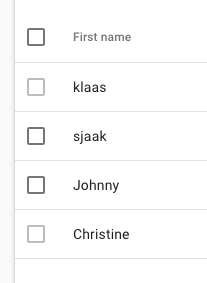
(2 rows, disabled from selecting)

(after 'select all')
Desktop (please complete the following information):
- MT version 1.39.0
 rnacken
All 12 comments
+1
 AugustoCalaca
on 7 Jun 2019
AugustoCalaca
on 7 Jun 2019
What is the solution for this issue?
Issue 854 is marked in this ticket and closed, similarly issue 854 is closed by marking duplicate of issue 686.
I'm also facing this issue, 'select All' in header is selecting disabled records as well.
 mrafivyr
on 2 Jan 2020
mrafivyr
on 2 Jan 2020
It's been almost a year since this issue was reported. What's the solution for this?
 ahfontaine
on 5 Mar 2020
ahfontaine
on 5 Mar 2020
PRs are welcome
AugustoCalaca
on 6 Mar 2020
i do something like this.
selectionProps: (rowData) => {
const checked = rowData.active === 'no' ? {checked: false} : {};
return {
disabled: rowData.active === 'no',
...checked
}
}
but in selected records it is included
 code404sg
on 13 Mar 2020
code404sg
on 13 Mar 2020
@code404sg Hi, thanks for the tips, but this is not reset the selectioned values for the table. Correct?
 KannarFr
on 14 Mar 2020
KannarFr
on 14 Mar 2020
@KannarFr yes. i found another solution but select all is the problem.
when you select all the count selected is all. and when you deselect/select on the record the total selected record is correct.
               selectionProps: rowData => {
                  const checked = rowData.id === 1 ? {checked: false} : {}
                  // add this code
                  if(rowData.id === 1){
                     rowData.tableData['checked'] = false;
                  }
                  return {
                     disabled: rowData.id === 1,
                     color: 'secondary',
                     ...checked
                  }
               }
code404sg
on 16 Mar 2020
guys can you help me how can i pull request?
i found a solution. i dont know how can i contribute
in src/utils/data-manager.js in line 213
from this d.tableData.checked = checked; to this row.tableData.checked = row.tableData.disabled ? false : checked;
and in the selectionProps
do this
` selectionProps: rowData => {
rowData.tableData.disabled = rowData.name === 'A1';
   return {
      disabled: rowData.name === 'A1';
   }
}
`
process is i add another node for the disabled checkbox to check if this is a disabled
i fork the project you can view here
https://github.com/code404sg/material-table
code404sg
on 16 Mar 2020
@mbrn created a pull request out of @code404sg 's changes here https://github.com/mbrn/material-table/pull/1787 need review
 gsstar9028
on 1 Apr 2020
gsstar9028
on 1 Apr 2020
Working workaround as higher order component:
```import React from "react";
import MaterialTable from "material-table";
import MTableToolbar from "material-table/dist/components/m-table-toolbar"
const withSelectAllFix = Component => ({components, options, enabledSelectionFilter, ...props}) => {
const selectionProps = rowData => {
if (enabledSelectionFilter(rowData)) {
return {}
}
else return {
disabled: true,
checked: false
}
};
const Toolbar = ({selectedRows, ...toolbarProps}) => {
return
};
const fixedComponents = Object.assign({}, components, {Toolbar});
const fixedOptions = Object.assign({}, options, {selectionProps});
return
};
const FixedMaterialTable = withSelectAllFix(MaterialTable);
// And example usage wrapped in Playground component:
const Playground = props =>
title: 'Sample Name',
field: 'sampleName'
}]}
data={[
{
sampleName: 'abc'
},
{
sampleName: 'cde'
},
{
sampleName: 'efg'
},
{
sampleName: 'ghi'
},
]}
enabledSelectionFilter={rowData => rowData.sampleName.includes('e')}
options={{
selection: true
}}
/>;
export default Playground;
 lbiernot
on 23 Jun 2020
lbiernot
on 23 Jun 2020
Here is the solution, although there select all gets a little buggy, not sure how to work around that:
 jessewillardcom
on 27 Aug 2020
jessewillardcom
on 27 Aug 2020
This issue has been automatically marked as stale because it has not had recent activity. It will be closed if no further activity occurs. Thank you for your contributions. You can reopen it if it required.
![stale[bot] picture](https://avatars3.githubusercontent.com/in/1724?v=4&s=40) stale[bot]
on 25 Nov 2020
stale[bot]
on 25 Nov 2020
Related issues
 VipinJoshi
·
3Comments
VipinJoshi
·
3Comments
 diegosps
·
3Comments
diegosps
·
3Comments
 jlgreene2
·
3Comments
jlgreene2
·
3Comments
 rasheedb
·
3Comments
rasheedb
·
3Comments
 victorwvieira
·
3Comments
victorwvieira
·
3Comments