Material-table: Selection and Actions in the same Table Row
Allow tables to have rows with both selection Checkboxes and Action Buttons
 RobertLbebber
All 22 comments
Hi @RobertLbebber
This feature requested by others many times. Firstly i advise them to using custom render feature. But i decided to add this feature asap.
 mbrn
on 5 Jun 2019
mbrn
on 5 Jun 2019
Yea I think its important because it was weird to track down why the actions were disappearing when the code looks all functionally correct
RobertLbebber
on 10 Jun 2019
I really appreciate your work on Material Table. I've started using it heavily and looking forward to contributing.
Could lend a hand on implementing this, I think.
As I understand it there's three types of actions currently:
isFreeActiontop bar action- Top bar action _when rows are selected_
- Actions on rows
The type of 2 and 3 are currently implicitly defined based on if it's a selectable table. (Please correct me if I'm wrong or missed something)
I would propose one or these two approaches (backwards-compatible with just deprecating the old API):
- Move row actions to
columns[]. Would make it very explicit what is where. - Explicit
position-prop in theactions[]array with 4 options + deprecateisFreeAction
auto(default) - existing behaviour (it can figure out the one of the below)headerheaderOnSelect- Show when a row is selectedrow
 KATT
on 17 Jun 2019
KATT
on 17 Jun 2019
Hi mbrn, can you tell me please the above feature requested by RobertLbebber, will be added?
if so when?
 yuri3
on 3 Oct 2019
yuri3
on 3 Oct 2019
Also waiting for this feature. Any updates as of yet?
 ahameleon
on 8 Oct 2019
ahameleon
on 8 Oct 2019
Related: https://github.com/mbrn/material-table/issues/1107. I've also posted solution to this problem on SO
@KATT unfortunately only @mbrn has enough insight on the project to evaluate your suggestion. Hope he will find a time to post some thoughts on the topic.
Until then you folks could try the solution from the thread I've referenced above.
 jayarjo
on 8 Oct 2019
jayarjo
on 8 Oct 2019
Also related: https://github.com/mbrn/material-table/issues/648
jayarjo
on 8 Oct 2019
@jayarjo in addition of having actions in the row level, it would be great to also have an option in the toolbar to hide the actions there if they are shown at the row level.
what I'm doing now is using your example for the TableBodyRow and the Toolbar but I added an option to not show the actions if it's a row action here
and here
Also, in your example, you missed removed this check as well
 tafelito
on 15 Oct 2019
tafelito
on 15 Oct 2019
Was this fixed? How to have both Selection and Action buttons on each row?
 Cristy94
on 9 Mar 2020
Cristy94
on 9 Mar 2020
Hi everyone!
I managed to have both selection and actions in the same table row without customising the Row component.
To do it, when managing actions don't use the isFreeAction flag but instead use the position value.
It is not documented on the official website, but it is documented in the TS declarations that you can find here node_modules/material-table/types/index.d.ts.
export interface Action<RowData extends object> {
disabled?: boolean;
icon: string | (() => React.ReactElement<any>);
isFreeAction?: boolean;
position?: 'auto' | 'toolbar' | 'toolbarOnSelect' | 'row';
tooltip?: string;
onClick: (event: any, data: RowData | RowData[]) => void;
iconProps?: IconProps;
hidden?: boolean;
}
So if you want an action to be of scope row, simply pass position: row while for buttons to be shown on toolbar when selecting use position: toolbarOnSelect.
In my specific use case I mapped them to an enum like this:
export enum ActionPosition {
default = "toolbar",
row = "row",
selection = "toolbarOnSelect",
}
Hope this helps you!
 luciobordonaro
on 5 May 2020
luciobordonaro
on 5 May 2020
@luciobordonaro This is not working for me.
I using "actions" prop. Exampl:
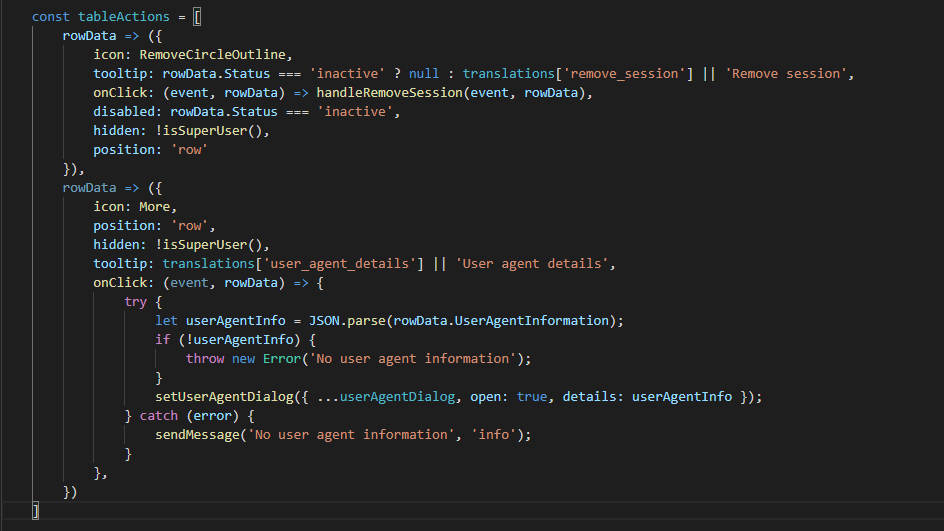
I hope it will be fixed soon.
 mmihic96
on 15 May 2020
mmihic96
on 15 May 2020
@luciobordonaro would you mind making a basic example using CodeSandbox for this? I cannot get it to work even with your instructions.
 oze4
on 15 May 2020
oze4
on 15 May 2020
Ok so I managed to get it working. Two things:
- You CANNOT use a function for your actions if you want to use the position property
- The
iconprop has to be either a function or just the variable name of the icon you are using (ie:icon: () => <SomeIcon />,oricon: SomeIcon,, but NOTicon: <SomeIcon />)
You can view a live demo here
// This **DOES NOT** work
const actions = [
  rowData => {
    return {
      icon: () => <RemoveCircleIcon />,
      tooltip: <h1>I am a tooltip</h1>,
      onClick: (event, rowData) => alert(JSON.stringify(rowData, null, 2)),
      position: "row"
    }
  }
];
// This **DOES** work
const actions = [
  {
    icon: () => <RemoveCircleIcon />,
    // icon: RemoveCircleIcon,    // <-- For `icon:` you can also do this
    // icon: <RemoveCircleIcon /> // <-- BUT THIS WILL NOT WORK
    tooltip: <h1>I am a tooltip</h1>,
    onClick: (event, rowData) => alert(JSON.stringify(rowData, null, 2)),
    position: "row"
  }
];
// Full demo
import React, { useState } from "react";
import { render } from "react-dom";
import MaterialTable from "material-table";
import tableIcons from "./TableIcons.js";
import { RemoveCircleOutlineOutlined as RemoveCircleIcon } from '@material-ui/icons';

const rando = max => Math.floor(Math.random() * max);
const words = ["Paper", "Rock", "Scissors"];
const data = [];

for (let i = 0; i < 100; i++) {
  data.push({
    id: rando(300),
    name: words[i % words.length]
  });
}

const columns = [
  { title: "Id", field: "id" },
  { title: "Name", field: "name" }
];

const actions = [
  {
    icon: () => <RemoveCircleIcon />,
    tooltip: <h1>I am a tooltip</h1>,
    onClick: (event, rowData) => alert(JSON.stringify(rowData, null, 2)),
    position: "row"
  }
];

const App = () => {
  return (
    <MaterialTable
      actions={actions}
      data={data}
      icons={tableIcons}
      columns={columns}
      options={{
        selection: true,
      }}
    />
  );
};

render(<App />, document.querySelector("#root"));
@oze4
Good example. This working. But there is an issue, how I can control disabled/inactive in that case?
As You see in my example, disable action depending on row status.
Before You answered question I already put "Actions" under column prop.
Thank You again for fast answer.
mmihic96
on 15 May 2020
Ok so I managed to get it working. Two things:
- You CANNOT use a function for your actions if you want to use the position property
- The
iconprop has to be either a function or just the variable name of the icon you are using (ie:icon: () => <SomeIcon />,oricon: SomeIcon,, but NOTicon: <SomeIcon />)
Yep, sorry forgot to mention that I wasn't working at the laptop to provide my example.
I'm using array for actions and names for icons as you mentioned.
This library is very powerful but lacks of documentation, maybe we can help improving this specific use case 👍
luciobordonaro
on 15 May 2020
@luciobordonaro I have been keeping up with this repo for the past year or so and they are EXTREMELY slow moving, they don't address open issues, and they don't address PR's.. I even volunteered to help out (which would mean providing me with merge permissions, etc..), but I never got a response on that (shocker)..
I have been giving some serious thought to forking this repo and resolving issues/maintaining that fork.. something like material-table-2 or whatever..
@mmihic96 while I know this is a hack, and not anywhere close to ideal, you can accomplish what you want by overriding the Row component, and enabling/disabling the action from there..
import React, { useState } from "react";
import { render } from "react-dom";
import MaterialTable, { MTableBodyRow } from "material-table";
import tableIcons from "./TableIcons.js";
import {
  RemoveCircleOutlineOutlined as RemoveCircleIcon,
  AccountCircleOutlined as AccountCircleIcon
} from '@material-ui/icons';

const rando = max => Math.floor(Math.random() * max);
const words = ["Paper", "Rock", "Scissors"];
const data = [];

for (let i = 0; i < 100; i++) {
  data.push({
    id: rando(300),
    name: words[i % words.length]
  });
}

const columns = [
  { title: "Id", field: "id" },
  { title: "Name", field: "name" }
];

const actions = [
  {
    name: 'remove', // Added custom name property so we know which action to check for
    icon: () => <RemoveCircleIcon />,
    tooltip: <h1>I am a tooltip</h1>,
    onClick: (event, rowData) => alert(JSON.stringify(rowData, null, 2)),
    disabled: false, // Set disabled to false by default for all actions
    position: "row"
  },
  {
    name: 'account',
    icon: () => <AccountCircleIcon />,
    tooltip: <h1>I am a tooltip</h1>,
    onClick: (event, rowData) => alert(JSON.stringify(rowData, null, 2)),
    disabled: false,
    position: "row"
  }
];

const App = () => {
  return (
    <MaterialTable
      actions={actions}
      data={data}
      icons={tableIcons}
      columns={columns}
      components={{
        Row: props => {
          const propsCopy = { ...props };
          propsCopy.actions.find(a => a.name === 'remove').disabled = propsCopy.data.id < 100;
          propsCopy.actions.find(a => a.name === 'account').disabled = propsCopy.data.name !== 'Paper';
          return <MTableBodyRow {...propsCopy} />
        }
      }}
      options={{
        selection: true,
      }}
    />
  );
};

render(<App />, document.querySelector("#root"));
@oze4 Thanks. Everything working.
mmihic96
on 15 May 2020
There's a way to use action as a function, what causes the problem is this line
https://github.com/mbrn/material-table/blob/dee28035ad478cede5fa2da9f41df8409a62dead/src/material-table.js#L124-L132
which check if options.selection is true and the type of action is function. and then force to set 'toolbarOnSelect'.
Hence, we just can provide options.selection to the m-table-body-row directly instead of specifying it in options so that we can kinda bypass above code block.
 Row: props => {
          return (
            <MTableBodyRow
              {...{
                ...props,
                options: {
                  ...props.options,
                  selection: true,
                },
              }}
            />
          );
        },
if you also need 'check-all' checkbox on header, you have to override Header as well
 Header: ({ columns, ...props }: any) => {
          return (
            <TableHead>
              <TableRow>
                {!!parentChildData && <TableCell />}
                {selection && (
                  <TableCell padding="none">
                    {props.showSelectAllCheckbox && (
                      <Checkbox
                        indeterminate={
                          props.selectedCount > 0 &&
                          props.selectedCount < props.dataCount
                        }
                        checked={
                          props.dataCount > 0 &&
                          props.selectedCount === props.dataCount
                        }
                        onChange={(event, checked) =>
                          props.onAllSelected && props.onAllSelected(checked)
                        }
                      />
                    )}
                  </TableCell>
                )}
                // and rest of columns goes here
          );
        },
Now, all actions(function or normal) will be located properly regardless of selection prop, so you can just use them as you would do in normal circumstances(with proper 'position' option).
Note that there are still other component that consumes options.selection prop besides m-table-body-row, you'll also need to pass them in case you need those features.
 ifndefdeadmau5
on 27 May 2020
ifndefdeadmau5
on 27 May 2020
How do I pass rowData to actions in this case?
I found this:
[https://github.com/mbrn/material-table/issues/1007]
But this method hides the icon right away. Actions won't show icon if we use his method.
Here I have passed StoreId in props of Icon (Add Sub Store) but it completely hides the icon. Could you show me a workaround or something that could help me get this done?
 kunalgoyal1992
on 7 Jun 2020
kunalgoyal1992
on 7 Jun 2020
@luciobordonaro I have been keeping up with this repo for the past year or so and they are EXTREMELY slow moving, they don't address open issues, and they don't address PR's.. I even volunteered to help out (which would mean providing me with merge permissions, etc..), but I never got a response on that (shocker)..
I have been giving some serious thought to forking this repo and resolving issues/maintaining that fork.. something like
material-table-2or whatever..@mmihic96 while I know this is a hack, and not anywhere close to ideal, you can accomplish what you want by overriding the Row component, and enabling/disabling the action from there..
import React, { useState } from "react";
import { render } from "react-dom";
import MaterialTable, { MTableBodyRow } from "material-table";
import tableIcons from "./TableIcons.js";
import {
  RemoveCircleOutlineOutlined as RemoveCircleIcon,
  AccountCircleOutlined as AccountCircleIcon
} from '@material-ui/icons';

const rando = max => Math.floor(Math.random() * max);
const words = ["Paper", "Rock", "Scissors"];
const data = [];

for (let i = 0; i < 100; i++) {
  data.push({
    id: rando(300),
    name: words[i % words.length]
  });
}

const columns = [
  { title: "Id", field: "id" },
  { title: "Name", field: "name" }
];

const actions = [
  {
    name: 'remove', // Added custom name property so we know which action to check for
    icon: () => <RemoveCircleIcon />,
    tooltip: <h1>I am a tooltip</h1>,
    onClick: (event, rowData) => alert(JSON.stringify(rowData, null, 2)),
    disabled: false, // Set disabled to false by default for all actions
    position: "row"
  },
  {
    name: 'account',
    icon: () => <AccountCircleIcon />,
    tooltip: <h1>I am a tooltip</h1>,
    onClick: (event, rowData) => alert(JSON.stringify(rowData, null, 2)),
    disabled: false,
    position: "row"
  }
];

const App = () => {
  return (
    <MaterialTable
      actions={actions}
      data={data}
      icons={tableIcons}
      columns={columns}
      components={{
        Row: props => {
          const propsCopy = { ...props };
          propsCopy.actions.find(a => a.name === 'remove').disabled = propsCopy.data.id < 100;
          propsCopy.actions.find(a => a.name === 'account').disabled = propsCopy.data.name !== 'Paper';
          return <MTableBodyRow {...propsCopy} />
        }
      }}
      options={{
        selection: true,
      }}
    />
  );
};

render(<App />, document.querySelector("#root"));
Thanks, man. That worked perfectly.
 daviddjp
on 16 Jul 2020
daviddjp
on 16 Jul 2020
@oze4 Thank you so much for your example, and then I tried to modify it like this based on your code, and it works to me,I only want to use the feature of action disabled and selection at the same time. but it also can give a formatAction that has params data and action by props.
Row: (props) => {
        const propsCopy = { ...props };
        // or add a format action function
        // formatAction(originAction, propsCopy.data) => finalAction;
        propsCopy.actions = propsCopy.actions.map((action) => {
         if (typeof action === 'function') {
           return action;
         }
          return {
            ...action,
            disabled: action.disabled || action.disabledFunc?.(propsCopy.data)
          };
        });
        return <TableRow {...propsCopy} />;
      }
and how to write action is
  action=[{
    icon: () => <Edit />
    position: 'row',
    disabledFunc: (row) => row.status === 2,
}]
I use typescript
 linkjane
on 22 Jul 2020
linkjane
on 22 Jul 2020
Sorry if this is obvious, but why do we copy the props in the below?
      components={{
        Row: props => {
          const propsCopy = { ...props };
          propsCopy.actions.find(a => a.name === 'remove').disabled = propsCopy.data.id < 100;
          propsCopy.actions.find(a => a.name === 'account').disabled = propsCopy.data.name !== 'Paper';
          return <MTableBodyRow {...propsCopy} />
        }
      }}
 grking8
on 14 Aug 2020
grking8
on 14 Aug 2020
Related issues
 VipinJoshi
·
3Comments
VipinJoshi
·
3Comments
 behrouz-s
·
3Comments
behrouz-s
·
3Comments
 roseak
·
3Comments
roseak
·
3Comments
 victorwvieira
·
3Comments
victorwvieira
·
3Comments
 diegosps
·
3Comments
diegosps
·
3Comments
Most helpful comment
Ok so I managed to get it working. Two things:
iconprop has to be either a function or just the variable name of the icon you are using (ie:icon: () => <SomeIcon />,oricon: SomeIcon,, but NOTicon: <SomeIcon />)You can view a live demo here