Material-table: Including material-table overrides material-ui theme
Describe the bug
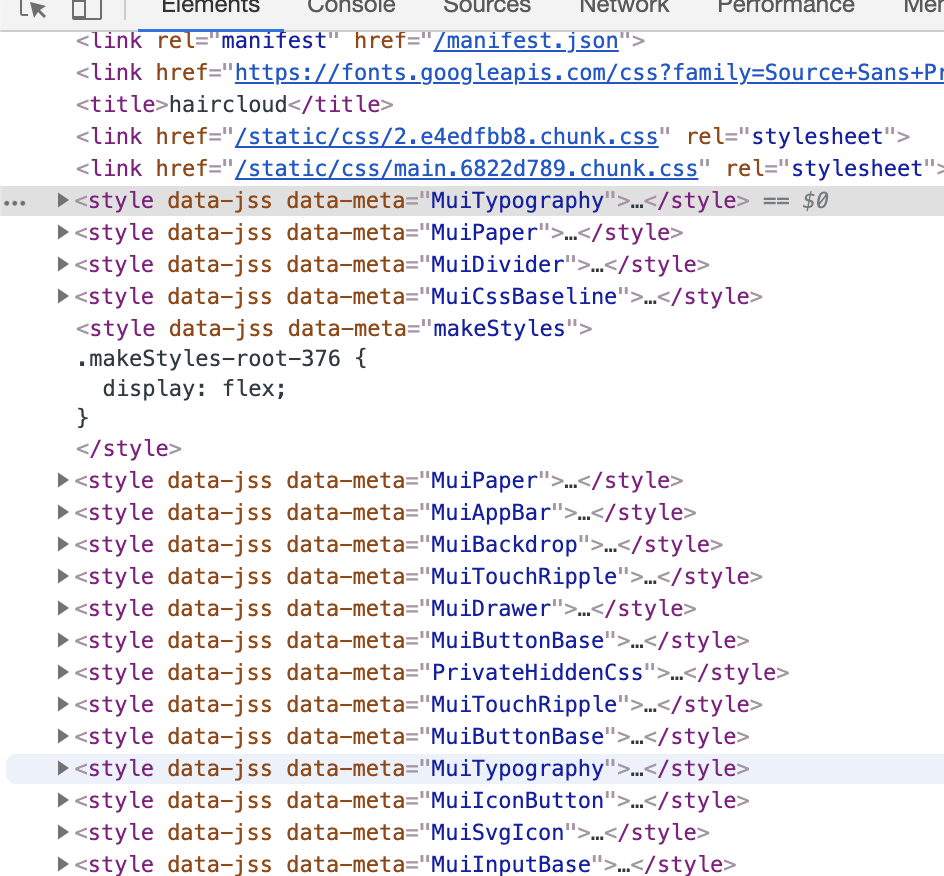
material-table loads default material-ui styles again overriding theme styles.
To Reproduce
Steps to reproduce the behavior:
- Create MUI theme and change
theme.typography.fontFamily - Load theme using
MuiThemeProvider - Create React page and ensure theme is applied
- Create React page with
MaterialTable - Look at developer tools to find typography styles have been overriden.
Expected behavior
Should not have duplicated material-ui style elements after including MaterialTable
Screenshots

Environment
npx create-react-app my-app --typescript
"@material-ui/core": "^4.0.0",
"material-table": "^1.37.0",
 sickyoon
All 14 comments
I tested this but i think this is not MT related case. When you use a muithemeprovider it adds styles of every component that used inside.
This is normal you will see two MuiTypography styles.
 <>
        <Typography>Text1</Typography>
        <MuiThemeProvider theme={theme}>
          <Typography>Text2</Typography>
        </MuiThemeProvide>
</>
 mbrn
on 29 May 2019
mbrn
on 29 May 2019
I have the same issue i'm trying to figure out. when i add the
Edit: I noticed this issue does not exists in 1.38.0 so that's what i'm going to roll with. Thanks.
 zumdahl76
on 11 Jun 2019
zumdahl76
on 11 Jun 2019
I will take a look again.
mbrn
on 13 Jun 2019
I'm having the same problem.
After the module is loaded, the MaterialUI theme (eg. button styles) is broken.
PS: I'm using NextJS
 Clem-
on 26 Jun 2019
Clem-
on 26 Jun 2019
I can confirm this happens with .MuiButtonBase-root too.
Is there a way to make your styles more specific at all?
 WillemLabu
on 27 Jun 2019
WillemLabu
on 27 Jun 2019
+1
 bilel-noomene
on 1 Jul 2019
bilel-noomene
on 1 Jul 2019
+1
 ahomatthew
on 10 Jul 2019
ahomatthew
on 10 Jul 2019
I had to go back to 1.36.0 to get it to stop behaving this way.
ahomatthew
on 10 Jul 2019
I am having this issue as well. In my case it affected Button styles and Textfield's select options. Both utilized .MuiButtonBase-root. I am using Material UI 4 with ThemeProvider and styled-components.
Downgrading to 1.36 fixed the issue.
 devopsjosh
on 11 Jul 2019
devopsjosh
on 11 Jul 2019
was this fixed? I used 1.57 and having the same issue.
 wolfdgreat
on 11 May 2020
wolfdgreat
on 11 May 2020
Same problem here. Other components that use material UI have their style changed when I include the material-table.
Also fixed by downgrading to 1.36.
I had a problem with editing in 1.36 so I tried 1.52 and it works without overwriting the styles too.
 m3h0w
on 26 May 2020
m3h0w
on 26 May 2020
This issue has been automatically marked as stale because it has not had recent activity. It will be closed if no further activity occurs. Thank you for your contributions. You can reopen it if it required.
![stale[bot] picture](https://avatars3.githubusercontent.com/in/1724?v=4&s=40) stale[bot]
on 24 Aug 2020
stale[bot]
on 24 Aug 2020
Issue is persistent on 1.69
 bishoym
on 26 Aug 2020
bishoym
on 26 Aug 2020
This issue has been automatically marked as stale because it has not had recent activity. It will be closed if no further activity occurs. Thank you for your contributions. You can reopen it if it required.
stale[bot]
on 24 Nov 2020
Related issues
 behrouz-s
·
3Comments
behrouz-s
·
3Comments
 rasheedb
·
3Comments
rasheedb
·
3Comments
 lazeebee
·
3Comments
lazeebee
·
3Comments
 revskill10
·
3Comments
revskill10
·
3Comments
 victorwvieira
·
3Comments
victorwvieira
·
3Comments
Most helpful comment
I can confirm this happens with
.MuiButtonBase-roottoo.Is there a way to make your styles more specific at all?