Material-table: Issue with custom column rendering
Issue with custom column rendering - cutting off popover being displayed
Steps to reproduce
- Create a column with custom component that includes a popover or menu that can be opened when you click on the cell.
- Make sure you try this further down the grid to reproduce.
- Can see popover/menu getting cut off

Expected behavior

Occurs on:
Desktop
Mobile devices
 IamSonOfTenny
All 2 comments
Hi @will-code-for-cash ,
I got similar issue for custom rendering. I solved problem with use a component instead of inline render function.
Do not use like this if you have a popover:
render: rowData => <...>
Use like this:
render: MyComponent
You can access this.props.rowData in MyComponent
 mbrn
on 27 May 2019
mbrn
on 27 May 2019
Hi,
Sorry to open a closed issue, however I have a question that is basically exactly the same issue as this one.
Feeding the render option a component is no longer a valid option so it this issue has come back.
The render option either just thinks it's a function (when using reacts functional components), or it does not render at all throwing an error (when using a class): this.props.columnDef.render is not a function.
I am using it with a split button (https://material-ui.com/components/button-group/#split-button) like below:
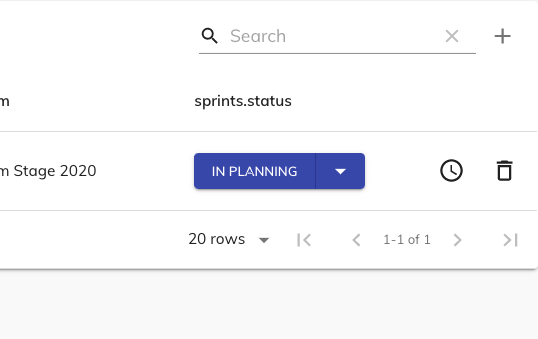
But it renders badly like the example in the first post:
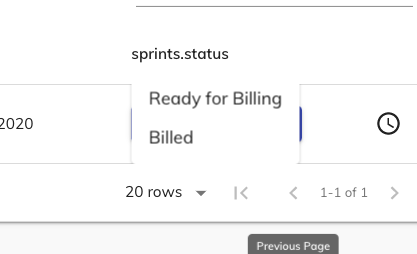
 bartdelange
on 31 Aug 2020
bartdelange
on 31 Aug 2020
Related issues
 VipinJoshi
·
3Comments
VipinJoshi
·
3Comments
 roseak
·
3Comments
roseak
·
3Comments
 timrchavez
·
3Comments
timrchavez
·
3Comments
 lazeebee
·
3Comments
lazeebee
·
3Comments
 ModPhoenix
·
3Comments
ModPhoenix
·
3Comments
Most helpful comment
Hi @will-code-for-cash ,
I got similar issue for custom rendering. I solved problem with use a component instead of inline render function.
Do not use like this if you have a popover:
render: rowData => <...>
Use like this:
render: MyComponent
You can access this.props.rowData in MyComponent