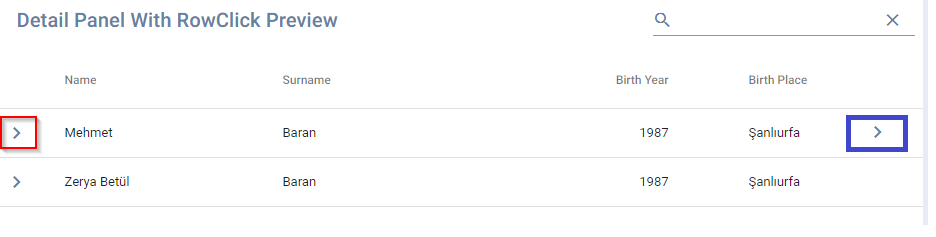
Material-table: Is it able to move the detail panel `Icon` from left to right
 YongZhangEmbed
All 8 comments
Currently no. But you can use onRowClick to toggle detail panel.
Look at 3rd example at:
https://material-table.com/#/docs/features/detail-panel
 mbrn
on 8 May 2019
mbrn
on 8 May 2019
Is it possible to remove the Icon?
YongZhangEmbed
on 8 May 2019
You can not. But you i can add this feature. Because a lot of developer asked for it.
mbrn
on 9 May 2019
thanks for your feedback, hope this feature coming soon
YongZhangEmbed
on 9 May 2019
This issue has been automatically marked as stale because it has not had recent activity. It will be closed if no further activity occurs. Thank you for your contributions. You can reopen it if it required.
![stale[bot] picture](https://avatars3.githubusercontent.com/in/1724?v=4&s=40) stale[bot]
on 15 Jun 2020
stale[bot]
on 15 Jun 2020
@mbrn, has the feature of hiding the "toggle" icon been implemented?
Also, is it possible to show a detail panel by default (without clicking anywhere)?
 Leocete
on 30 Jun 2020
Leocete
on 30 Jun 2020
@mbrn, has the feature of hiding the "toggle" icon been implemented?
Also, is it possible to show a detail panel by default (without clicking anywhere)?
Not related to the original issue, but I was also looking for this feature. Using this as a workaround:
detailPanel={[
    (rowData) => ({
        disabled: isEmpty(rowData.notes),  // hides hover state
        icon: isEmpty(rowData.notes) ? ' ' : ChatBubbleOutline,  // single space used here, empty string defaults to chevron
        openIcon: isEmpty(rowData.notes) ? ' ' : ChatBubble, // single space
        ...
    }),
]}
 edwinckc
on 8 Jul 2020
edwinckc
on 8 Jul 2020
This issue has been automatically marked as stale because it has not had recent activity. It will be closed if no further activity occurs. Thank you for your contributions. You can reopen it if it required.
stale[bot]
on 6 Oct 2020
Related issues
 victorwvieira
·
3Comments
victorwvieira
·
3Comments
 slevy85
·
3Comments
slevy85
·
3Comments
 bohrsty
·
3Comments
bohrsty
·
3Comments
 Likurg2010
·
3Comments
Likurg2010
·
3Comments
 KKrisu
·
3Comments
KKrisu
·
3Comments
Most helpful comment
You can not. But you i can add this feature. Because a lot of developer asked for it.