Material-table: Warning: Failed prop type: Invalid prop `detailPanel` supplied to `MaterialTable`
Hi,
First thanks for your awesome package.
I have this error when I put an array of detailPanel as props to the MaterialTable component.

Here my code :

But all is working well. There is just this warning in the console.
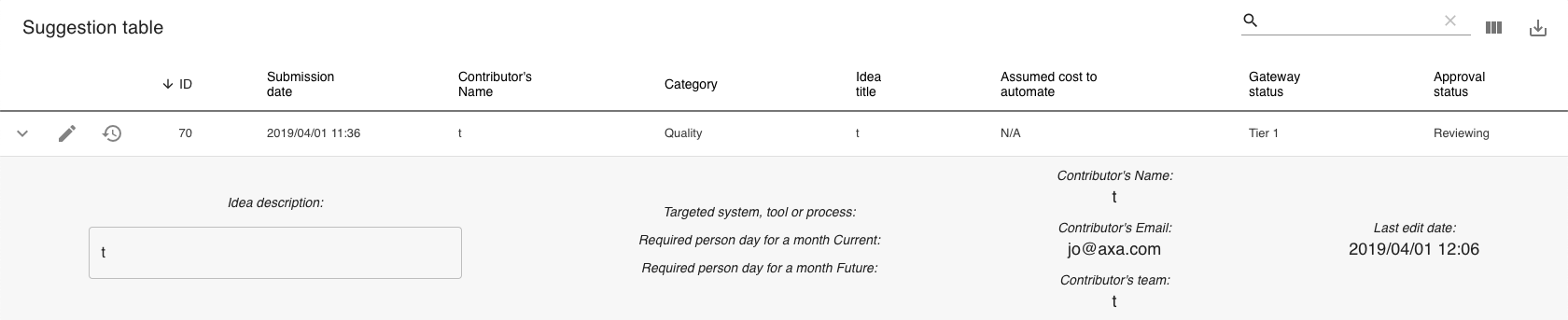
Do you know what is the problem?
Thanks
 theofournier
All 17 comments
Hi @theofournier ,
I guess that it is a PropTypes warning. I will take a look at it asap.
 mbrn
on 1 Apr 2019
mbrn
on 1 Apr 2019
This is done with version 1.31.0
mbrn
on 11 Apr 2019
The warning is still there in version 1.40.1
 lasimonne
on 1 Jul 2019
lasimonne
on 1 Jul 2019
Hi @lasimonne ,
I will check it asap.
mbrn
on 1 Jul 2019
Hi,
i tried in 1.47.0 it works.
Thanks
 emrekara37
on 8 Aug 2019
emrekara37
on 8 Aug 2019
The warning is still there in version 1.50.0
 nmwangxin
on 27 Aug 2019
nmwangxin
on 27 Aug 2019
Still happening in version 1.54.1
 hugoxhaal
on 22 Nov 2019
hugoxhaal
on 22 Nov 2019
Happening for me. I think it started after the last update that fixed color props.
backend.js:6 Warning: Failed prop type: Invalid prop `detailPanel` supplied to `MaterialTable`.
in MaterialTable
in Unknown (created by WithStyles(Component))
in WithStyles(Component) (created by ClientList)
in div (created by ClientList)
in ClientList (created by ConnectFunction)
Also, after this new update it started giving me more warning messages:
backend.js:6 Warning: Failed prop type: Invalid prop `color` of value `inherit` supplied to
`ForwardRef(TextField)`, expected one of ["primary","secondary"].
in ForwardRef(TextField) (created by WithStyles(ForwardRef(TextField)))
in WithStyles(ForwardRef(TextField)) (created by MTableToolbar)
in div (created by ForwardRef(Toolbar))
in ForwardRef(Toolbar) (created by WithStyles(ForwardRef(Toolbar)))
in WithStyles(ForwardRef(Toolbar)) (created by MTableToolbar)
in MTableToolbar (created by WithStyles(MTableToolbar))
in WithStyles(MTableToolbar) (created by Toolbar)
in div (created by Toolbar)
in Toolbar (created by MaterialTable)
in div (created by ForwardRef(Paper))
in ForwardRef(Paper) (created by WithStyles(ForwardRef(Paper)))
in WithStyles(ForwardRef(Paper)) (created by Container)
in Container (created by MaterialTable)
in Provider (created by App)
in App (created by ErrorBoundary)
in ErrorBoundary (created by DragDropContext)
in DragDropContext (created by MaterialTable)
in MaterialTable
in Unknown (created by WithStyles(Component))
in WithStyles(Component) (created by ClientList)
in div (created by ClientList)
And:
Warning: Failed prop type: Invalid prop color of value inherit supplied to
ForwardRef(FormControl),
expected one of ["primary","secondary"].
in ForwardRef(FormControl) (created by WithStyles(ForwardRef(FormControl)))
in WithStyles(ForwardRef(FormControl)) (created by ForwardRef(TextField))
in ForwardRef(TextField) (created by WithStyles(ForwardRef(TextField)))
in WithStyles(ForwardRef(TextField)) (created by MTableToolbar)
in div (created by ForwardRef(Toolbar))
in ForwardRef(Toolbar) (created by WithStyles(ForwardRef(Toolbar)))
in WithStyles(ForwardRef(Toolbar)) (created by MTableToolbar)
in MTableToolbar (created by WithStyles(MTableToolbar))
in WithStyles(MTableToolbar) (created by Toolbar)
in div (created by Toolbar)
in Toolbar (created by MaterialTable)
in div (created by ForwardRef(Paper))
in ForwardRef(Paper) (created by WithStyles(ForwardRef(Paper)))
in WithStyles(ForwardRef(Paper)) (created by Container)
in Container (created by MaterialTable)
in Provider (created by App)
in App (created by ErrorBoundary)
in ErrorBoundary (created by DragDropContext)
in DragDropContext (created by MaterialTable)
in MaterialTable
in Unknown (created by WithStyles(Component))
in WithStyles(Component) (created by ClientList)
in div (created by ClientList)
 lfsando
on 22 Nov 2019
lfsando
on 22 Nov 2019
Getting this as well, any help would be appreciated!
connectAdvanced.js:233 Warning: Failed prop type: Invalid prop color of value inherit supplied to ForwardRef(TextField), expected one of ["primary","secondary"].
in ForwardRef(TextField) (created by WithStyles(ForwardRef(TextField)))
in WithStyles(ForwardRef(TextField)) (created by MTableToolbar)
in div (created by ForwardRef(Toolbar))
in ForwardRef(Toolbar) (created by WithStyles(ForwardRef(Toolbar)))
in WithStyles(ForwardRef(Toolbar)) (created by MTableToolbar)
in MTableToolbar (created by WithStyles(MTableToolbar))
in WithStyles(MTableToolbar) (created by MaterialTable)
in div (created by ForwardRef(Paper))
in ForwardRef(Paper) (created by WithStyles(ForwardRef(Paper)))
in WithStyles(ForwardRef(Paper)) (created by Container)
in Container (created by MaterialTable)
in Provider (created by App)
in App (created by ErrorBoundary)
in ErrorBoundary (created by DragDropContext)
in DragDropContext (created by MaterialTable)
in MaterialTable
in Unknown (created by WithStyles(Component))
in WithStyles(Component) (created by Students)
in Students (created by App)
in RouterPage (created by App)
in div (created by FocusHandlerImpl)
in FocusHandlerImpl (created by Context.Consumer)
in FocusHandler (created by RouterImpl)
in RouterImpl (created by LocationProvider)
in LocationProvider (created by Context.Consumer)
in Location (created by Context.Consumer)
in Router (created by App)
in div (created by App)
in App
 ahaq0
on 11 Dec 2019
ahaq0
on 11 Dec 2019
The warning still occurs in 1.54.2.
 ldsmike88
on 18 Dec 2019
ldsmike88
on 18 Dec 2019
Warning occurs in [email protected]
 msidlo
on 29 Jan 2020
msidlo
on 29 Jan 2020
I found a solution for this warning in my case, maybe the source of your warning its not the same
Since the warning is throwed by some object validation i started to removing items hoping the warning goes away to find the issue, and realize that when i removed the icon prop, the warning was gone, so i took a look in the docs again and saw the problem:
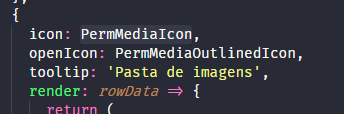
I was declaring the icon prop in the wrong way:
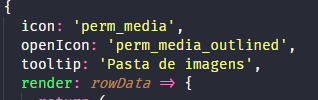
Right way:
 brunojkurt
on 31 Jan 2020
brunojkurt
on 31 Jan 2020
@brunojkurt,
While your solution fixes it and I'm using it because I don't want the annoying warning, the documentation says you should be able to do it either way:
detailPanel
Field | Type | Default | Description
-- | -- | -- | --
disabled | boolean | false | Flag for button disabled or enabled
icon | string or ReactElement | | Icon of button from material icons or custom component
ldsmike88
on 3 Feb 2020
@ldsmike88
I agree, it should support material icons and other custom elements according the docs.
brunojkurt
on 4 Feb 2020
Another solution, create a function in same file that return the icon component
 dannielarriola
on 23 Feb 2020
dannielarriola
on 23 Feb 2020
Another solution, create a function in same file that return the icon component
@dannielarriola
can you give an example? I tried this but it still shows the same error.
"material-table": "^1.57.2",
function getIcon() {
    return VerticalSplitTwoTone;
}
...
detailPanel={[
                    { icon: getIcon(),
...
 JimiSweden
on 2 Mar 2020
JimiSweden
on 2 Mar 2020
I just did this icon: ()=> <ChatIcon/>,
Then all was fixed.
 thomskint
on 10 Mar 2020
thomskint
on 10 Mar 2020
Related issues
 revskill10
·
3Comments
revskill10
·
3Comments
 balibou
·
3Comments
balibou
·
3Comments
 VipinJoshi
·
3Comments
VipinJoshi
·
3Comments
 slevy85
·
3Comments
slevy85
·
3Comments
 lazeebee
·
3Comments
lazeebee
·
3Comments
Most helpful comment
I just did this
icon: ()=> <ChatIcon/>,Then all was fixed.