Material-table: How to go to a specific page when number of pages is very large?
I have used the new server-side pagination feature here: https://github.com/mbrn/material-table/issues/64 and it is awesome. Thanks for your work!
The issue I encountered is that there can be 100 pages in my scenario. And somehow I need to go to the 50th page. But the there's no a "go to page x" way for me to directly go to a page. I have to click the "left" and "right" buttons for many times to go to a page far from start or end.

I think the best way for me would be letting me input the page number: (forget about it's Mac instead of web:))
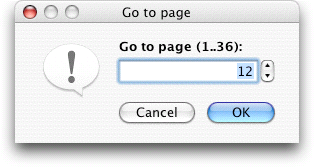
But I'm also OK with the Google way (by providing 10 pages):

Thanks!
 hsluoyz
All 6 comments
Hi @hsluoyz ,
Can you try adding paginationType: 'stepped' to options of table. It may resolve your requirements.
 mbrn
on 26 Mar 2019
mbrn
on 26 Mar 2019
@mbrn Hi, I tried your solution, but it only gave me one more page. The length is too small. I may want at least buttons for next 10 pages, or provide a "Go To" input box.

hsluoyz
on 11 Apr 2019
Hi @hsluoyz ,
I will do this but i need time.
mbrn
on 11 Apr 2019
This feature is needed in cases of large set of pages. Could this issue be reopened?
 zhaoyao91
on 23 Dec 2019
zhaoyao91
on 23 Dec 2019
Hi @hsluoyz ,
I will do this but i need time.
Hey, do you have an idea if you will add it as a functionality?
 ivanvladimirov
on 21 Apr 2020
ivanvladimirov
on 21 Apr 2020
Is this available now ? this is a very good feature
 shamseerahammedm
on 21 Aug 2020
shamseerahammedm
on 21 Aug 2020
Related issues
 timrchavez
·
3Comments
timrchavez
·
3Comments
 lazeebee
·
3Comments
lazeebee
·
3Comments
 kfirshahar
·
3Comments
kfirshahar
·
3Comments
 KKrisu
·
3Comments
KKrisu
·
3Comments
 rasheedb
·
3Comments
rasheedb
·
3Comments
Most helpful comment
Hi @hsluoyz ,
I will do this but i need time.