Is your feature request related to a problem? Please describe.
It is very annoying to have to click over and over to edit multiple rows.
There are many examples where users will have to edit each row in a table for user input data.
Describe the solution you'd like
There should be a way to open up editing on the entire table for bulk edits with a save and a cancel button.
 jakeleventhal
All 27 comments
Why not:)
 mbrn
on 16 Mar 2019
mbrn
on 16 Mar 2019
+1 :)
 wandrzejczak
on 12 Apr 2019
wandrzejczak
on 12 Apr 2019
@mbrn
is this feature released?
 hungbang
on 22 Aug 2019
hungbang
on 22 Aug 2019
@mbrn
+1
very much needed
 michaero
on 1 May 2020
michaero
on 1 May 2020
+1!
 arheinjohnson
on 29 May 2020
arheinjohnson
on 29 May 2020
+1
 thedmeyer
on 11 Jun 2020
thedmeyer
on 11 Jun 2020
+1
 VidushaZ
on 25 Jun 2020
VidushaZ
on 25 Jun 2020
+1 @mbrn please prioritise this.
We would want to bulk edit certain fields e.g. Status selector changes.
This would highly improve the user productivity.
 iamsaurabhgupt
on 8 Jul 2020
iamsaurabhgupt
on 8 Jul 2020
+1 @mbrn any news on this?
 TCM5
on 10 Jul 2020
TCM5
on 10 Jul 2020
+1 @mbrn any news on this?
 jeffsupancic
on 22 Jul 2020
jeffsupancic
on 22 Jul 2020
Bulk edit was added in the release 1.68.0
 atosh502
on 10 Aug 2020
atosh502
on 10 Aug 2020
@atosh502 That's great.
But, this saves only the time to click edit on every row.
In any case cell level editing now saves that.
The true power of Bulk editing will be when one can select 100s of rows and enter value on them simultaneously.
It can be visualised like this:
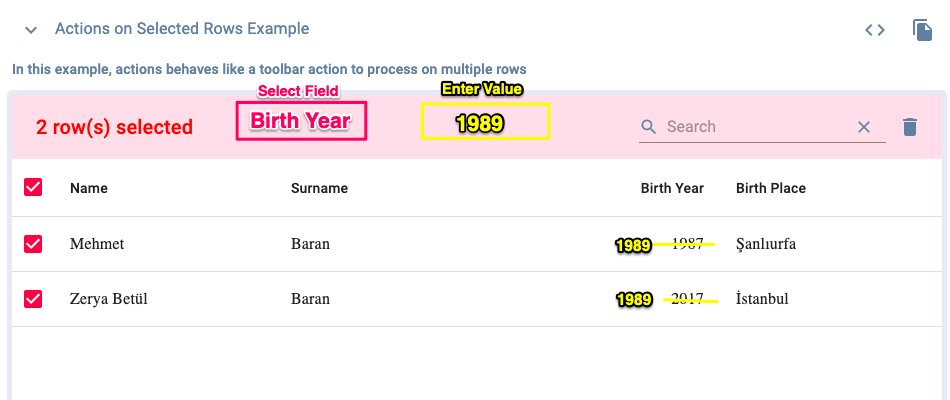
So, to change the birth year of both to 1989, we would still need to enter them twice.
If we are able to select the rows and select the field to set the value, then both can be changed at once.
Let me know if there's any confusion.
Hope it makes sense @mbrn
iamsaurabhgupt
on 10 Aug 2020
+1 It would be great if I could select all the rows I want to update, click edit, change a field value in one of them and confirm, editing all selected rows values.
 PedrinhowVieira
on 3 Sep 2020
PedrinhowVieira
on 3 Sep 2020
Hi @mbrn looks like this pr can solve this issue:
https://github.com/mbrn/material-table/pull/2359
michaero
on 5 Sep 2020
@iamsaurabhgupt
I solved this by adding a custom function to the table, with this it is possible to multi edit fields:
const [allSelectedRows, setAllSelectedRows] = useState([]);

onSelectionChange={(rows) => {
  setAllSelectedRows([...rows]);
}}

editable={{
  isEditable: (rowData) => data[rowData.tableData.id].Locked !== true,
  onRowUpdate: (newData, oldData) => new Promise((resolve) => {
    const dataUpdateArray = [...data];
    if (allSelectedRows.length && allSelectedRows.includes(oldData)) {    // if there is multiple checkboxes selected
      const updatedData = updatedDiff(oldData, newData);
      allSelectedRows.map((item) => {
        return Object.assign(dataUpdateArray[item.tableData.id], updatedData);
      });
    } else {    // if there is no selected checkbox, you are editing the row
      dataUpdateArray[oldData.tableData.id] = newData;
    }
    setData([...dataUpdateArray]);
    resolve();
  }),
}}
Thanks a lot @PedrinhowVieira. Will try to implement this.
Do have it implemented somewhere in CodeSandbox for ease of understanding and quick implementation?
iamsaurabhgupt
on 9 Sep 2020
@iamsaurabhgupt sure, here is a stackblitz made with all the necessary code to achieve the bulk editing. If you want more details about the implementation, I made a post in stackoverflow.
PedrinhowVieira
on 9 Sep 2020
Thanks a lot @PedrinhowVieira. It works.
Yet, it would have been wonderful if there was a selector for field and input for value.

iamsaurabhgupt
on 10 Sep 2020
You are welcome @iamsaurabhgupt.
About your suggestion, in my case, my users have to be able to edit multiple fields at the same time. In my solution they can edit, for example, Birth Year and Birth Place at the same time, plus it don't add more input fields, maintaining the UI simple and clean.
PedrinhowVieira
on 10 Sep 2020
@PedrinhowVieira is my use case doable?
iamsaurabhgupt
on 10 Sep 2020
@iamsaurabhgupt Probably doable, but your case would need changes in the library code since it adds fields and whatnot. My solution don't interfere with the library's code, that's why it was simple to implement. In order to achieve your desired feature you will have wait a reply from someone that develop material-table or study their code and contribute with it.
PedrinhowVieira
on 10 Sep 2020
ok @PedrinhowVieira, thanks for the effort though.
@mbrn can you shed some light on how to achieve my desirable functionality?
iamsaurabhgupt
on 10 Sep 2020
Is this feature implemented? Its not working as per document.
 shaheeralimm
on 13 Sep 2020
shaheeralimm
on 13 Sep 2020
@iamsaurabhgupt icon in actions is accepting a ReactElement, it's not the best way as the library is expecting a button and not select/input fields so you'll have to overwrite the stylings.

{javascript}
      actions={[
        {
          icon: () => <MyFields ids={ids} />,
 qwert666
on 29 Sep 2020
qwert666
on 29 Sep 2020
@qwert666 Thanks a lot for the suggestion.
Please share your code on codesandbox or stackblitz for a functional preview.
iamsaurabhgupt
on 1 Oct 2020
@iamsaurabhgupt https://codesandbox.io/s/aged-hooks-6oj0b?file=/src/App.tsx
qwert666
on 8 Oct 2020
Hey, @mbrn, @iamsaurabhgupt.
my PR: https://github.com/mbrn/material-table/pull/2359
should solve this issue.
 admasodaniel
on 16 Oct 2020
admasodaniel
on 16 Oct 2020
Related issues
 balibou
·
3Comments
balibou
·
3Comments
 timrchavez
·
3Comments
timrchavez
·
3Comments
 diegosps
·
3Comments
diegosps
·
3Comments
 Mihier-Roy
·
3Comments
Mihier-Roy
·
3Comments
 lazeebee
·
3Comments
lazeebee
·
3Comments
Most helpful comment
Why not:)