Material-table: Unexpected behavior with header styling
Describe the bug
https://mbrn.github.io/material-table/#/docz-examples-10-example-component-overriding
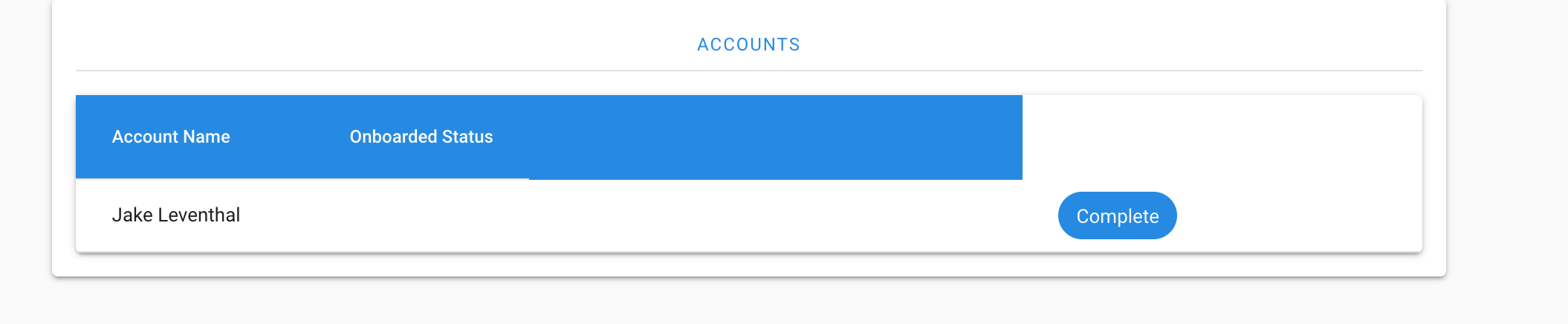
When trying to apply this to the table header, the cell columns get unaligned
Screenshots
Here is my code with a screenshot:
components={{
                    Header: props => (
                      <div style={{ background: palette.primary.main }}>
                        <MTableHeader {...props} />
                      </div>
                    )
                  }}
help wanted
 jakeleventhal
All 4 comments
Hi @jakeleventhal ,
You can not cover MTableHeader with a div.
Can you try this instead of it:
<MaterialTable
  options={{
    headerStyle: { background: 'red' }
  }}
  columns={[
    { title: 'Adı', field: 'name' },
    { title: 'Soyadı', field: 'surname' },
    { title: 'Doğum Yılı', field: 'birthYear', type: 'numeric' },
    {
      title: 'Doğum Yeri',
      field: 'birthCity',
      lookup: { 34: 'İstanbul', 63: 'Şanlıurfa' },
    },
  ]}
  data={[
    { name: 'Mehmet', surname: 'Baran', birthYear: 1987, birthCity: 63 },
  ]}
  title="Demo Title"
/>
 mbrn
on 15 Mar 2019
mbrn
on 15 Mar 2019
❤1
That works, the docs made it a little hard to infer that this was the correct solution though.
Thanks!
jakeleventhal
on 15 Mar 2019
👍1
This change breaks when upgrading from 1.24->1.25+
jakeleventhal
on 27 Mar 2019
Hi @jakeleventhal ,
It is fixed with 1.28.1.
mbrn
on 28 Mar 2019
👍1
Was this page helpful?
0 / 5 - 0 ratings
Related issues
 timrchavez
·
3Comments
timrchavez
·
3Comments
 kfirshahar
·
3Comments
kfirshahar
·
3Comments
 jlgreene2
·
3Comments
jlgreene2
·
3Comments
 victorwvieira
·
3Comments
victorwvieira
·
3Comments
 KKrisu
·
3Comments
KKrisu
·
3Comments