Material-table: Table Supports Density and Can Be Made "Dense"
The table supports MaterialUI Density so that it is easy to specify that the table is "Dense". Less white space in the table, preferred for desktop usage.
 brianpdev
All 12 comments
Hi @brianpdev ,
I tried something about this. But we use buttons, checkboxes and so. So it could broke some design if we apply this. So won't apply dense. Sorry
 mbrn
on 9 Mar 2019
mbrn
on 9 Mar 2019
Hey @mbrn, I understand that certain components can break on dense. But can you still please support such that dense can be applied if we do not use checkboxes and buttons in the table?
 stemarf50
on 9 Apr 2019
stemarf50
on 9 Apr 2019
of course. I will try to do it.
mbrn
on 9 Apr 2019
Thank you very much. I've chosen to use this for my project and this option will really help :)
stemarf50
on 10 Apr 2019
Hey @mbrn, any update on this one?
stemarf50
on 19 Apr 2019
@stemarf50 unfortunately. I am working on new documentation nowadays.
mbrn
on 19 Apr 2019
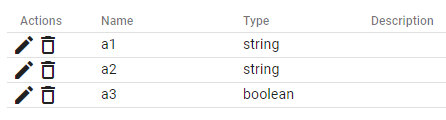
I was also looking forward for this feature. I propose a VERY UGLY workaround, but probably better than nothing. Note that this will not interfere with other pages, so it is better than importing a *.css file, as this would stay in DOM until you reload the page. It could probably be made even better by adding a custom class to make only certain tables in the same page dense. (Adjust padding value to your liking)
const specialCSS = "<style>.MuiTableCell-root.MuiTableCell-body.MuiTableCell-alignLeft { padding: 0 !important } .MuiTableCell-root.MuiTableCell-body.MuiTableCell-paddingNone .MuiIconButton-root { padding: 0 !important }</style>"
md5-3cfc0bf55a2cdbc3d68bba268a3da2ad
Result:
 masbaehr
on 18 Jun 2019
masbaehr
on 18 Jun 2019
Also look forward to seeing it working.
 OnkelTem
on 11 Nov 2019
OnkelTem
on 11 Nov 2019
+1
 flavioribeiro
on 2 Mar 2020
flavioribeiro
on 2 Mar 2020
+1
 atinyakov
on 2 Apr 2020
atinyakov
on 2 Apr 2020
I have stumbled upon the same issue today... i 've solved it somehow, not 100% "the material way", but it served my purpose... adding to the MaterialTable component the following options:
            options={{
                cellStyle: { padding: '0.3em'},
                headerStyle: { padding: '0.3em'},
              }}
 gabizz
on 6 Apr 2020
gabizz
on 6 Apr 2020
This issue has been automatically marked as stale because it has not had recent activity. It will be closed if no further activity occurs. Thank you for your contributions. You can reopen it if it required.
![stale[bot] picture](https://avatars3.githubusercontent.com/in/1724?v=4&s=40) stale[bot]
on 6 Jul 2020
stale[bot]
on 6 Jul 2020
Related issues
 Likurg2010
·
3Comments
Likurg2010
·
3Comments
 balibou
·
3Comments
balibou
·
3Comments
 roseak
·
3Comments
roseak
·
3Comments
 timrchavez
·
3Comments
timrchavez
·
3Comments
 diegosps
·
3Comments
diegosps
·
3Comments
Most helpful comment
I have stumbled upon the same issue today... i 've solved it somehow, not 100% "the material way", but it served my purpose... adding to the MaterialTable component the following options: