Material-table: [HOWTO] When mark checkbox row will be highlighted
How can I make this real?

 JoeKyy
All 12 comments
Look at this:
import React, { Component } from 'react';
import ReactDOM from 'react-dom';
import MaterialTable from './material-table';
import { createMuiTheme } from '@material-ui/core/styles';
import MuiThemeProvider from '@material-ui/core/styles/MuiThemeProvider';

const theme = createMuiTheme({
  palette: {
    secondary: {
      main: '#37b159',
      light: '#37b159',
      dark: '#37b159',
    }
  },
});

class App extends Component {
  state = {
    selectedCount: 0,
    data: [
      { id: 1, name: 'ax', surname: 'Baran', birthYear: 1987, birthCity: 63, sex: 'Male', type: 'adult' },
      { id: 2, name: 'bx', surname: 'Baran', birthYear: 1987, birthCity: 34, sex: 'Female', type: 'adult', parentId: 1 },
      { id: 3, name: 'cx', surname: 'Baran', birthYear: 1987, birthCity: 34, sex: 'Female', type: 'child', parentId: 1 },
      { id: 4, name: 'dx', surname: 'Baran', birthYear: 1987, birthCity: 34, sex: 'Female', type: 'child', parentId: 3 },
      { id: 5, name: 'ex', surname: 'Baran', birthYear: 1987, birthCity: 34, sex: 'Female', type: 'child' },
      { id: 6, name: 'fx', surname: 'Baran', birthYear: 1987, birthCity: 34, sex: 'Female', type: 'child', parentId: 5 },
    ],
    columns: [
      { title: 'Adı', field: 'name' },
      { title: 'Soyadı', field: 'surname', export: false },
      { title: 'Cinsiyet', field: 'sex', disableClick: true },
      { title: 'Tipi', field: 'type', removable: false },
      { title: 'Doğum Yılı', field: 'birthYear', type: 'numeric' },
      { title: 'Doğum Yeri', field: 'birthCity', lookup: { 34: 'İstanbul', 63: 'Şanlıurfa' } },
    ]
  }

  render() {
    return (
      <MuiThemeProvider theme={theme}>
        <div style={{ maxWidth: '100%' }}>
          <MaterialTable
            columns={this.state.columns}
            data={this.state.data}
            title="Demo Title"
            options={{
              selection: true,
              rowStyle: rowData => ({ backgroundColor: rowData.tableData.checked ? '#37b15933' : '' })
            }}
          />
        </div>
      </MuiThemeProvider>
    );
  }
}

 mbrn
on 5 Mar 2019
mbrn
on 5 Mar 2019
I Want to change the cell color when moving the mouse to the line.
 quocbaondvn2000
on 6 Mar 2019
quocbaondvn2000
on 6 Mar 2019
Just override MUI Theme like
import {
    withStyles,
    MuiThemeProvider,
    createMuiTheme
} from '@material-ui/core/styles'

const theme = createMuiTheme({
  overrides: {
    MuiTableRow: {
      "&$selected": {
        backgroundColor: 'red'
      }
    },
 }
})
thanks joeKyy
quocbaondvn2000
on 6 Mar 2019
You can send this table code for my reference
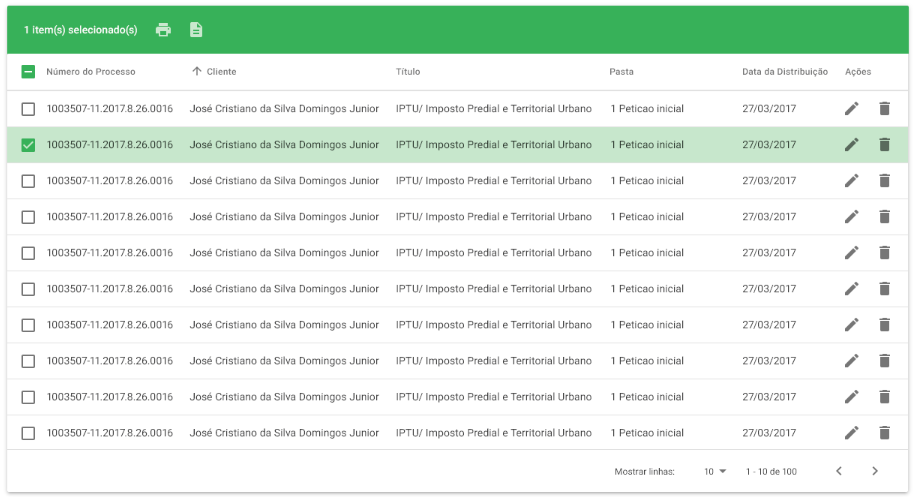
Thanks
quocbaondvn2000
on 6 Mar 2019
Sure
import React from 'react'

import {
  withStyles,
  MuiThemeProvider,
  createMuiTheme
} from '@material-ui/core/styles'

import green from '@material-ui/core/colors/green'
import MaterialTable, { MTableToolbar } from 'material-table'


class Table extends React.Component {
  constructor(props) {
    super(props)
      state = {
          selectedCount: 0,
          data: [
              { id: 1, name: 'ax', surname: 'Baran', birthYear: 1987, birthCity: 63, sex: 'Male', type: 'adult' },
              { id: 2, name: 'bx', surname: 'Baran', birthYear: 1987, birthCity: 34, sex: 'Female', type: 'adult', parentId: 1 },
              { id: 3, name: 'cx', surname: 'Baran', birthYear: 1987, birthCity: 34, sex: 'Female', type: 'child', parentId: 1 },
              { id: 4, name: 'dx', surname: 'Baran', birthYear: 1987, birthCity: 34, sex: 'Female', type: 'child', parentId: 3 },
              { id: 5, name: 'ex', surname: 'Baran', birthYear: 1987, birthCity: 34, sex: 'Female', type: 'child' },
              { id: 6, name: 'fx', surname: 'Baran', birthYear: 1987, birthCity: 34, sex: 'Female', type: 'child', parentId: 5 },
          ],
          columns: [
              { title: 'Adı', field: 'name' },
              { title: 'Soyadı', field: 'surname', export: false },
              { title: 'Cinsiyet', field: 'sex', disableClick: true },
              { title: 'Tipi', field: 'type', removable: false },
              { title: 'Doğum Yılı', field: 'birthYear', type: 'numeric' },
              { title: 'Doğum Yeri', field: 'birthCity', lookup: { 34: 'İstanbul', 63: 'Şanlıurfa' } },
          ]
      }
    }

  render() {

    const { classes } = this.props

    return (
      <div>
        <MuiThemeProvider theme={theme}>
            <MaterialTable
                components={{
                    Toolbar: props => (
                        <MTableToolbar classes={{ highlight: classes.highlight }} {...props} />
                    ),
                }}
                columns={this.state.columns}
                data={this.state.data}
                title="Demo Title"
                options={{
                    selection: true,
                    rowStyle: rowData => ({ backgroundColor: rowData.tableData.checked ? '#37b15933' : '' })
                }}
            />
          </MuiThemeProvider>
      </div>
    )
  }
}

const theme = createMuiTheme({
  palette: {
    secondary: {
      main: green[600]
    }
  },
  overrides: {
    MuiTableRow: {
      root: {
        height: 'inherit !important',
        minHeight: 50,
      },
      "&$selected": {
        backgroundColor: 'inherit'
      }
    },
    MuiTableCell: {
      root: {
        padding: '0 22px',
      },
      body: {
        fontSize: '.875rem'
      },
      paddingNone: {
        maxWidth: '48px !important',
        width: '48px !important',
      }
    },
    MuiListItem: {
      disabled: {
        display: 'none',
        '&:first-child': {
          display: 'inherit',
          paddingBottom: 0
        }
      }
    }
  }
})

const styles = theme => ({
  highlight: {
    backgroundColor: '#43a047 !important',
    "& *": {
      color: 'rgba(255, 255, 255, 0.8)',
    }
  }
})

export default withStyles(styles, { withTheme: true })(Table)
How can I make this real?
hi, how to do selectable and actions for each row?
 ohorbachov
on 18 Sep 2019
ohorbachov
on 18 Sep 2019
hi, how to do selectable and actions for each row?
take a look at this link, there was a "how to": https://material-ui.com/components/tables/#material-table
 GuilhermeAbacherli
on 5 Dec 2019
GuilhermeAbacherli
on 5 Dec 2019
hi, how to do selectable and actions for each row?
take a look at this link, there was a "how to": https://material-ui.com/components/tables/#material-table
hi, i can't find how to use select with actions :(
 mosaab97
on 9 Dec 2019
mosaab97
on 9 Dec 2019
hi, i can't find how to use select with actions :(
You can search in this documentation link for the topic Actions on Selected Rows Example.
<MaterialTable
    options={{
      selection: true
    }}
    actions={[
      {
        tooltip: 'Remove All Selected Users (Your action)',
        icon: 'delete',
        onClick: (evt, data) => alert('You want to delete ' + data.length + ' rows, (The event you got)')
      }
    ]}
/>
hi, i can't find how to use select with actions :(
You can search in this documentation link for the topic Actions on Selected Rows Example.
<MaterialTable
    options={{
      selection: true
    }}
    actions={[
      {
        tooltip: 'Remove All Selected Users (Your action)',
        icon: 'delete',
        onClick: (evt, data) => alert('You want to delete ' + data.length + ' rows, (The event you got)')
      }
    ]}
/>
i am sorry that is not what i mean.
i want to use selection and editable props .. how can i do it ?
because when i use selection the editable props disappear.
mosaab97
on 11 Dec 2019
hi, i can't find how to use select with actions :(
You can search in this documentation link for the topic Actions on Selected Rows Example.
<MaterialTable
    options={{
      selection: true
    }}
    actions={[
      {
        tooltip: 'Remove All Selected Users (Your action)',
        icon: 'delete',
        onClick: (evt, data) => alert('You want to delete ' + data.length + ' rows, (The event you got)')
      }
    ]}
/>
i am sorry that is not what i mean.
i want to use selection and editable props .. how can i do it ?
because when i use selection the editable props disappear.
Hi, have you found the way to do it? I am having the same problem. Thanks.
 tdkseraph
on 3 Feb 2020
tdkseraph
on 3 Feb 2020
Related issues
 Likurg2010
·
3Comments
Likurg2010
·
3Comments
 rasheedb
·
3Comments
rasheedb
·
3Comments
 revskill10
·
3Comments
revskill10
·
3Comments
 VipinJoshi
·
3Comments
VipinJoshi
·
3Comments
 slevy85
·
3Comments
slevy85
·
3Comments
Most helpful comment
Look at this: