Material-table: Icon not loading in react only label is showing
When i install in my react app then icon not loading
 mehuljariwala
All 20 comments
You should add material icons url to your html:
or use icons props to give icons to material-table:
https://mbrn.github.io/material-table/#/docz-examples-10-example-component-overriding
https://github.com/mbrn/material-table/issues/93#issuecomment-457015457
 mbrn
on 4 Feb 2019
mbrn
on 4 Feb 2019
Mine project already have material ui icons they all are loading but this table icons is not loading..
mehuljariwala
on 4 Feb 2019
Can you share screenshot and code usage of material-table.
mbrn
on 4 Feb 2019
"dependencies": {
"@material-ui/core": "^3.8.1",
"@material-ui/icons": "^3.0.1",
"@material-ui/lab": "^3.0.0-alpha.24",
}
{ title: "Name", field: "name" },
{ title: "Soyadı", field: "surname" },
{ title: "Doğum Yılı", field: "birthYear", type: "numeric" },
{
title: "Doğum Yeri",
field: "birthCity",
lookup: { 34: "İstanbul", 63: "Şanlıurfa" }
}
]}
data={[
{
name: "Mehmet",
surname: "Baran",
birthYear: 1987,
birthCity: 63
}
]}
title="title"
actions={[
{
icon: "done_all",
tooltip: "Do",
onClick: (event, rows) => {
alert("You selected " + rows.length + " rows");
}
}
]}
options={{
selection: true
}}
onSelectionChange={data =>
alert("You selected " + data.length + " rows")
}
/>
mehuljariwala
on 4 Feb 2019

mehuljariwala
on 4 Feb 2019
You should install icons with script tag in html or try to give icons like this: https://github.com/mbrn/material-table/issues/93#issuecomment-457015457
mbrn
on 4 Feb 2019
in react you should pass props like that i solved
icons={{ FirstPage: FirstPage }}
mehuljariwala
on 4 Feb 2019
some icons is not working on this also
mehuljariwala
on 4 Feb 2019
Which one?
mbrn
on 4 Feb 2019
@mehuljariwala as per referenced in https://github.com/mbrn/material-table/issues/93#issuecomment-457015457 and with a little bit of digging myself it turns out that the lib expects SortArrow while @material-ui/icons provides it under the name "Sort". This is working (TypeScript) code as of Material-Table v1.18.0
import { SvgIconProps } from '@material-ui/core/SvgIcon';
import Check from '@material-ui/icons/Check';
import ChevronLeft from '@material-ui/icons/ChevronLeft';
import ChevronRight from '@material-ui/icons/ChevronRight';
import FilterList from '@material-ui/icons/FilterList';
import FirstPage from '@material-ui/icons/FirstPage';
import LastPage from '@material-ui/icons/LastPage';
import Remove from '@material-ui/icons/Remove';
import SaveAlt from '@material-ui/icons/SaveAlt';
import Search from '@material-ui/icons/Search';
import SortArrow from '@material-ui/icons/Sort';
import ViewColumn from '@material-ui/icons/ViewColumn';
import MaterialTable, { Column } from 'material-table';
import React, { Component } from 'react';
import { commonObject } from '../utils/types';
interface Props {
data: commonObject[];
columns: Column[];
title: string;
}
class MUITable extends Component<Props> {
render () {
return (
<MaterialTable
columns={this.props.columns}
data={this.props.data}
title={this.props.title}
icons={{
Check: () => <Check /> as React.ReactElement<SvgIconProps>,
DetailPanel: () => <ChevronRight /> as React.ReactElement<SvgIconProps>,
Export: () => <SaveAlt /> as React.ReactElement<SvgIconProps>,
Filter: () => <FilterList /> as React.ReactElement<SvgIconProps>,
FirstPage: () => <FirstPage /> as React.ReactElement<SvgIconProps>,
LastPage: () => <LastPage /> as React.ReactElement<SvgIconProps>,
NextPage: () => <ChevronRight /> as React.ReactElement<SvgIconProps>,
PreviousPage: () => <ChevronLeft /> as React.ReactElement<SvgIconProps>,
Search: () => <Search /> as React.ReactElement<SvgIconProps>,
SortArrow: () => <SortArrow /> as React.ReactElement<SvgIconProps>,
ThirdStateCheck: () => <Remove /> as React.ReactElement<SvgIconProps>,
ViewColumn: () => <ViewColumn /> as React.ReactElement<SvgIconProps>,
}}
/>
);
}
}
export default MUITable;
 Favna
on 15 Feb 2019
Favna
on 15 Feb 2019
The clear icon is not working for me:
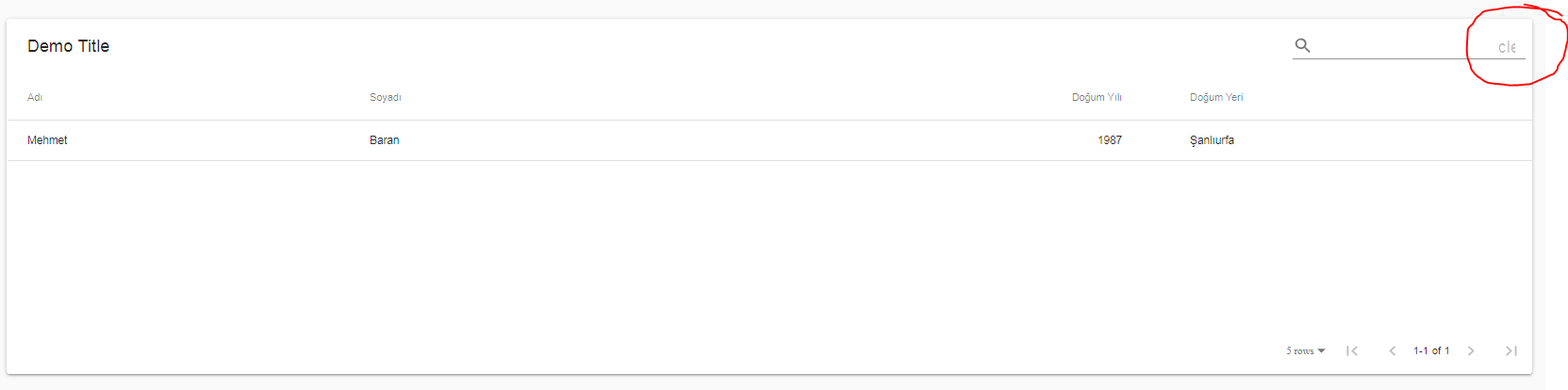
````
import Search from "@material-ui/icons/Search"
import ViewColumn from "@material-ui/icons/ViewColumn"
import SaveAlt from "@material-ui/icons/SaveAlt"
import ChevronLeft from "@material-ui/icons/ChevronLeft"
import ChevronRight from "@material-ui/icons/ChevronRight"
import FirstPage from "@material-ui/icons/FirstPage"
import LastPage from "@material-ui/icons/LastPage"
import Check from "@material-ui/icons/Check"
import FilterList from "@material-ui/icons/FilterList"
import Remove from "@material-ui/icons/Remove"
Check: () =>
Export: () =>
Filter: () =>
FirstPage: () =>
LastPage: () =>
NextPage: () =>
PreviousPage: () =>
Search: () =>
ThirdStateCheck: () =>
ViewColumn: () =>
DetailPanel: () =>
}}
columns={[
{title: "Ad_", field: "name"},
{title: "Soyad_", field: "surname"},
{title: "Do_um Y_l_", field: "birthYear", type: "numeric"},
{
title: "Do_um Yeri",
field: "birthCity",
lookup: {34: "_stanbul", 63: "_anl_urfa"}
}
]}
data={[
{
name: "Mehmet",
surname: "Baran",
birthYear: 1987,
birthCity: 63
}
]}
title="Demo Title"
/>
````
Is there a way to determine which icons we need to import for any particular layout?
 pak11273
on 7 Apr 2019
pak11273
on 7 Apr 2019
Hi @pak11273
use: ResetSearch
You can look at here to complete list of icons.
https://mbrn.github.io/material-table/#/docz-props
mbrn
on 8 Apr 2019
Got it. Should I leave these type questions on Gitter or StackOverflow?
pak11273
on 8 Apr 2019
I prefer stackoverflow or here. To someone else see them.
mbrn
on 8 Apr 2019
Hi @pak11273
use:
ResetSearchYou can look at here to complete list of icons.
https://mbrn.github.io/material-table/#/docz-props
@mbrn The link is break, where can I find the complete list of icons?
 mforman1
on 18 Sep 2019
mforman1
on 18 Sep 2019
For action props, providing a string failed, search and pagination icons were showing, had to return a react element to get action icons to display..
        actions={[
            {
                icon: () => <AddBox />,
                tooltip: 'Add User',
                isFreeAction: true,
                onClick: (event) => alert("You want to add a new row")
            }
        ]}
 rocketkittens
on 7 Jan 2020
rocketkittens
on 7 Jan 2020
Hi,I am facing the same issue...my icons are not displaying on web although added the library
 Jyotiaggarwal235
on 2 Jun 2020
Jyotiaggarwal235
on 2 Jun 2020
Thanks @rocketkittens "had to return a react element to get action icons to display.."
actions={[
            {
                icon: () => <Edit />,
                icon: () => <Delete />,
               .
               .
               .
            }
        ]}
this worked for me.
 Henao
on 19 Jun 2020
Henao
on 19 Jun 2020
Thanks @rocketkittens, just want to add,
if you put your icons definition on separate file then use (in my case I defined all the icons in tableIcons object which is
stored in another file like icons.config.js):
import { tableIcons } from '../../utils/icons.config.util';

actions={[
          {
            icon: () => <tableIcons.Email />,
            tooltip: 'Send Email Reminder',
            onClick: (event, rowData) => alert('You send ' + rowData.name),
          },
        ]}
 yudyhendry
on 6 Oct 2020
yudyhendry
on 6 Oct 2020
some material.io icon doesn't work, like admin_panel_settings icons
example in my menu
{label: msg ('menu.admin.roles'), icon: 'admin_panel_settings', to: '/ roles', features: [ROLE]},
in Ultima reactJs
 stehen77
on 23 Nov 2020
stehen77
on 23 Nov 2020
Related issues
 jlgreene2
·
3Comments
jlgreene2
·
3Comments
 ModPhoenix
·
3Comments
ModPhoenix
·
3Comments
 timrchavez
·
3Comments
timrchavez
·
3Comments
 terapepo
·
3Comments
terapepo
·
3Comments
 slevy85
·
3Comments
slevy85
·
3Comments
Most helpful comment
For action props, providing a string failed, search and pagination icons were showing, had to return a react element to get action icons to display..