Material-components-web: [mdc-select] floating label disappears under density subsystem
Bug report
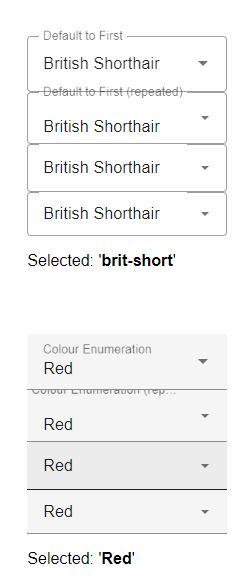
MDC Selects with density other than zero show the floating label moving out of range. It looks like the distance between the label and the base of the select remains constant irrespective of the density, and so it becomes invisible once it is "above" it's correct location.
Steps to reproduce
- Apply density mixins to mdc-select, from 0 to -3.
- View each and notice floating labels "disappearing".
Actual behavior
As described above.
Expected behavior
The floating label should appear in the correct location irrespective of density.
Screenshots
Your Environment:
| Software | Version(s) |
| ---------------- | ---------- |
| MDC Web | 7.0.0 |
| Browser | Chrome |
| Operating System | Windows 10 |
Additional context
The following gist has a copy of the HTML markup that has been generated, and taken from Chrome developer tools for the relevant selects, along with the SASS mixin usage and resultant CSS for one of the density levels. selected (-3).
https://gist.github.com/simonziegler/239c82dcd0fa48facd430038cc1ff423
There seems to be a similar issue with Text Fields. I hope to be able to refer you to a demonstration website in a few days.
 simonziegler
All 7 comments
Hey Simon,
Thanks for reaching out! I see you're applying all 4 filled (& filled with icon) and outlined density (& outlined with icon) mixins together under the same classes. This way filled select/textfield will be getting unwanted styles from filled+leading icon & outlined dense variants. The mixins should be applied to their targeted variants only.
Could you try separating the styles in each level out by variant? i.e.:
    .my-filled-select {
      &.dense--3,
      &.dense-compact {
          @include select.filled-density(-3);
      }
      // Similarly for other levels
    }

    .my-outlined-select {
        // apply density levels here

    }

   // Similarly for filled with icon, outlined with icon
I fathom this is also the reason you're having the same issue in textfield.
 allan-chen
on 24 Jul 2020
allan-chen
on 24 Jul 2020
Oh I see! Looks like I need to do a little work here. Many thanks!
simonziegler
on 24 Jul 2020
No problem! Once those are fixed, note that for the filled variant any density below -2 will require an external label since there simply isn't enough space. Same applies to textfield.
Also, thanks for providing the gist - it really helped pinpoint the issue quickly.
allan-chen
on 24 Jul 2020
And thank you for responding so quickly. I note the point about external labels and will tread carefully.
simonziegler
on 24 Jul 2020
Just wanted to let you know that so far dense selects are looking great. Thanks again, Allan.
simonziegler
on 25 Jul 2020
@allan-chen, I'm finding that a density of -2 also needs the floating label suppressed for the filled variant. This would mean you use the label only for Default and minus 1. All other densities require label suppression. Is that correct? Tx
simonziegler
on 25 Jul 2020
Glad it works! And yes, anything lower than or equal to -2 for the filled variant will need it.
allan-chen
on 25 Jul 2020
Related issues
 devshekhawat
·
3Comments
devshekhawat
·
3Comments
 CyborgSemon
·
3Comments
CyborgSemon
·
3Comments
 ghost
·
3Comments
ghost
·
3Comments
 cintaccs
·
3Comments
cintaccs
·
3Comments
 ronnieroyston
·
3Comments
ronnieroyston
·
3Comments