Material-components-web: [mdc-text-field] input not correctly aligned in Safari 13.1
Bug report
After upgrading to textfield 6.0.0 the input in mdc-text-fields isn't aligned correctly anymore. It seems to fix itself after entering text and clicking the input.
Steps to reproduce
- Go to https://jsbin.com/sekemoyivi/2/edit?html,output in Safari
- Click on the input field and enter text
- See that the input field is centered and intersects with the label text
- Click on the entered text, the alignment seems to fix itself
Screenshots
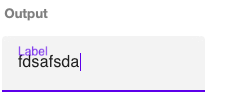

Your Environment:
| Software | Version(s) |
| ---------------- | ---------- |
| MDC Web | 6.0.0
| Browser | Safari Version 13.1 (15609.1.20.111.8)
| Operating System | macOS 10.15.4 (19E287)
 Strayer
All 4 comments
Thanks for the issue! It looks like a bug in webkit: https://bugs.webkit.org/show_bug.cgi?id=142968
We'll see if there's anything we can do to help speed along a fix and get a workaround in the meantime.
 asyncLiz
on 1 May 2020
asyncLiz
on 1 May 2020
This is a serious regression. Any news?
 MaximBalaganskiy
on 5 Sep 2020
MaximBalaganskiy
on 5 Sep 2020
We're currently working on an update to text field's layout that addresses this issue.
asyncLiz
on 8 Sep 2020
As a workaround for now you can set the placeholder attribute of the input element to a single space. i.e.
<input type="text" class="mdc-text-field__input" aria-labelledby="my-label" placeholder=" ">
 robinsummerhill
on 16 Oct 2020
robinsummerhill
on 16 Oct 2020
Related issues
 kimurakenshi
·
3Comments
kimurakenshi
·
3Comments
 patrickrodee
·
3Comments
patrickrodee
·
3Comments
 traviskaufman
·
3Comments
traviskaufman
·
3Comments
 yapryntsev
·
3Comments
yapryntsev
·
3Comments
 ronnieroyston
·
3Comments
ronnieroyston
·
3Comments
Most helpful comment
Thanks for the issue! It looks like a bug in webkit: https://bugs.webkit.org/show_bug.cgi?id=142968
We'll see if there's anything we can do to help speed along a fix and get a workaround in the meantime.