Material-components-web: [mdc-card] Text color is not being set based on current theme color palette
Bug report
Text color is not being set based on current theme color palette
Steps to reproduce
- Create a custom theme with different values for
surfaceandon-surfacecolors. In my case i'm creating a dark theme wheresurfaceis black andon-surfaceis white. - Compile your scss styles.
- Check card component styles.
Actual behavior
Text color is set to black instead of white.
Expected behavior
Text color should be white since that is the value that $on-surface has.
Additional context
By looking at the base mdc-card styles i see that background-color is being set to surface but color is inherited:
.mdc-card {
  border-radius: 4px;
  background-color: #212121;
  /* @alternate */
  background-color: var(--mdc-theme-surface, #212121);
  /* @alternate */
  position: relative;
  /* @alternate */
  box-shadow: 0px 2px 1px -1px rgba(0, 0, 0, 0.2), 0px 1px 1px 0px rgba(0, 0, 0, 0.14), 0px 1px 3px 0px rgba(0, 0, 0, 0.12);
  display: flex;
  flex-direction: column;
  box-sizing: border-box;
}
Possible solution
@use "@material/theme";

.mdc-card {
 color: theme.$on-surface;
}
 kimurakenshi
All 4 comments
This should be intentional, since the foreground color of content on a card can vary and is not always guaranteed to be the on-surface color.
Have you tried adding the .mdc-theme--on-surface class to the content that should be the on-surface color?
<div class="mdc-card">
  <div class="mdc-theme--on-surface">I should be on-surface</div>
  <div class="mdc-card__actions">
    <div class="mdc-card__action-buttons">
      <button class="mdc-button mdc-card__action mdc-card__action--button">
        <div class="mdc-button__ripple"></div>
        <span class="mdc-button__label">I should not be on-surface</span>
      </button>
    </div>
  </div>
</div>
You can also set the background/color of the root element and let things fall through CSS's inherit.
@use "@material/theme" with (
  $surface: black,
  $on-surface: white
);

html { /* or another root app element */
  background-color: theme.$surface;
  color: theme.$on-surface;
}
 asyncLiz
on 10 Mar 2020
asyncLiz
on 10 Mar 2020
Hi @asyncLiz, if this is intentional i think the background color of card should not be set to surface by default then to be consistent with the behavior you are describing. What is happening now is that if you have a custom theme with:
$surface: #212121;
$on-surface: #fff;
You end up with something like this:

And i can see the surface color is being set by the component here:
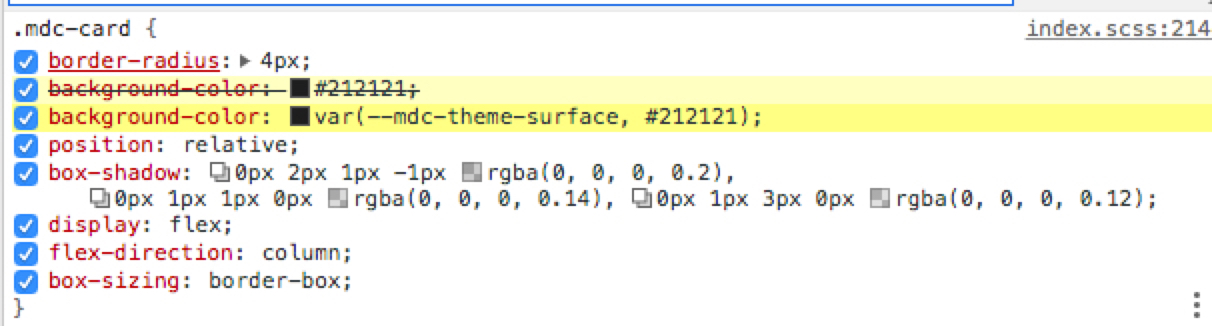
I can workaround this by changing the colors manually like you suggested but it seems the theme in this component works a little bit different than in the other components. Also, i agree that the content of a card could be anything but mots likely the content is going to be defined but a combination of components that tis library offer and if all of them follow the theme implementation it should not be a need to set the theme colors with mdc-theme- classes, it should work by default.
kimurakenshi
on 10 Mar 2020
I'll bring this up with the team this week!
asyncLiz
on 10 Mar 2020
This makes sense to us. Adding it to our backlog to add on-surface foreground color to cards. We'll do some investigating to make sure this doesn't break anything.
asyncLiz
on 13 Mar 2020
Related issues
kimurakenshi
·
3Comments
 traviskaufman
·
3Comments
traviskaufman
·
3Comments
 trimox
·
4Comments
trimox
·
4Comments
 devshekhawat
·
3Comments
devshekhawat
·
3Comments
 abhiomkar
·
3Comments
abhiomkar
·
3Comments