Material-components-web: [MDCDrawer] Add build-in support for change drawer type at runtime
Feature Request
Hello. I'am working on a app that should be adapted depending of the user's screen size. It uses a Drawer to show the navigation menu. The problem is the following: if I use a Modal Drawer, the user needs to click on the menu button to open it when he's in a large screen. Mobile users don't have this problem. To solve the problem, I can use a Dismissible Drawer, but it's not designed to mobile devices.
Is it possible to add a new element (like Responsive Drawer) that changes depending on the screen size? Or there's a easy way to change the type of Drawer using css @media? The Material Design specification says that "[Modal Drawer] can be replaced by standard drawers on tablet and desktop", but it is not easy to do in web (or I don't know how).
Proposed solution
IMHO, adding a new type of Drawer is the easier solution. It's a good idea to add a section in the Drawer Web Component to help developers, showing a way to use a "responsive" drawer that adapts itself depending of the screen.
The #590 issue is similar to this, but it doesn't show a clear solution to the problem.
Thanks in advance.
 m-alzam
All 11 comments
Thanks for the suggestion Manuel!
Please see example on Glitch for responsive drawer:
https://glitch.com/~material-responsive-drawer
We can link this example to our drawer README file, since this is requested frequently.
PR Welcome :)
 abhiomkar
on 13 Jun 2019
abhiomkar
on 13 Jun 2019
That was a useful example. Thanks.
Is there an example where the dismissible drawer is below the top app bar (ex: https://github.com/material-components/material-components-web/tree/master/packages/mdc-drawer#dismissible-drawer-below-top-app-bar) for non-mobile screens and switches to modal drawer for mobile screens?
 samstride
on 14 Jun 2019
samstride
on 14 Jun 2019
Yes like @samstride says I am looking for something that works exactly the same as news.google.com
Eg:
The Dismissible Drawer appears Non Modal when in desktop. ( But can still be hidden )
and as soon as it goes to tablet or mobile view it becomes modal.
 youbet1980
on 14 Jun 2019
youbet1980
on 14 Jun 2019
Hello.
If I have time this summer, I will try to create a MDCResponsibleDrawer or something similar, @abhiomkar.
Thanks
m-alzam
on 16 Jun 2019
Hello
I have styling the MDCDrawer component to be responsive, but I don't know who to create or modify a component, so I decided to put the code here and ask if someone can help me.
CSS:
.mdc-drawer {
  position: inherit;
}

.mdc-drawer-scrim {
  display: none;
  visibility: hidden;
  background-color: rgba(0, 0, 0, 0.32);
  z-index: 7;
}

.mdc-drawer__header {
  display: none;
}

// Mobile
@media (max-width: 600px) {
  .mdc-drawer {
    z-index: 10;
    padding-top: 0;
    position: fixed;
  }

  .mdc-drawer-scrim {
    visibility: visible;
  }

  .mdc-drawer__header {
    display: block;
  }

}
JS
document.querySelector(".mdc-drawer-scrim").addEventListener("click", () => {
    drawer.open = !drawer.open;
});
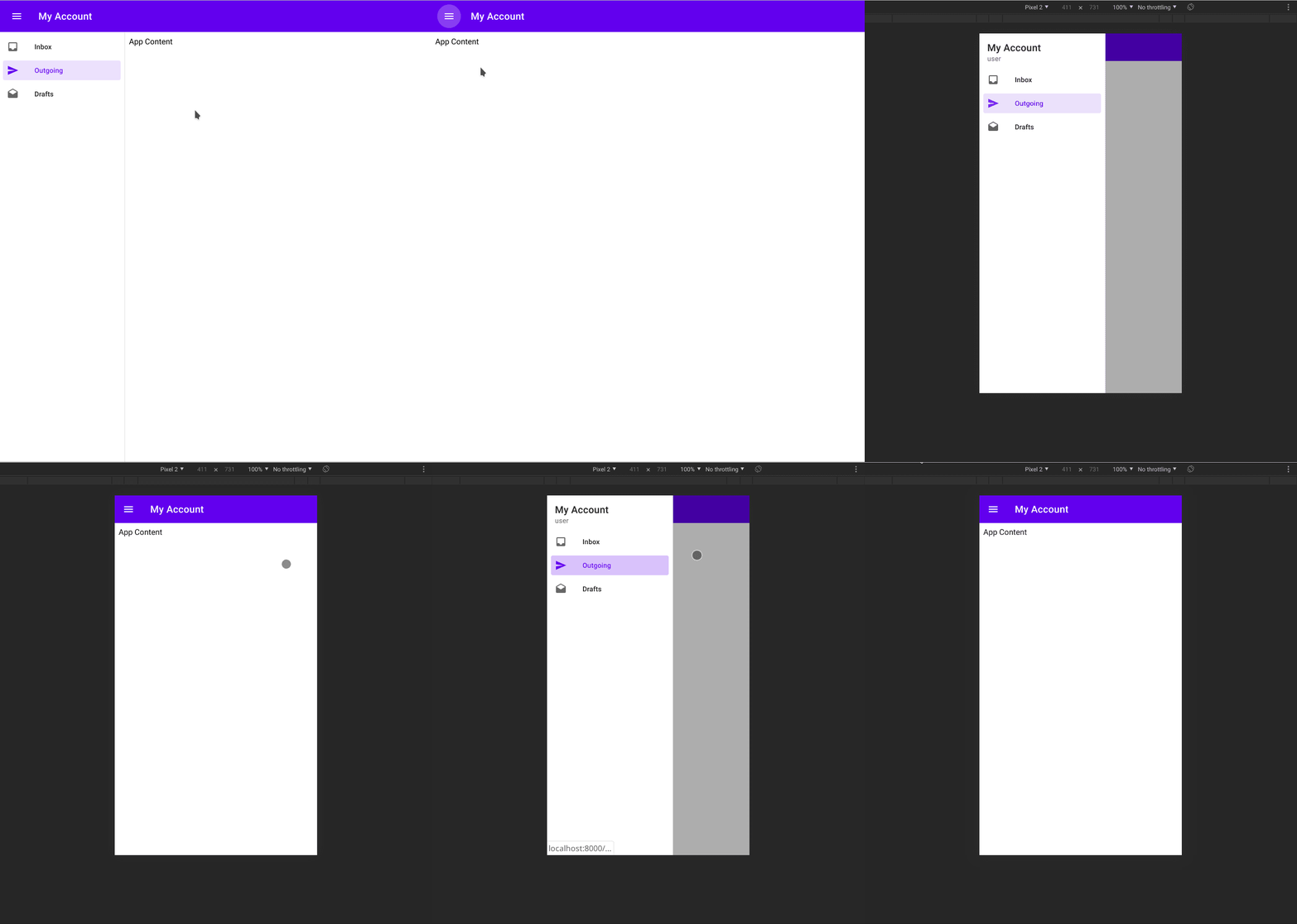
And the final result:
m-alzam
on 18 Jul 2019
@m-alzam , are you able to post the HTML as well please? I tried to guess the HTML and I couldn't reproduce your result.
Here is my HTML, sorry it's a bit of a guess work from all the docs and your code:
<!DOCTYPE html>

<html lang="en">

<head>
    <meta charset="utf-8">
    <meta name="viewport" content="width=device-width, initial-scale=1, shrink-to-fit=no">
    <title>Responsive Drawer</title>

    <link rel="stylesheet" href="https://fonts.googleapis.com/css?family=Roboto:300,400,500">
    <link rel="stylesheet" href="https://fonts.googleapis.com/icon?family=Material+Icons">
    <link rel="stylesheet" href="https://unpkg.com/material-components-web@latest/dist/material-components-web.min.css">
    <style>
        body {
            display: flex;
            height: 100vh;
        }

        .mdc-drawer {
            position: inherit;
        }

        .mdc-drawer-scrim {
            display: none;
            visibility: hidden;
            background-color: rgba(0, 0, 0, 0.32);
            z-index: 7;
        }

        .mdc-drawer__header {
            display: none;
        }

        @media (max-width: 600px) {
            .mdc-drawer {
                z-index: 10;
                padding-top: 0;
                position: fixed;
            }

            .mdc-drawer-scrim {
                visibility: visible;
            }

            .mdc-drawer__header {
                display: block;
            }

        }
    </style>
</head>

<body>
    <header class="mdc-top-app-bar app-bar" id="app-bar">
        <div class="mdc-top-app-bar__row">
            <section class="mdc-top-app-bar__section mdc-top-app-bar__section--align-start">
                <button class="material-icons mdc-top-app-bar__navigation-icon mdc-icon-button">menu</button>
                <span class="mdc-top-app-bar__title">Dismissible Drawer</span>
            </section>
        </div>
    </header>
    <aside class="mdc-drawer mdc-drawer--modal">
        <div class="mdc-drawer__content">
            <nav class="mdc-list">
                <a class="mdc-list-item mdc-list-item--activated" href="#" aria-current="page">
                    <i class="material-icons mdc-list-item__graphic" aria-hidden="true">inbox</i>
                    <span class="mdc-list-item__text">Inbox</span>
                </a>
                <a class="mdc-list-item" href="#">
                    <i class="material-icons mdc-list-item__graphic" aria-hidden="true">send</i>
                    <span class="mdc-list-item__text">Outgoing</span>
                </a>
                <a class="mdc-list-item" href="#">
                    <i class="material-icons mdc-list-item__graphic" aria-hidden="true">drafts</i>
                    <span class="mdc-list-item__text">Drafts</span>
                </a>
            </nav>
        </div>
    </aside>

    <div class="mdc-drawer-scrim"></div>
    <div class="main-content" id="main-content">
        Main Content
    </div>
    <script src="https://unpkg.com/material-components-web@latest/dist/material-components-web.min.js"></script>
    <script>
        const drawer = new mdc.drawer.MDCDrawer.attachTo(document.querySelector('.mdc-drawer'));
        const topAppBar = new mdc.topAppBar.MDCTopAppBar.attachTo(document.getElementById('app-bar'));
        topAppBar.setScrollTarget(document.getElementById('main-content'));
        /*
        topAppBar.listen('MDCTopAppBar:nav', () => {
            drawer.open = !drawer.open;
        });
        */
        document.querySelector(".mdc-drawer-scrim").addEventListener("click", () => {
            drawer.open = !drawer.open;
        });
    </script>
</body>

</html>
Hi @samstride!
My HTML code is a bit different. Add the js and css, that should be fine.
<header class="mdc-top-app-bar app-bar" id="app-bar">
    <div class="mdc-top-app-bar__row">
        <section class="mdc-top-app-bar__section mdc-top-app-bar__section--align-start">
            <button class="mdc-icon-button material-icons mdc-top-app-bar__navigation-icon">menu</button>
            <span class="mdc-top-app-bar__title">Chess</span>
        </section>
    </div>
</header>
<aside class="mdc-drawer mdc-drawer--dismissible mdc-top-app-bar--fixed-adjust">
    <div class="mdc-drawer__header">
        <h3 class="mdc-drawer__title">Chess</h3>
        <h6 class="mdc-drawer__subtitle">username</h6>
    </div>
    <div class="mdc-drawer__content">
        <div class="mdc-list">
            <a class="mdc-list-item mdc-list-item--activated" aria-current="page">
                <span class="mdc-list-item__graphic material-icons">computer</span>
                <span class="mdc-list-item__text">Play vs computer</span>
            </a>
        </div>
    </div>
</aside>

<div class="mdc-drawer-scrim"></div>

<div class="mdc-drawer-app-content mdc-top-app-bar--fixed-adjust">
    <main class="main-content" id="main-content">
        Content
    </main>
</div>
This is a part of a project I'm working on. May be it will be open source at Christmas/New Year. I can post here a note when it's published, if you want.
m-alzam
on 10 Dec 2019
Hi @m-alzam ,
Here is the updated HTML, CSS and JS. Still can't get it to work. I am using the latest version of mdc (4.0.0 as of this post)
<!DOCTYPE html>

<html lang="en">

<head>
    <meta charset="utf-8">
    <meta name="viewport" content="width=device-width, initial-scale=1, shrink-to-fit=no">
    <title>Responsive Drawer</title>

    <link rel="stylesheet" href="https://fonts.googleapis.com/css?family=Roboto:300,400,500">
    <link rel="stylesheet" href="https://fonts.googleapis.com/icon?family=Material+Icons">
    <link rel="stylesheet" href="https://unpkg.com/material-components-web@latest/dist/material-components-web.min.css">
    <style>
        body {
            display: flex;
            height: 100vh;
            margin: 0;
        }

        .mdc-drawer {
            position: inherit;
        }

        .mdc-drawer-scrim {
            display: none;
            visibility: hidden;
            background-color: rgba(0, 0, 0, 0.32);
            z-index: 7;
        }

        .mdc-drawer__header {
            display: none;
        }

        @media (max-width: 600px) {
            .mdc-drawer {
                z-index: 10;
                padding-top: 0;
                position: fixed;
            }

            .mdc-drawer-scrim {
                visibility: visible;
            }

            .mdc-drawer__header {
                display: block;
            }

        }
    </style>
</head>

<body>
    <header class="mdc-top-app-bar app-bar" id="app-bar">
        <div class="mdc-top-app-bar__row">
            <section class="mdc-top-app-bar__section mdc-top-app-bar__section--align-start">
                <button class="mdc-icon-button material-icons mdc-top-app-bar__navigation-icon">menu</button>
                <span class="mdc-top-app-bar__title">Chess</span>
            </section>
        </div>
    </header>
    <aside class="mdc-drawer mdc-drawer--dismissible mdc-top-app-bar--fixed-adjust">
        <div class="mdc-drawer__header">
            <h3 class="mdc-drawer__title">Chess</h3>
            <h6 class="mdc-drawer__subtitle">username</h6>
        </div>
        <div class="mdc-drawer__content">
            <div class="mdc-list">
                <a class="mdc-list-item mdc-list-item--activated" aria-current="page">
                    <span class="mdc-list-item__graphic material-icons">computer</span>
                    <span class="mdc-list-item__text">Play vs computer</span>
                </a>
            </div>
        </div>
    </aside>

    <div class="mdc-drawer-scrim"></div>

    <div class="mdc-drawer-app-content mdc-top-app-bar--fixed-adjust">
        <main class="main-content" id="main-content">
            Content
        </main>
    </div>
    <script src="https://unpkg.com/material-components-web@latest/dist/material-components-web.min.js"></script>
    <script>
        const drawer = new mdc.drawer.MDCDrawer.attachTo(document.querySelector('.mdc-drawer'));
        const topAppBar = new mdc.topAppBar.MDCTopAppBar.attachTo(document.getElementById('app-bar'));
        topAppBar.setScrollTarget(document.getElementById('main-content'));
        document.querySelector(".mdc-drawer-scrim").addEventListener("click", () => {
            drawer.open = !drawer.open;
        });
    </script>
</body>

</html>
Hi,
You need to use sass and es2015 in order to make the feature working. See the documentation for more details: https://material.io/develop/web/docs/getting-started/
m-alzam
on 26 Jan 2020
Why is this closed? The title asks for built-in support. We are all coders and could make it ourselves, but that kinda defeats the purpose of using a UI library.
This use case applies to nearly all web apps, this should be built in the material library as it was for Polymer.
https://www.webcomponents.org/element/@polymer/app-layout/elements/app-drawer-layout
Has development of this library started to stagnate?
 MarcMouallem
on 2 Aug 2020
MarcMouallem
on 2 Aug 2020
Quite a few MDC components were never made for html such as the bottom icons. I'm not sure if something else has taken over instead of this like flutter and we should learn that instead.
youbet1980
on 2 Aug 2020
Related issues
 ronnieroyston
·
3Comments
ronnieroyston
·
3Comments
 traviskaufman
·
3Comments
abhiomkar
·
3Comments
traviskaufman
·
3Comments
abhiomkar
·
3Comments
 CyborgSemon
·
3Comments
traviskaufman
·
3Comments
CyborgSemon
·
3Comments
traviskaufman
·
3Comments
Most helpful comment
Thanks for the suggestion Manuel!
Please see example on Glitch for responsive drawer:
https://glitch.com/~material-responsive-drawer
We can link this example to our drawer README file, since this is requested frequently.
PR Welcome :)