Material-components-web: [TextField] bug(text-field, notched-outline): Chrome autofill doesn't work with outline variant
Hi,
there is still a problem with autofilling of credentials in Chrome, when the outlined variant of textfields is used:

There was already an issue (#137) for the non-outlined variant, which was solved in #180:
https://github.com/material-components/material-components-web/blob/70672f12ff19591c53fef6876c059c854f9cb816/packages/mdc-textfield/mdc-text-field.scss#L134-L138
_(Please note that the filename has changed after the PR.)_
As in the outline variant more classes and combinations of classes are involved for the filled state, there'll be more CSS selectors with * &:-webkit-autofill, as well as more JS needed, as far as I can guess without having a deeper look into the library/SCSS files.
What MDC Web Version are you using?
0.44.1
What browser(s) is this bug affecting?
It's only a problem with Chrome, Firefox still sends a change event. I can't say anything about the other browsers at the moment as I haven't tested them.
What are the steps to reproduce the bug?
Create a form with a textfield for username and password while using the outlined variant. Then open it in Chrome, type in some credentials, save them with Chrome and reload the page.
Hints:
- Chrome doesn't ask for saving the credentials when it's a local path.
- Do not click around in the page as this will cause the labels to be updated.
 TheCom3di4n
All 11 comments
I've been investigating this in our codebase and put together this hacky quickfix. There's got to be a better way to handle it.
window.setTimeout(() => {
  document
    .querySelectorAll('.mdc-text-field__input:-webkit-autofill')
    .forEach(el => {
      const textField = el.parentNode;
      const label = textField.querySelector('.mdc-floating-label');
      if (label) {
        label.classList.add('mdc-floating-label--float-above');
      }
      if (textField.MDCTextField) {
        textField.MDCTextField.foundation_.notchOutline(true);
      }
    });
}, 300);
 pangolingo
on 25 Feb 2019
pangolingo
on 25 Feb 2019
Thanks for reporting this issue @TheCom3di4n!
Unlike the filled variant of textfield the notched outline requires JS to calculate the width of notch and seems like can't be solved only with CSS.
Thanks @pangolingo for temporary workaround!
Adding additional condition to check if input element has :-webkit-autofill seems to solve the original issue. Fix coming up soon. Adding this to icebox.
 abhiomkar
on 26 Feb 2019
abhiomkar
on 26 Feb 2019
Here is an codepen to reproduce this issue:
https://codepen.io/williamernest/full/WmbZZN
abhiomkar
on 15 Apr 2019
Recent updates in Chrome browser automatically fixes this issue. I'm not able to reproduce it anymore.
This bug on chromium might be related?
I'm closing this one. Please feel free to re-open if you encounter this issue again.
abhiomkar
on 10 May 2019
Hi @abhiomkar,
first of all, I want to note that I also had a time when I couldn't reproduce the bug, but I was unsure if it wasn't me. Unfortunately, I can't remember the Chrome version I was using at the time.
But now I can reproduce it again. We also tested it on two independent computers. (Same version of Chrome)

Version of Chrome: 74.0.3729.131
Version of material-components-web: latest@05/13/2019
Oh, and I can't reopen the issue because I don't have the necessary rights.
TheCom3di4n
on 13 May 2019
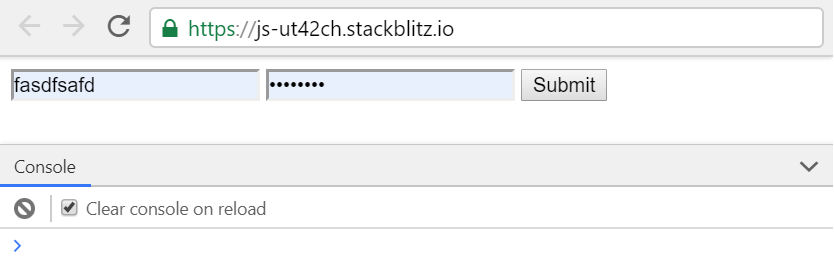
I did some more tests with a simpler setup. Firefox still sends a change event when fields are filled automatically.
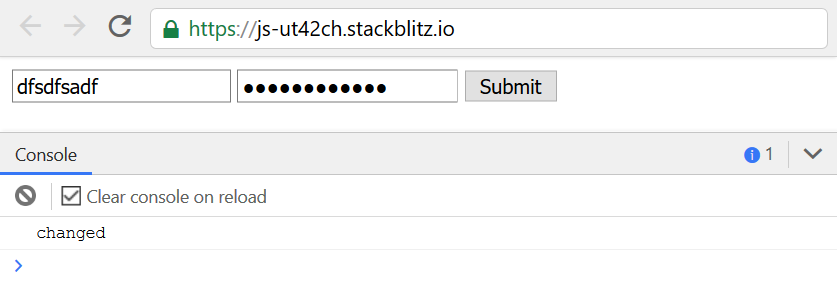
Chrome definitely doesn't do this, but only after clicking somewhere else on the page. I'm not sure what the intention behind this behavior might be.
Exception: If you use the menu to select a specific account, Chrome will also send a change event directly.
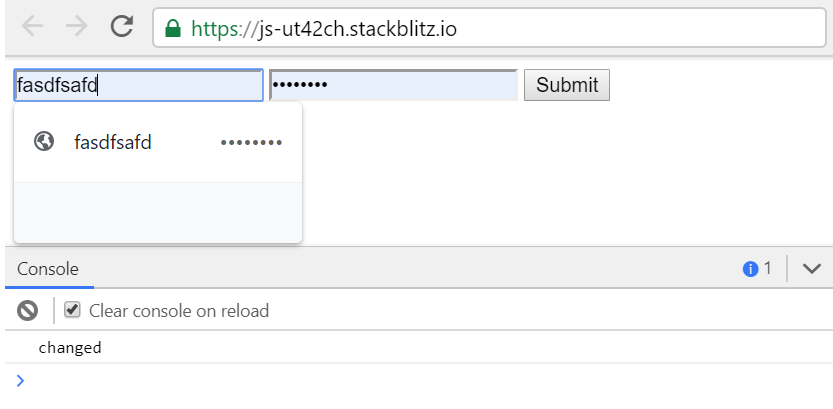
Since this, in my opinion, is a different behavior for one and the same process, this seems to be an unwanted behavior of Chrome, so consequently a bug, I guess.
CC @abhiomkar
TheCom3di4n
on 14 May 2019
Thanks for testing this!
Yes, I'm able to repro issue on this page:
https://codepen.io/williamernest/details/WmbZZN
abhiomkar
on 16 May 2019
In my proposed implementation I used Element.matches(':-webkit-autofill') API to detect the presence of chrome browser autofill. But there is no standardized way to detect autofill across browsers. For example above matches API throws error in Firefox since the selector is invalid.
I suggest to use textField.layout() API after initializing MDCTextField component as workaround.
Here is the updated codepen with this fix:
https://codepen.io/abhiomkar/pen/ZNVbYo
Here is the demo where I'm not able to repro this issue with this fix:
https://s.codepen.io/abhiomkar/debug/ZNVbYo/yoMZEWwPjDak
We can alternatively use try {} catch {} block when using matches API, but I do not want to go down the rabbit hole by introducing browser specific code.
I'm closing this one as Won't Fix. But provided workaround for this issue.
abhiomkar
on 31 May 2019
Hi @abhiomkar,
thank you and I agree, sadly there is no standard way to recognize autofilled fields. And yes, Firefox throws an error because it doesn't know the targeted pseudo class.
But I don't think it should be left to the user to handle these kind of platform differences, especially as it won't change in Chromium in the near future, they describe the current behavior as a security feature.
In addition, platform-specific code is a valid case, no matter whether it is a system language, which sometimes even provides extra selectors for it, or a web language. The latter is even more so due to the large differences in the browsers.
Of course, such additional code is never in a developer's interest and mostly an ugly thing to do, but sometimes you just can't get around it, and with the :-webkit-autofill pseudoclass you would already have a small platform-specific code anyway.
I also took a look at your workaround. I guess with the textfield.layout() API you're trying to use the [...] Boolean(this.getValue()) [...] part to find out if the textfield got a value via the autofill. But this doesn't work, because it seems that Chromium doesn't really inject the values into the DOM during the first loading and auto-filling, but only shows them to the user. This is so until the user has performed at least one "action", a reload is also considered such one, so the workaround works afterwards.
See this, particularly this comment and maybe this for more info, I hope they are still up-to-date.
My theory is supported by the fact that I can still reproduce the error with your CodePen. (Also tested again with several computers.)
I have deliberately not yet made any suggestions on how to manage this browser-specific code and would like to wait for your further thoughts, so what do you think about it? :)
P.S.: Note that I wrote "_this kind_" in the second section. Of course, a framework should not have to cover ALL architectural differences, but in my opinion we have a very general problem here.
TheCom3di4n
on 3 Jun 2019
Crazy, this issue is closed but the problem still exists. We cant figure out how to fix this behavior. 😪
 FabianKoestring
on 12 Dec 2019
FabianKoestring
on 12 Dec 2019
Another workaround if you are trying to avoid using setTimeout to wait for the autofill to kick in, is to:
- Use an empty CSS animation on the
:-webkit-autofillpseudo class. - Add an
animationstartevent listener on the text field input that adds themdc-floating-label--float-aboveclass on the label and setstextField.MDCTextField.foundation_.notchOutline(true);like the fix @pangolingo suggested.
 ninogonzales
on 30 Jan 2020
ninogonzales
on 30 Jan 2020
Related issues
 yapryntsev
·
3Comments
yapryntsev
·
3Comments
 ghost
·
3Comments
ghost
·
3Comments
 patrickrodee
·
3Comments
patrickrodee
·
3Comments
 16rajumane
·
3Comments
16rajumane
·
3Comments
 m-alzam
·
3Comments
m-alzam
·
3Comments
Most helpful comment
Hi @abhiomkar,
first of all, I want to note that I also had a time when I couldn't reproduce the bug, but I was unsure if it wasn't me. Unfortunately, I can't remember the Chrome version I was using at the time.
But now I can reproduce it again. We also tested it on two independent computers. (Same version of Chrome)
Version of Chrome: 74.0.3729.131
Version of material-components-web: latest@05/13/2019
Oh, and I can't reopen the issue because I don't have the necessary rights.