Material-components-web: Investigate how to support custom fonts in all components
Hi
You are using Roboto font that hasn't good appearance in some languages and it's hard to change font in compiled css or even in sass without modifying main codes.
If is possible use an global css variable that make it easier.
For Persian, Arabic, Pashto a desired font is IRANSans that attached below.
For compare I write some words in both Persian and English:
Hello World سلام دنیا
1234 ۱۲۳۴
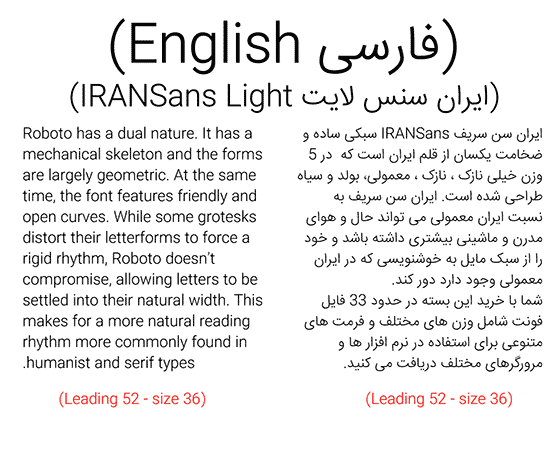
here is UltraLight size of this font(because of copyrights i cannot put all type of fonts. main package has 33 types of fonts!)
 mojighahar
All 4 comments
Thanks for filing this issue!
I18N and font customization are on our TODO list, and we definitely want to make this easier.
It's _very_ important to get it right (i.e., support all fonts in all languages while keeping the API simple and sensible), but doing so is trickier than you might expect, so we probably won't have anything to share in 2018. But it's definitely on our radar, and we really appreciate your patience 🙂
 acdvorak
on 5 Jan 2018
acdvorak
on 5 Jan 2018
@acdvorak, faced with a similar problem. It is difficult to redefine the Roboto font.
it would be possible to add CSS3 variable --mdc-theme-font-family?
 IgorNovozhilov
on 10 Apr 2018
IgorNovozhilov
on 10 Apr 2018
Hi!
As I'm new in material-components threads - hello world! 😁I like MDC a lot and use them quite extensively right now, so came across the same problem. My solution is as follows (I made a component out of that, but here you have a short).
In my _variables.scss I have:
@import "@material/typography/variables";

$mdc-typography-font-family: MyCustomFont, sans-serif;

$mdc-mm-typography-styles: (
  mm-custom1: (
    font-size: 4.5rem, /* 72px */
    line-height: 5.75rem, /* 92px */
    font-weight: map-get($mdc-typography-font-weight-values, bold),
    text-decoration: inherit,
    text-transform: inherit
  ),
  display4: (
    font-size: 3.25rem, /* 52px */
    line-height: 4.188rem, /* 67px */
  )
) !default;

$mdc-typography-styles: map-merge($mdc-typography-styles, $mdc-mm-typography-styles);
Then in app.scss I needed to import my custom typography component before any other MDC components:
/* Custom MDC Components */
@import "./mm-material/typography/mdc-mm-typography";

/* MDC Components */
@import "@material/button/mdc-button";
@import "@material/card/mdc-card";
...
@import "@material/typography/mdc-typography";
...
With above solution I have custom font for each element and I am able to add my custom type variants (like mm-custom1 above) and override the ones which I want to change (like display4 above). You can keep it in one file, extract as component (as I did) or even add to your custom theme component.
What do you think about this approach? I will appreciate all your feedback, thanks!
 dyrdzik
on 17 Apr 2018
dyrdzik
on 17 Apr 2018
This is an old issue that got missed: this is now possible with the --mdc-typography-font-family custom property. The typography custom properties readme contains more information on how to configure them for compiled CSS.
Font families may also be configured via Sass before compilation with the typography package.
 asyncLiz
on 3 Sep 2020
asyncLiz
on 3 Sep 2020
Related issues
 16rajumane
·
3Comments
16rajumane
·
3Comments
 AbuMareBear
·
3Comments
AbuMareBear
·
3Comments
 ghost
·
3Comments
ghost
·
3Comments
 jimyhdolores
·
3Comments
jimyhdolores
·
3Comments
 traviskaufman
·
4Comments
traviskaufman
·
4Comments
Most helpful comment
@acdvorak, faced with a similar problem. It is difficult to redefine the Roboto font.
it would be possible to add CSS3 variable
--mdc-theme-font-family?