Material-components-web: Menus open from edge not working
Bugs
Follow the template below to ensure the quickest and most accurate response to your issue.
What MDC-Web Version are you using?
v0.11.1
What browser(s) is this bug affecting?
N/A
What OS are you using?
N/A
What are the steps to reproduce the bug?
Documentation states that there are convenience classes to use for changing opening point of menus:
The menu will open from the top left by default (top right in RTL). Depending on how you’ve positioned your button, you may want to change the point it opens from. To override the opening point, you can style transform-origin directly, or use one of the following convenience classes:
Adding any of this classes to menu component does not change anything, ie:
<div class="mdc-simple-menu mdc-simple-menu--open-from-top-right">
Searching source code shows this classes are not used anywhere.
What is the expected behavior?
Opening menu from edge specified with class.
What is the actual behavior?
Always opening menu from top-left (or different edge when there is no space)
Please describe what the component/code is actually doing that's different from what it should be
doing.
Any other information you believe would be useful?
 bmihelac
All 12 comments
Hi @bmihelac ,
This sounds like a interesting problem. We checked the code and the logic is there, could you provide a pen to reproduce for the bug so we can nail down what is exactly happening?
 yeelan0319
on 22 May 2017
yeelan0319
on 22 May 2017
Hi @yeelan0319 and thanks for quick answer.
Sure, I can make a pen to provide example.
Just for info, searching in this repository for mdc-simple-menu--open-from-top-right or TOP_RIGHT constant will demonstrate that this strings are not actually used in code :)
bmihelac
on 22 May 2017
Here is codepen that reproduces behavior:
http://codepen.io/bmihelac/pen/zwyNpq
I expected result to be like this:

It is possible that I just misunderstood documentation.
bmihelac
on 22 May 2017
@bmihelac We think what you ask for it total valid, but once again, we would like to confirm with designer that's their suggestion. Hold on tight and we will get back to you asap.
yeelan0319
on 25 May 2017
I think that the problem is due to the fact that in the autoPosition_() function (defined in line 318) the default values for vertical and horizontal are top and left respectively. Those values are changed only once if isRtl() and then are passed to the setTransformOrigin().
Hence, there is no checks to understand if the root element has one of the convenience classes (e.g. mdc-simple-menu--open-from-top-right) defined in the README.md. To the best of my knowledge there is the need to check if the root element has one of those classes before invoking setTransformOrigin().
EDIT: I tried this very simple stupid solution and it worked. Of course more checks are needed.
autoPosition_() {

  // ...

  if (this.adapter_.hasClass(MDCSimpleMenuFoundation.cssClasses.TOP_RIGHT)) {
    horizontal = 'right';
    vertical = 'top';
  }

  const position = {
    [horizontal]: '0',
    [vertical]: '0',
  };

  this.adapter_.setTransformOrigin(`${vertical} ${horizontal}`);
  this.adapter_.setPosition(position);
}
Let me know, I might be wrong.
 robzenn92
on 26 May 2017
robzenn92
on 26 May 2017
I have this issue too.
I forked the codepen above and added this workaround:
.mdc-simple-menu--open-from-top-right {
  left: auto !important;
  right: 0;
  transform-origin: right !important;
}
https://codepen.io/aecz/pen/MEejQV
Demo below is working but only because the anchor is close to the right border.
https://material-components-web.appspot.com/simple-menu.html
Also, the demo does not seem to use the convenient classes.
 aecz
on 21 Sep 2017
aecz
on 21 Sep 2017
The design is right. It covers the triggering node as the MD spec says. The "open from" is where the animation to open the menu occurs from. It does not change the physical position of the menu list node.
 Garbee
on 21 Sep 2017
Garbee
on 21 Sep 2017
I updated the codepen to show my use case. The menu covers the anchor (red) but also the adjacent node (blue). If it is by design then what are the convenient classes used for ?
https://codepen.io/aecz/pen/MEejQV
Without the workaround:
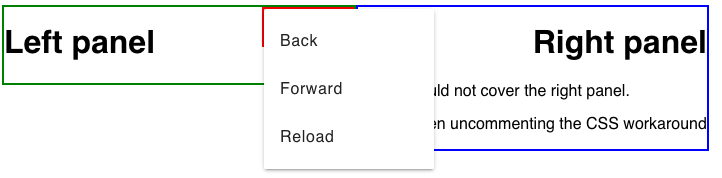
With the workaround:
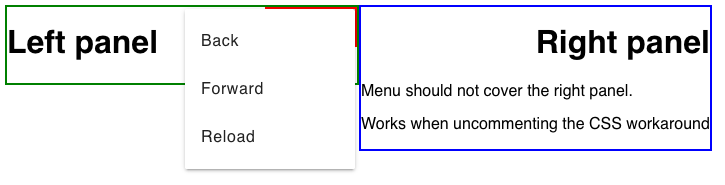
aecz
on 21 Sep 2017
The classes, as stated, are for the opening animation only. Not the physical menu positioning.
Garbee
on 21 Sep 2017
@Garbee Thanks for explaining. Convenient classes are indeed for animations only. (Maybe we could rename them mdc-simple-menu--animate-from-top-right).
My question is then, how do we position the menu to top right ?
I have made another codepen copying the official demo.
It adds the convenient classes depending on the button position AND fix the menu position.
Without position workaround:

With position workaround:

Any chance that this could be the default behavior or make it easier to position the menu correctly?
aecz
on 21 Sep 2017
As far as I understand it, the current behavior is correct by the spec. The design team should let us know if your alternate positioning is allowed. If they say no, then it's on developers to implement this if they want it.
Garbee
on 22 Sep 2017
Closing this as obsolete. Please feel free to re-open if you're still able to repro this with newer version of MDC Web.
 abhiomkar
on 13 Nov 2019
abhiomkar
on 13 Nov 2019
Related issues
 cintaccs
·
3Comments
cintaccs
·
3Comments
 ghost
·
3Comments
ghost
·
3Comments
 kimurakenshi
·
3Comments
kimurakenshi
·
3Comments
 m-alzam
·
3Comments
m-alzam
·
3Comments
 AbuMareBear
·
3Comments
AbuMareBear
·
3Comments
Most helpful comment
@Garbee Thanks for explaining. Convenient classes are indeed for animations only. (Maybe we could rename them mdc-simple-menu--animate-from-top-right).
My question is then, how do we position the menu to top right ?
I have made another codepen copying the official demo.
It adds the convenient classes depending on the button position AND fix the menu position.
Without position workaround:

With position workaround:

Any chance that this could be the default behavior or make it easier to position the menu correctly?