Material-components-web-components: actionItems only show if drawer is modal
I'm submitting a:
- [ x] bug report
- [ ] feature request
What OS are you using?
kubuntu 19.10
What browser(s) is this bug affecting:
chromium, firefox. (probably all browsers)
Current behavior:
When using a top-app-bar with a drawer, the icons in the "actionItems" slot only show if the drawer has type="modal"
Expected behavior:
The drawer type should not affect the actionItems in the top-app-bar
Steps to reproduce:
In the drawer demo, remove the type="modal" from the last example and see the icons on the right side of the top-app-bar disappear
 AlexanderLang
All 24 comments
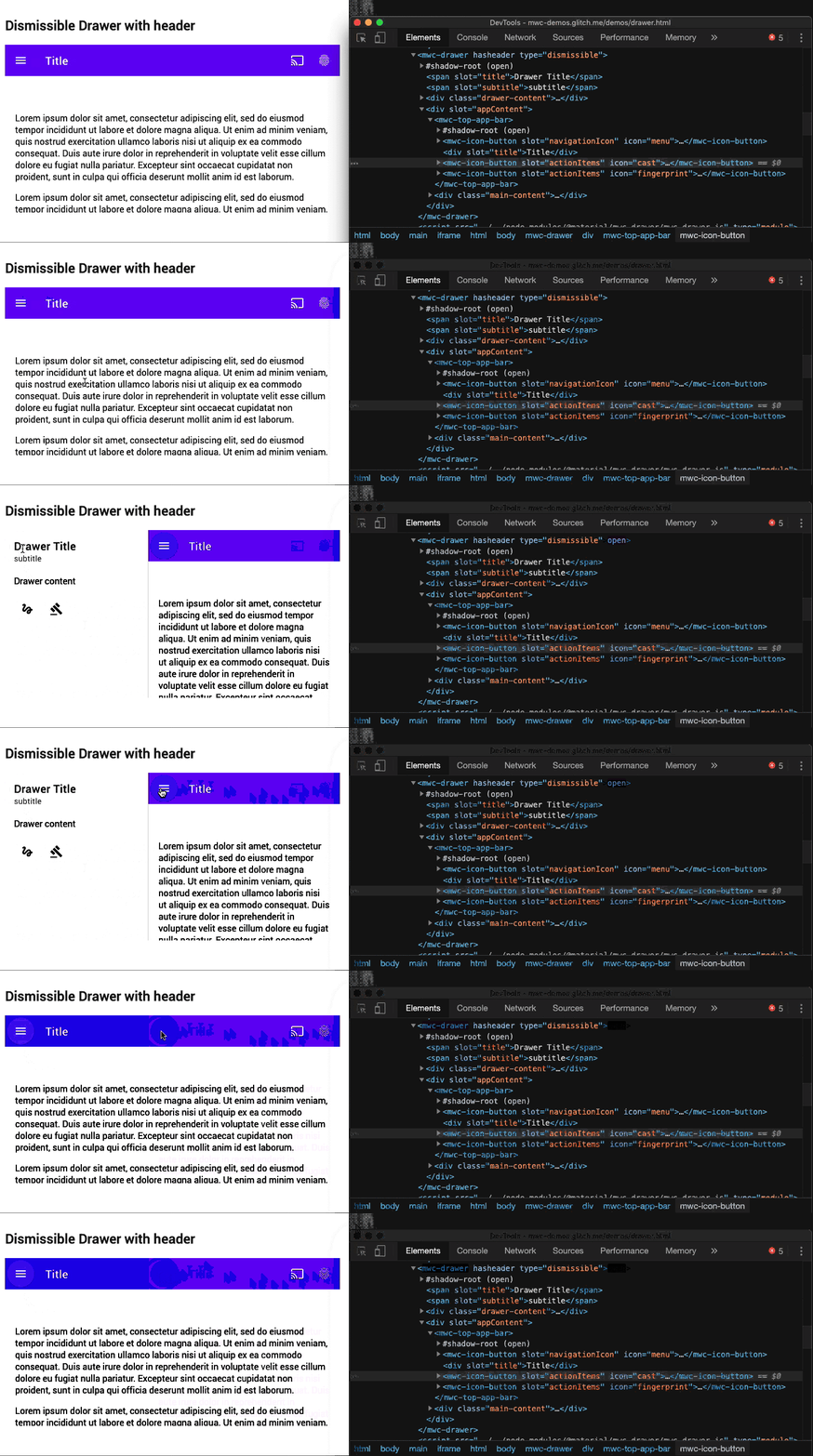
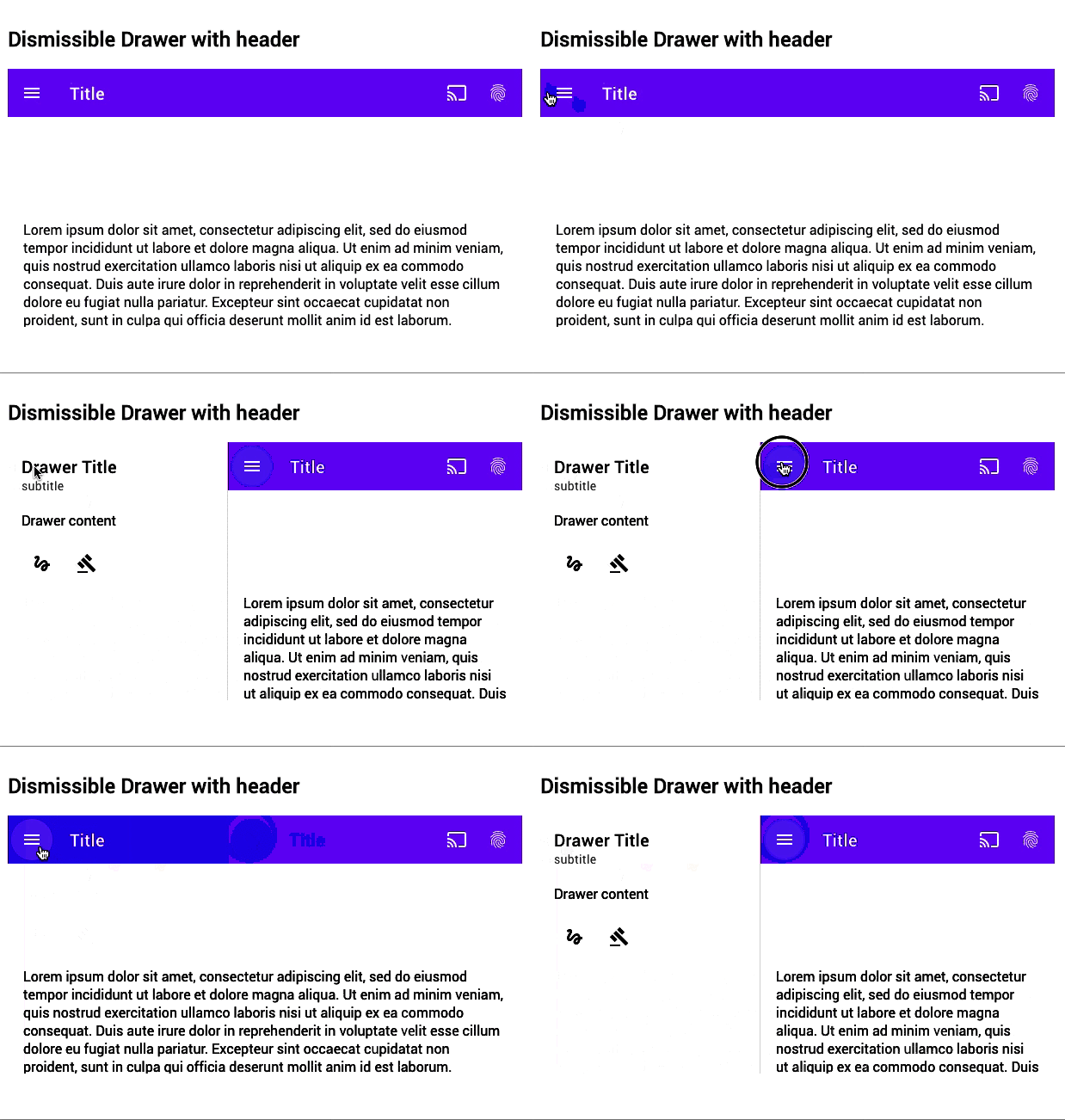
The issue is that the top app bar is staying as wide as the viewport when the drawer opens, and the action items are off screen to the right.
Examples
current behavior:
desired behavior:
 stephantabor
on 9 Jan 2020
stephantabor
on 9 Jan 2020
The issue is that mdc-top-app-bar is styled with position: fixed, which essential means that it has a width 100% of the window now.
For the mdc-top-app-bar a styling option with position: absolute might be viable. However I dont know what side effects there might be, especially with mdc-top-app-bar-fixed
 jonau
on 23 Jun 2020
jonau
on 23 Jun 2020
I maintain a customized fork of this (internal to my company) and its been a while but i'm pretty sure i just did a hack fix where the drawer will toggle a class in any slotted top-app-bars and then the top app bar does a calc to reduce width by drawer width. I think position: absolute had other issues
stephantabor
on 23 Jun 2020
fixed in #1508 you need to size top-app-bar to be 100% - the width of the drawer which can be adjusted with --mdc-drawer-width
e.g.
mdc-drawer[open]:not([type="modal"]) {
  --mdc-top-app-bar-width: calc(100% - var(--mdc-drawer-width, 256px));
}
 e111077
on 9 Jul 2020
e111077
on 9 Jul 2020
What's about this issue actionItems slot disappear on desktop media for standard bar with header ?
It looks similar one, but different issue. I'm using standard header for desktop version and modal type for mobile version. The actionItems slot disappear for standard with header.
 mahdiridho
on 11 Jul 2020
mahdiridho
on 11 Jul 2020
Hello @mahdiridho, please read my comment above; it should solve your issue as well
e111077
on 13 Jul 2020
Hi @e111077
Yes, I was referenced by @dfreedm
I left a question above due to your solution doesn't work on my case, I have tried. Would you like to check my link issue above? I added your css line on my element styles, but the problem still exist
Perhaps I will create a separate demo to simulate the issue
mahdiridho
on 13 Jul 2020
I had a typo in the solution. The :not selector should be selecting the type attribute. Does that work?
e111077
on 13 Jul 2020
Here, I created a demo to simulate my issue :
mahdiridho
on 13 Jul 2020
it is not yet released; please install @material/mwc-top-app-bar@canary to see the changes
e111077
on 13 Jul 2020
it is not yet released; please install
@material/mwc-top-app-bar@canaryto see the changes
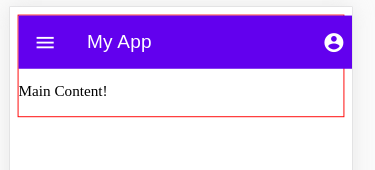
Well, It works but give me a new bug for the drawer style. It has about 10px margin now

mahdiridho
on 13 Jul 2020
For temporary solution, I adjust the drawer style to be :
mwc-drawer {
  margin: -10px;
}
But, I think you will fix this part later?
Thanks
mahdiridho
on 13 Jul 2020
That looks like the body's default margin. Looking at your code, it doesn't look like you have anything to remove it. Try adding this to your index.html file:
<style>body { margin: 0; }</style>
Since you're setting the width to 100% of the parent container, and the body has a margin, that's why the drawer isn't expanded to the full width of the viewport.
 asyncLiz
on 13 Jul 2020
asyncLiz
on 13 Jul 2020
Ah I see, you're right @asyncLiz
I have updated the demo repo for the final sample
Thanks everyone
mahdiridho
on 13 Jul 2020
it is not yet released; please install
@material/mwc-top-app-bar@canaryto see the changes
Hi,
I get back my problem, either on my above demo or other projects. The above solution doesn't work anymore. You can try my demo link above. What happens?
mahdiridho
on 20 Jul 2020
Anybody knows why do @material/mwc-top-app-bar either @material/mwc-top-app-bar@canary have same problem now? Previously @material/mwc-top-app-bar@canary solved the issue.
mahdiridho
on 21 Jul 2020
I unfortunately cannot repro. But in your example all mwc components should have the same version. Please update mwc-drawer's version to be the same as mwc-top-app-bar.
Note that our demos on github.io run at @canary in which i cannot reproduce your issue:
https://material-components.github.io/material-components-web-components/demos/
e111077
on 21 Jul 2020
I unfortunately cannot repro. But in your example all mwc components should have the same version. Please update mwc-drawer's version to be the same as mwc-top-app-bar.
Note that our demos on github.io run at
@canaryin which i cannot reproduce your issue:https://material-components.github.io/material-components-web-components/demos/
Well, I have updated the mwc-drawer to be work @canary :
    "dependencies": {
      "@material/mwc-drawer": "^0.18.0-canary.f6a6ca38.0",
      "@material/mwc-icon-button": "^0.17.2",
      "@material/mwc-top-app-bar": "^0.18.0-canary.f6a6ca38.0",
      "lit-element": "^2.3.1"
    }
But same problem :


Strange.. previously it worked?
mahdiridho
on 21 Jul 2020
I am still unable to reproduce this issue. Can you please provide a live reproduction case? You can fork / remix and edit https://mwc-demos.glitch.me/ with the link at the top of the page (don't forget to set all the dependencies to @canary).
Additionally, this application already uses mwc-top-app-bar-fixed. You just need to add the drawer and styling
e111077
on 21 Jul 2020
I provided the demo on separate repo, you can just clone, install, and serve the demo app to reproduce the issue :
https://github.com/mahdiridho/actionItems-issue
I'm implementing property binding for the mwc-drawer type and the mwc-top-app-bar size
mahdiridho
on 22 Jul 2020
Previous one (about a week ago), my dependencies worked like so :
"dependencies": {
    "@material/mwc-drawer": "^0.17.2",
    "@material/mwc-icon-button": "^0.17.2",
    "@material/mwc-top-app-bar": "^0.18.0-canary.efdfbc21.0",
    "lit-element": "^2.3.1"
  }
And it solved my issue. This week I'm implementing the solution to another project but doesn't work. Then I back to my demo repo to compared, strange.. It didn't work as well with my original demo.
The update dependencies doesn't work as well, now I stuck how to resolve it.
mahdiridho
on 22 Jul 2020
I am still unable to reproduce this issue. Can you please provide a live reproduction case? You can fork / remix and edit https://mwc-demos.glitch.me/ with the link at the top of the page (don't forget to set all the dependencies to
@canary).Additionally, this application already uses mwc-top-app-bar-fixed. You just need to add the drawer and styling
Well, I just remix the glitch demo here :
https://glitch.com/~unmarred-pewter-mayflower
Now, you can see and reproduce the issue
mahdiridho
on 22 Jul 2020
This is due to your use of semantic versioning. Here is a working example:
https://glitch.com/edit/#!/quasar-fearless-magazine?path=package.json%3A12%3A30
in your package.json you have:
"@material/mwc-top-app-bar": "^0.18.0-canary.f6a6ca38.0",
The ^ means to go up to the latest major version which in this case resolves to:
0.18.0-canary.fd970958.0
which is in fact an older canary commit. You need to pin it to that version using
"@material/mwc-top-app-bar": "=0.18.0-canary.f6a6ca38.0",
or if you don't mind the uncertainty
"@material/mwc-top-app-bar": "canary",
which will always be the latest version. Additionally, all components in our component set should be on the same version to prevent code duplication and possible web component name registry clashes. You should also align the version of @material/mwc-icon-button
e111077
on 22 Jul 2020
I see
I did npm i -s @material/mwc-top-app-bar@canary and it set to semantic version.
It works back now, my current package.json :
  "dependencies": {
    "@material/mwc-drawer": "^0.17.2",
    "@material/mwc-icon-button": "^0.17.2",
    "@material/mwc-top-app-bar": "canary",
    "lit-element": "^2.3.1"
  }
Thanks
mahdiridho
on 22 Jul 2020
Related issues
 eskan
·
4Comments
eskan
·
4Comments
 Sebastianhex
·
5Comments
Sebastianhex
·
5Comments
 Dabolus
·
3Comments
Dabolus
·
3Comments
 kr05
·
3Comments
kr05
·
3Comments
 vdegenne
·
3Comments
vdegenne
·
3Comments