Material-components-web-components: Option to set mwc-top-app-bar-fixed less that width of window
I'm submitting a:
- [ ] bug report
- [x] feature request
What OS are you using?
all
Current behavior:
mwc-top-app-bar-fixed and mwc-top-app-bar are always the width of the window. As such they cannot replace the Polymer app-toolbar in many situations.
Expected behavior:
There should be a CSS custom property for changing the mwc-top-app-bar-fixed (and mwc-top-app-bar) with to a component that is not the width of the screen.
Other information:
The width of a Polymer app-toolbar can be limited to its parent component without resorting to an iframe.
 johnthad
All 12 comments
In playing with DevTools, it seems that if I could set position: unset on the class mdc-top-app-bar of mwc-top-app-bar-fixed's <header> element, I could achieve what I want, and dump Polymer app-toolbar
johnthad
on 2 Oct 2019
edit:
it.s achievable with setting scrollTarget to the desired container
 doktordirk
on 27 Oct 2019
doktordirk
on 27 Oct 2019
it.s achievable with setting scrollTarget to the desired container
Thanks for the reply. How would I do this? See https://stackblitz.com/edit/mwc-appbarfixed
I mostly copied one of the demos and assigned content to scrollTarget but the app bar still runs the width of the window.
johnthad
on 6 Nov 2019
it.s achievable with setting scrollTarget to the desired container
Thanks for the reply. How would I do this? See https://stackblitz.com/edit/mwc-appbarfixed
I mostly copied one of the demos and assigned
contenttoscrollTargetbut the app bar still runs the width of the window.
from what i gathered one missing part in the docs example is that an element with 'mdc-drawer-app-content' is needed for the drawer to set the right width . that one then also was my scroll target
| |
| | slot="appContent"
| | class='mdc-drawer-app-content app-content'
| | >
doktordirk
on 7 Nov 2019
Sorry, I'm not following you. There is no slot named appContent in mwc-top-app-bar or mwc-top-app-bar-fixed. scrollTarget is a property|attribute that is the default slot.
In my inbox I see a comment from on Oct 27th that has been deleted:
From: doktordirk notifications@github.com
Created at Sun, Oct 27, 2019 at 1:11 PMas i see it, it's coming from a regression in 553e283 where here :host changed from display: inline-flex to display: block. with inline-flex the app bar would only fill it's container and not the hole page.
at the time of writing this is still visible https://material-components.github.io/material-components-web-components/demos/top-app-bar.html which still uses inline-flex there
Is this the problem? Was a bug created? If so this issue should be reclassified bug vs feature.
johnthad
on 7 Nov 2019
Is there a particular reason you need the top-app-bar to be less than the width of the app?
It appears this is intended in the spec, but if you have a good use case, we can talk to the spec designers to try and fit this in.
 dfreedm
on 7 Nov 2019
dfreedm
on 7 Nov 2019
I have master-detail cases where there two panels with different headers are side-by-side, such as image thumbnails on the left, and one full image on the right (similar to a PDF viewer). Another case is a catalog of folders and forms on the left, and other items to the right (the pull-out draw has the app's master menu). To get away from PolymerElements, I'm currently using a div for the toolbar with a scrolling div underneath. However separate app-toolbar are much easier to manage.
johnthad
on 8 Nov 2019
Also, to keep a mobile layout presentable in desktop setting one might want to set max-width: x on the container containing the mwc-top-app-bar. Currently the mwc-top-app-bar sticks out to the right

 govis
on 15 Jan 2020
govis
on 15 Jan 2020
I also need this.
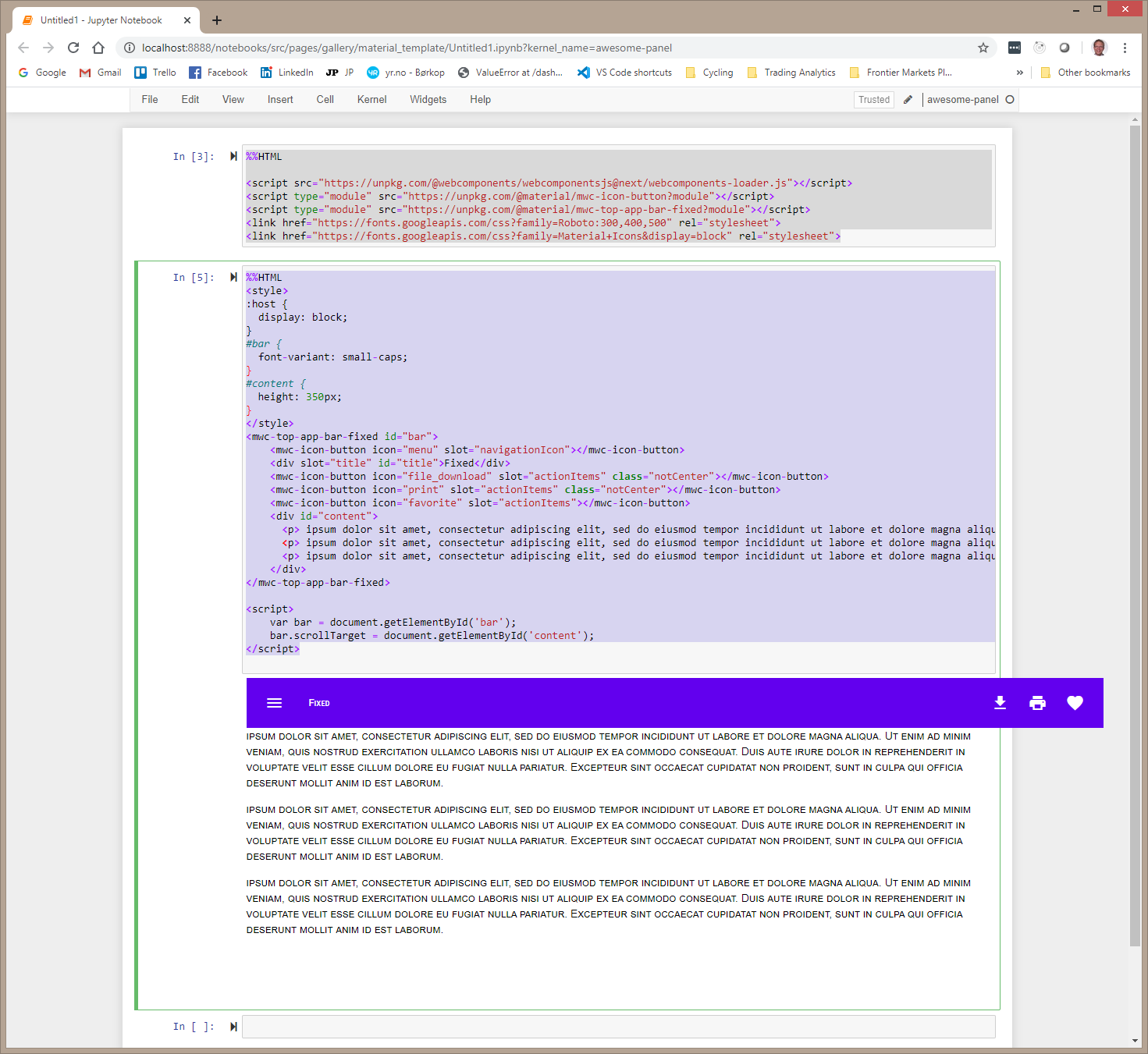
I would like to enable my self and Panel users to develop awesome apps in a Jupyter Notebook using mwc components and Python.
Currently the mwc-top-app-bar looks like this

See also https://github.com/material-components/material-components-web-components/issues/1097
 MarcSkovMadsen
on 10 Apr 2020
MarcSkovMadsen
on 10 Apr 2020
I tried the scrollTarget option described above and used in https://stackblitz.com/edit/mwc-appbarfixed?file=my-element.js.
But it does not work fully.
I've created a seperate issue on this https://github.com/material-components/material-components-web-components/issues/1106
MarcSkovMadsen
on 10 Apr 2020
For the record I managed find the the problem in https://github.com/material-components/material-components-web-components/issues/1106 and fix it.
MarcSkovMadsen
on 10 Apr 2020
fixed in #1508
 e111077
on 9 Jul 2020
e111077
on 9 Jul 2020
Related issues
 mhamrah
·
3Comments
mhamrah
·
3Comments
 Sebastianhex
·
5Comments
Sebastianhex
·
5Comments
 vdegenne
·
3Comments
MarcSkovMadsen
·
4Comments
vdegenne
·
3Comments
MarcSkovMadsen
·
4Comments
 Dabolus
·
3Comments
Dabolus
·
3Comments
Most helpful comment
I have master-detail cases where there two panels with different headers are side-by-side, such as image thumbnails on the left, and one full image on the right (similar to a PDF viewer). Another case is a catalog of folders and forms on the left, and other items to the right (the pull-out draw has the app's master menu). To get away from PolymerElements, I'm currently using a
divfor the toolbar with a scrollingdivunderneath. However separateapp-toolbarare much easier to manage.