Material-components-android: [MaterialTransformContainer/Motion] sharedElementReturnTransition not working with navigation component
Description: When navigation between fragments using navigation component sharedElementReturnTransition doesn't work.
The enter transition works fine but the fragment is popped out of the backstack there's no sharedElement transition. This doesn't happen when navigating using fragment transactions only when using navigation component.
Android API version: 29
Material Library version: 1.2.0-alpha05
Device: Pixel 2 API 28(Emulator)
 aumarbello
All 19 comments
@aumarbello same happen to me using FragmentTransaction with setReorderingAllowed(true)
 ologe
on 1 Mar 2020
ologe
on 1 Mar 2020
@ologe That's interesting, did it work fine without setReorderingAllowed(true).
I tried getting the effect by setting the reenterTransition in the original Fragment to MaterialContainerTransform but couldn't get it work, had to settle for FadeTransition when return back to the fragment.
aumarbello
on 1 Mar 2020
@aumarbello actually I'm playing with the library since this morning, and it should work out of the box!
I figure out that to make work MaterialContainerTransform you have to set sharedElementEnterTransition = MaterialContainerTransform(..) on second Fragment, and exitTransition=Hold() on first
ologe
on 1 Mar 2020
@ologe I had the same experience when navigating with fragment transactions, MaterialContainerTransform and Hold worked great together but after switching to Navigation component I haven't been able to get the sharedElementReturnTransition to work, I've tried settting Hold and even MaterialContainerTransform as the reEnter, exit or sharedElementTranstion with no luck.
aumarbello
on 2 Mar 2020
@aumarbello mmm, I think you can check if the shared element transition is rejected for some reason in the setExitSharedElementCallback, and remap if needed.
ologe
on 2 Mar 2020
@ologe Thanks for the suggestion, the callbacks seems to suggest everything is fine as the shared view wasn't rejected.
I ended up setting the reenterTransition in the first fragment to a slightly modified MaterialContainerTransform and the sharedElementReturnTransition works fine now.
aumarbello
on 3 Mar 2020
@aumarbello, I ran into this problem. This happens because the View is not destroyed in the backstack fragment when the navigation component is used .
In order for the animation to work in the opposite direction you need to make a check
private var rootView:View?=null
override fun onCreateView(inflater: LayoutInflater, container: ViewGroup?,
savedInstanceState: Bundle?): View {
if(rootView!=null){
return rootView as View
}else
return inflater.inflate(R.layout.main_fragment, container, false)
}
If the backstack fragment was destroyed , then in order for the animation to work, you need to override setExitSharedElementCallback
 srgpanov
on 17 Mar 2020
srgpanov
on 17 Mar 2020
@srgpanov Thanks for the explanation.
Tried following your guide but couldn't get the return transition working, had to fallback to setting the reenter transition on the backstack fragment.
Maybe because I'm trying to return to a list of items? 🤷♂️
Thanks anyway
aumarbello
on 19 Mar 2020
@aumarbello could you pls provide sample example/project?
 Xtizainy
on 21 Mar 2020
Xtizainy
on 21 Mar 2020
There's a sample using MaterialContainerTransform, Fragments and the Navigation Component here - https://github.com/material-components/material-components-android-examples/tree/develop/Reply
HomeFragment (starting fragment) sets its exit transition to a Hold and EmailFragment (ending/destination fragment) sets both its sharedElementEnterTransition and sharedElementReturnTransition to MaterialContainerTransforms.
This PR has all the changes made to add motion to this sample - https://github.com/material-components/material-components-android-examples/pull/24.
Hopefully this helps. Otherwise, if you could provide a sample that reproduces your issue, I can try to figure out what might be happening.
 hunterstich
on 30 Mar 2020
hunterstich
on 30 Mar 2020
Thanks @hunterstich for taking a look at this, I tried following the steps in the commit you referenced but still couldn't get it to work.
Here's a link to the sample I'm working with: https://github.com/aumarbello/List-Hero
aumarbello
on 31 Mar 2020
@aumarbello can you share the workaround you have made to first fragment's reenterTransition and what have you set in second fragment's sharedElementReturnTransition to make it working for now?
 unused-variable
on 12 Apr 2020
unused-variable
on 12 Apr 2020
@ShreyanshLodha I believe this issue was the reason why following the tutorial didn't work out of the box:
https://github.com/googlesamples/android-architecture-components/issues/495
Going through the sample project @hunterstich shared helped me figure it out, adding the code snippet below the in onViewCreated method of the ReturnFragment fixed it for me:
postponeEnterTransition()
requireView().doOnPreDraw { startPostponedEnterTransition() }
I recommend you go through the issue and the sample project to get a better understanding of what's happening.
aumarbello
on 12 Apr 2020
I'm going to go ahead and close this for now since it doesn't look to be related to the transitions we're providing.
Let me know if I can answer any other questions
hunterstich
on 13 Apr 2020
Not working for me either
 swetaturncar
on 1 May 2020
swetaturncar
on 1 May 2020
I was messing with a sample app (other than Reply, linked in a comment above) and ran across this issue as well.
After looking into it further, it isn't related to MaterialContainerTransform as it's reproducible with any other Framework transition.
What ended up working in my case was finding a way to start/defer the transition to when you're confident your Fragment has the correct views with the correct transition names laid out. This can get tricky when Fragment A (the Fragment you're returning to) has a recycler view or a recycler view backed by live data as it becomes more difficult to debug exactly when views are bound/changed/laid out/etc.
@aumarbello I cloned your project and there are a few things you need to change to get shared element return transitions working.
[1] Move ViewCompat.setTransitionName(view, link.id) to be called when you bind each item in your first Fragment's adapter.
    inner class LinkHolder(view: View) : RecyclerView.ViewHolder(view) {
        fun bindItem(link: Link) = with(itemView) {
            ViewCompat.setTransitionName(this, link.id)
            ...
        }
[2] In your first Fragment's onViewCreated callback, defer your transition until your Fragment has been laid out, including the recycler view and its children.
    override fun onViewCreated(view: View, savedInstanceState: Bundle?) {
        super.onViewCreated(view, savedInstanceState)
        postponeEnterTransition()
        view.doOnPreDraw { startPostponedEnterTransition() }
        rvThreadList.adapter = LinkAdapter(getLinks(), this::openDetails)
    }
The above two steps should get return transitions working. However, you can improve the look of the container transform by making a few changes to the way it's configured in your project -
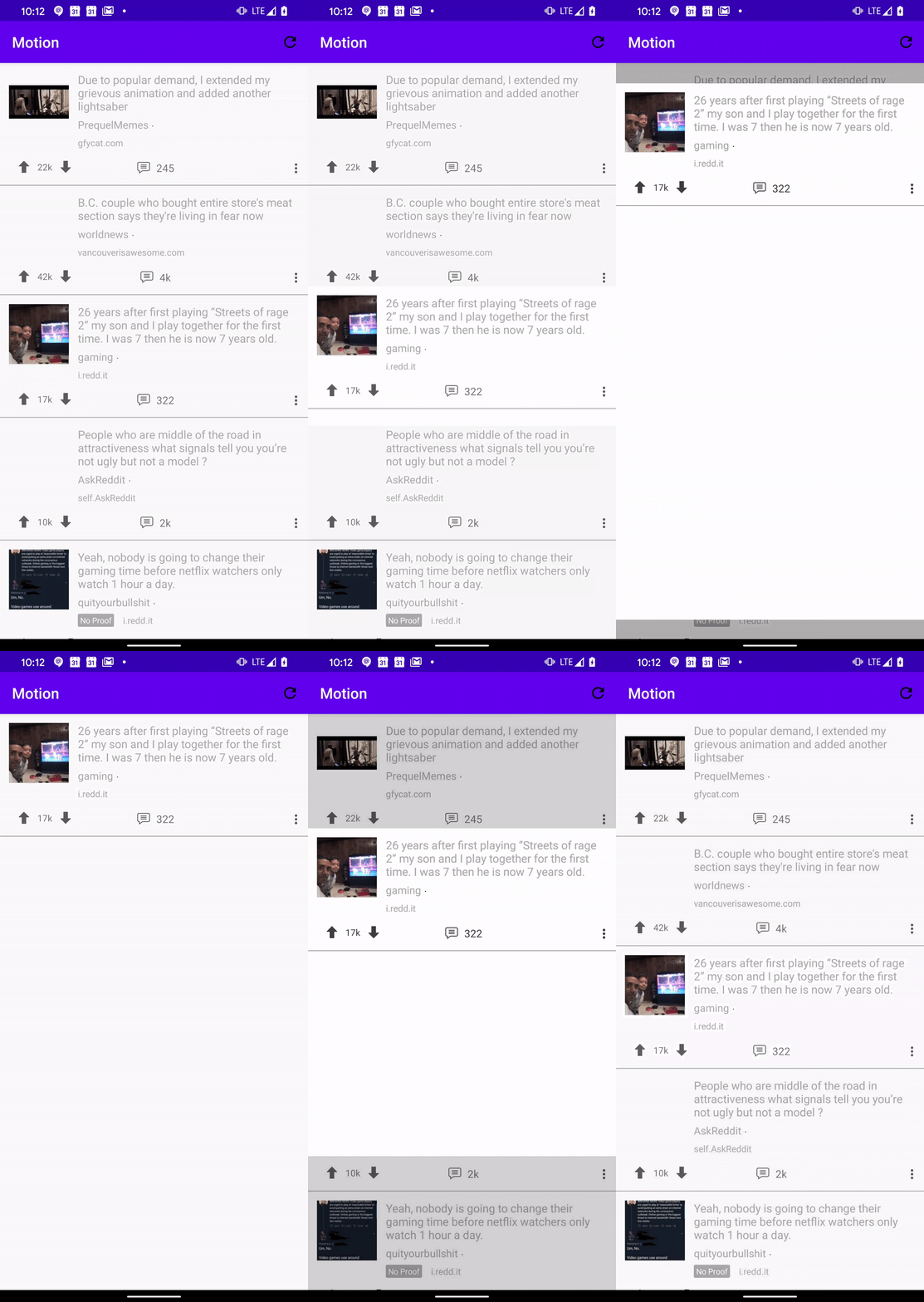
[3] Set your second Fragment's height to match_parent, give both enter and return container transforms a background, and clip your transform's scrim to the bounds of a view using drawingViewId to avoid the scrim showing over your toolbar:
<androidx.constraintlayout.widget.ConstraintLayout
    ...
    android:layout_height="match_parent">
    MaterialContainerTransform(requireContext()).apply {
        // Use 300L for entering and 250L for returning as described in the spec:
        // material.io/design/motion/the-motion-system.html#container-transform
        duration = 300L
        containerColor = Color.WHITE
        drawingViewId = R.id.nav_host_fragment
    }
You should end up with something like:
hunterstich
on 26 May 2020
@hunterstich Thanks for taking the time to make these recommendations, the transitions look a lot better.
I did try debugging the initial code but couldn't narrow down what was wrong, can you some general tips/resources on debugging (or just understanding what's going on) when with transitions? Thanks.
aumarbello
on 27 May 2020
I unfortunately don't have a methodology other than setting break points and making sure the order in which your Fragment's view(s) is created, initiated and laid out is happening before startPostponedEnterTransition is called or MaterialContainerTransform's createAnimator method is run.
I wish I had some better tips, but all I've found to work!
hunterstich
on 27 May 2020
Thanks, I'm sure these tips will be useful.
aumarbello
on 27 May 2020
Related issues
 Nakuls426
·
21Comments
Nakuls426
·
21Comments
 jeevansurendran
·
49Comments
jeevansurendran
·
49Comments
 alevittoria
·
26Comments
alevittoria
·
26Comments
 blu3-b1rd
·
34Comments
blu3-b1rd
·
34Comments
 sipersso
·
17Comments
sipersso
·
17Comments
Most helpful comment
I was messing with a sample app (other than Reply, linked in a comment above) and ran across this issue as well.
After looking into it further, it isn't related to MaterialContainerTransform as it's reproducible with any other Framework transition.
What ended up working in my case was finding a way to start/defer the transition to when you're confident your Fragment has the correct views with the correct transition names laid out. This can get tricky when Fragment A (the Fragment you're returning to) has a recycler view or a recycler view backed by live data as it becomes more difficult to debug exactly when views are bound/changed/laid out/etc.
@aumarbello I cloned your project and there are a few things you need to change to get shared element return transitions working.
[1] Move
ViewCompat.setTransitionName(view, link.id)to be called when you bind each item in your first Fragment's adapter.[2] In your first Fragment's onViewCreated callback, defer your transition until your Fragment has been laid out, including the recycler view and its children.
The above two steps should get return transitions working. However, you can improve the look of the container transform by making a few changes to the way it's configured in your project -
[3] Set your second Fragment's height to
match_parent, give both enter and return container transforms a background, and clip your transform's scrim to the bounds of a view usingdrawingViewIdto avoid the scrim showing over your toolbar:You should end up with something like: